# An improved configuration file for MPV (now for one-handed use!)
**URL:** https://community.muos.dev/t/an-improved-configuration-file-for-mpv-now-for-one-handed-use/233
**Category:** Customisation
**Created:** [April 23, 2025, 6:08pm UTC](https://community.muos.dev/t/an-improved-configuration-file-for-mpv-now-for-one-handed-use/233 "2025-04-23T18:08:54Z")
**Posts on this page:** 4
**Page:** 1
### Author:  [@myothehedgefox](https://community.muos.dev/u/myothehedgefox)
#### Post date: [April 23, 2025, 6:08pm UTC](https://community.muos.dev/t/an-improved-configuration-file-for-mpv-now-for-one-handed-use/233/1 "2025-04-23T18:08:54Z")
This is an attempt to make the built-in `mpv` media player more comfortable to use. Turn your handheld into a media player!
NEW - Now features one-handed mode for more convenient late-night binging. HOLD any trigger/bumper to use the D-Pad as a MIRRORED set of abxy keys and use the abxy keys as the d-pad.
UNTESTED - Pressing SELECT in one-handed mode should cycle between the audio tracks of your video file. Since `mpv` key for that is `#`, I’m not exactly sure how to escape it properly – but I did my best.
Save the code below as `general.gptk`, drop it to `/mmc/MUOS/emulator/mpv/` - and presto!
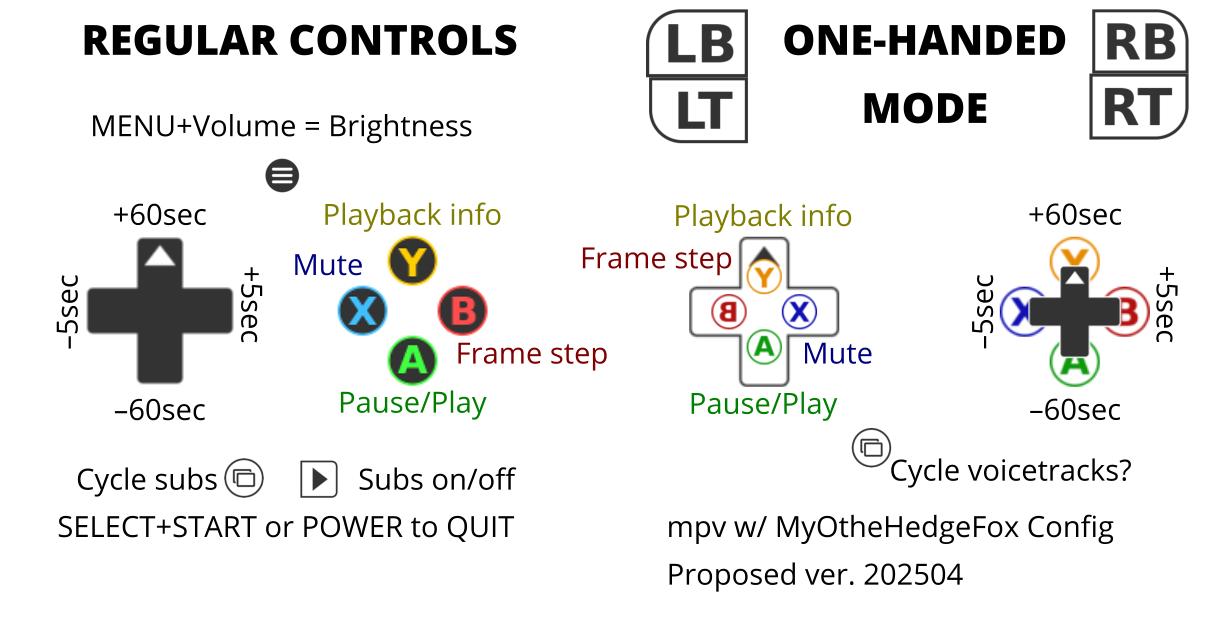
NOTE FOR BEGINNER USERS: If `mpv` blackscreens when trying to play a media file, press SELECT+START or POWER to quit back to the menu! And mark this media file for re-encoding (it’s an `mpv` playback issue).
=== general.gptk BEGINS BELOW ===
```auto
[controls]
overlay = clear
a_hk = esc # MPV config by MyOtheHedgeFox, ver 202504
# One Handed Controls edition:
# hold any trigger/bumper to use the other half
# of your controls!
# use Select+Start to exit
# use volume keys to adj volume
# use MENU+volume keys to adj brightness
# drop this to [SD1 aka mmc] /MUOS/emulator
# enjoy, vanger
a = p # pause/play
b = . # frame step
x = m # mute sound
y = o # on screen display (playback info)
up = up # seek +1min
down = down # seek -1min
left = left # seek -5sec
right = right # seek +5sec
l1 = hold_state flipped #
l2 = hold_state flipped #
r1 = hold_state flipped # holding any of these
r2 = hold_state flipped # enables FLIPPED mode
start = v # subtitle visibility
select = j # subtitle next
[controls:flipped]
# lets you use the d-pad as a MIRRORED set of ABXY buttons
up = m # FLIPPED X - mute sound
down = . # FLIPPED B - frame step
left = p # FLIPPED A - pause/play
right = o # FLIPPED Y - on screen display (playback info)
# lets you use the ABXY buttons as a d-pad
a = right # FLIPPED RIGHT - seek +5sec
b = down # FLIPPED DOWN - seek -1min
x = up # FLIPPED UP - seek +1min
y = left # FLIPPED LEFT - seek -5sec
select = \# # audio track next (not sure if it works)
```
---
### Author:  [@myothehedgefox](https://community.muos.dev/u/myothehedgefox)
#### Post date: [May 9, 2025, 12:53pm UTC](https://community.muos.dev/t/an-improved-configuration-file-for-mpv-now-for-one-handed-use/233/2 "2025-05-09T12:53:31Z")
For those choosing between ffplay and mpv – remember to check files for individual assigned cores (individual core settings persist even if you change the folder / recursive assigned core).
Remember you can use **Clear Core Assignments** in **Apps \> Task Toolkit** to reset these settings!
---
### Author:  [@myothehedgefox](https://community.muos.dev/u/myothehedgefox)
#### Post date: [May 9, 2025, 8:22pm UTC](https://community.muos.dev/t/an-improved-configuration-file-for-mpv-now-for-one-handed-use/233/3 "2025-05-09T20:22:43Z")
This is a past version of my config. For a newer version, see [https://community.muos.dev/t/an-improved-configuration-file-for-mpv-ver-202505-now-good-for-playlists/339](https://community.muos.dev/t/an-improved-configuration-file-for-mpv-ver-202505-now-good-for-playlists/339).
---
### Author:  [@bgelmini](https://community.muos.dev/u/bgelmini)
#### Post date: [May 9, 2025, 8:49pm UTC](https://community.muos.dev/t/an-improved-configuration-file-for-mpv-now-for-one-handed-use/233/4 "2025-05-09T20:49:37Z")