# Can i restore E:\\MUOS\\bios folder without flashing all SD card?
**URL:** https://community.muos.dev/t/can-i-restore-e-muos-bios-folder-without-flashing-all-sd-card/320
**Category:** 2502 Pixie
**Tags:** other
**Created:** [May 5, 2025, 7:04pm UTC](https://community.muos.dev/t/can-i-restore-e-muos-bios-folder-without-flashing-all-sd-card/320 "2025-05-05T19:04:15Z")
**Posts on this page:** 10
**Page:** 1
### Author:  [@RonDallas](https://community.muos.dev/u/RonDallas)
#### Post date: [May 5, 2025, 7:04pm UTC](https://community.muos.dev/t/can-i-restore-e-muos-bios-folder-without-flashing-all-sd-card/320/1 "2025-05-05T19:04:15Z")
So, i put RetroArch bios files in E:\MUOS\bios, and i don`t really want to install MuOS again. Can someone help?
---
### Author:  [@arkun](https://community.muos.dev/u/arkun)
#### Post date: [May 5, 2025, 7:23pm UTC](https://community.muos.dev/t/can-i-restore-e-muos-bios-folder-without-flashing-all-sd-card/320/2 "2025-05-05T19:23:49Z")
Do you have a second SD card? You can migrate your install to SD2, while SD1 gets flashed.
> [@Storage Migration Information](https://community.muos.dev/t/storage-migration-information/46):
>
> muOS works in a unique way to be adaptable on devices that have additional storage access. Adaptable storage means if something happens to your primary storage, or a muOS update happens, you will have a backup. [Migrate to Secondary Storage](#migrate) If the device you are using has a secondary storage you will have the option to migrate your content to SD2. Go to Configuration then select Storage. There are several options that can be migrated from SD1 to SD2. This will create the directory on SD2, an…
Another option is to use the Backups feature of the Task Toolkit to restore folders quickly.
> [@muOS Task Toolkit](https://community.muos.dev/t/muos-task-toolkit/318#p-1170-backupsbackups-2):
>
> [Task Toolkit](#tasktoolkit) Task Toolkit is a collection of helpful scripts that perform various utilities for muOS. [Backups](#backups) muOS ships with backup scripts. These will produce backup muxzip archives with the mentioned folder contained in the archive. These will show up in the Archive Manager as a backup archive you can run to easily restore a folder. This is an easy way to carry items over after a reflash, providing clear files to transfer. These include: Artwork BIOS Config Saves Syncthing Config Theme…
---
### Author:  [@RonDallas](https://community.muos.dev/u/RonDallas)
#### Post date: [May 5, 2025, 7:27pm UTC](https://community.muos.dev/t/can-i-restore-e-muos-bios-folder-without-flashing-all-sd-card/320/3 "2025-05-05T19:27:14Z")
I can put backups to the pc. But is somewhere is default folder for MuOS bioses, that go with the OS?
---
### Author:  [@arkun](https://community.muos.dev/u/arkun)
#### Post date: [May 5, 2025, 7:30pm UTC](https://community.muos.dev/t/can-i-restore-e-muos-bios-folder-without-flashing-all-sd-card/320/4 "2025-05-05T19:30:25Z")
You would either need to restore a BIOS backup through Archive Manager or copy your BIOS back into MUOS/bios.
---
### Author:  [@RonDallas](https://community.muos.dev/u/RonDallas)
#### Post date: [May 5, 2025, 7:31pm UTC](https://community.muos.dev/t/can-i-restore-e-muos-bios-folder-without-flashing-all-sd-card/320/5 "2025-05-05T19:31:56Z")
I don`t want my BIOS, i want a default one (and i do not have a backup for default one). Where i can get it?
---
### Author:  [@arkun](https://community.muos.dev/u/arkun)
#### Post date: [May 5, 2025, 7:33pm UTC](https://community.muos.dev/t/can-i-restore-e-muos-bios-folder-without-flashing-all-sd-card/320/6 "2025-05-05T19:33:44Z")
Sorry I misunderstood your question.
I’m sorry, but [we do not provide BIOS](https://community.muos.dev/t/click-here-for-bios-files/36).
---
### Author:  [@RonDallas](https://community.muos.dev/u/RonDallas)
#### Post date: [May 5, 2025, 7:35pm UTC](https://community.muos.dev/t/can-i-restore-e-muos-bios-folder-without-flashing-all-sd-card/320/7 "2025-05-05T19:35:37Z")
You misunderstood me again. Frick it, i just reflash it again.
---
### Author:  [@RonDallas](https://community.muos.dev/u/RonDallas)
#### Post date: [May 5, 2025, 8:30pm UTC](https://community.muos.dev/t/can-i-restore-e-muos-bios-folder-without-flashing-all-sd-card/320/8 "2025-05-05T20:30:17Z")
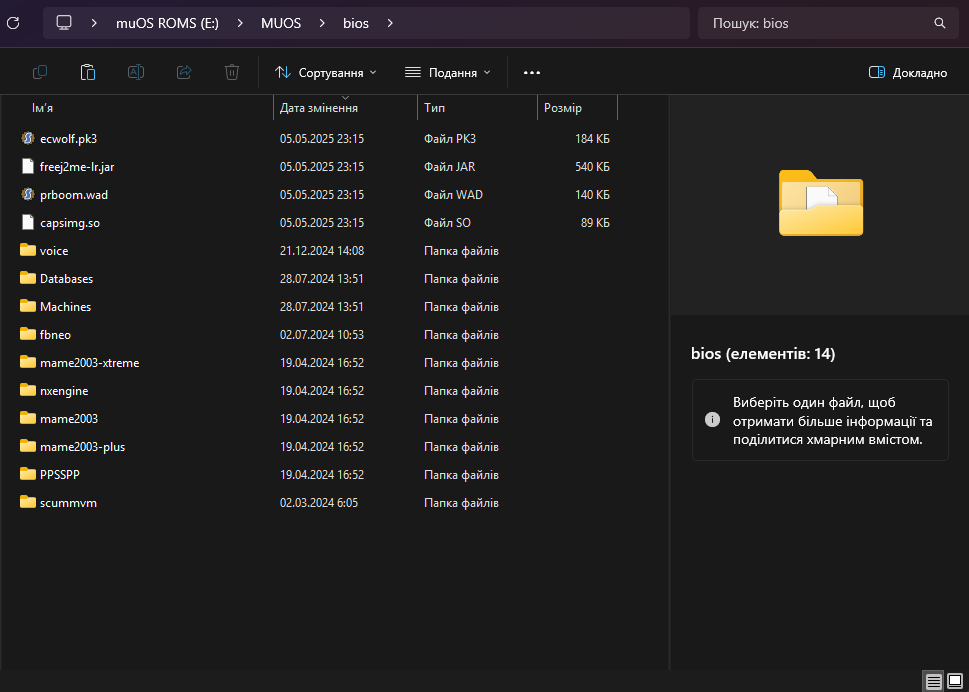
I was needed this folder, that you get after installing MuOS.
---
### Author:  [@Dr.Worm](https://community.muos.dev/u/Dr.Worm)
#### Post date: [May 5, 2025, 9:03pm UTC](https://community.muos.dev/t/can-i-restore-e-muos-bios-folder-without-flashing-all-sd-card/320/9 "2025-05-05T21:03:58Z")
That folder with those contents comes on a fresh install of muOS as those bios files are associated with free/open source content. Any BIOS files you added to it will be lost when you reflash unless you put them on your PC first as a backup or put them on a secondary SD card
---
### Author:  [@Kirky](https://community.muos.dev/u/Kirky)
#### Post date: [May 5, 2025, 9:27pm UTC](https://community.muos.dev/t/can-i-restore-e-muos-bios-folder-without-flashing-all-sd-card/320/10 "2025-05-05T21:27:36Z")
Topic has served it’s purpose.