# Day/Night Temperature Toggle
**URL:** https://community.muos.dev/t/day-night-temperature-toggle/211
**Category:** Release
**Tags:** pixie, custom, banana, goose
**Created:** [April 19, 2025, 12:06am UTC](https://community.muos.dev/t/day-night-temperature-toggle/211 "2025-04-19T00:06:41Z")
**Posts on this page:** 20
**Page:** 1
### Author:  [@imantor](https://community.muos.dev/u/imantor)
#### Post date: [April 19, 2025, 12:06am UTC](https://community.muos.dev/t/day-night-temperature-toggle/211/1 "2025-04-19T00:06:41Z")
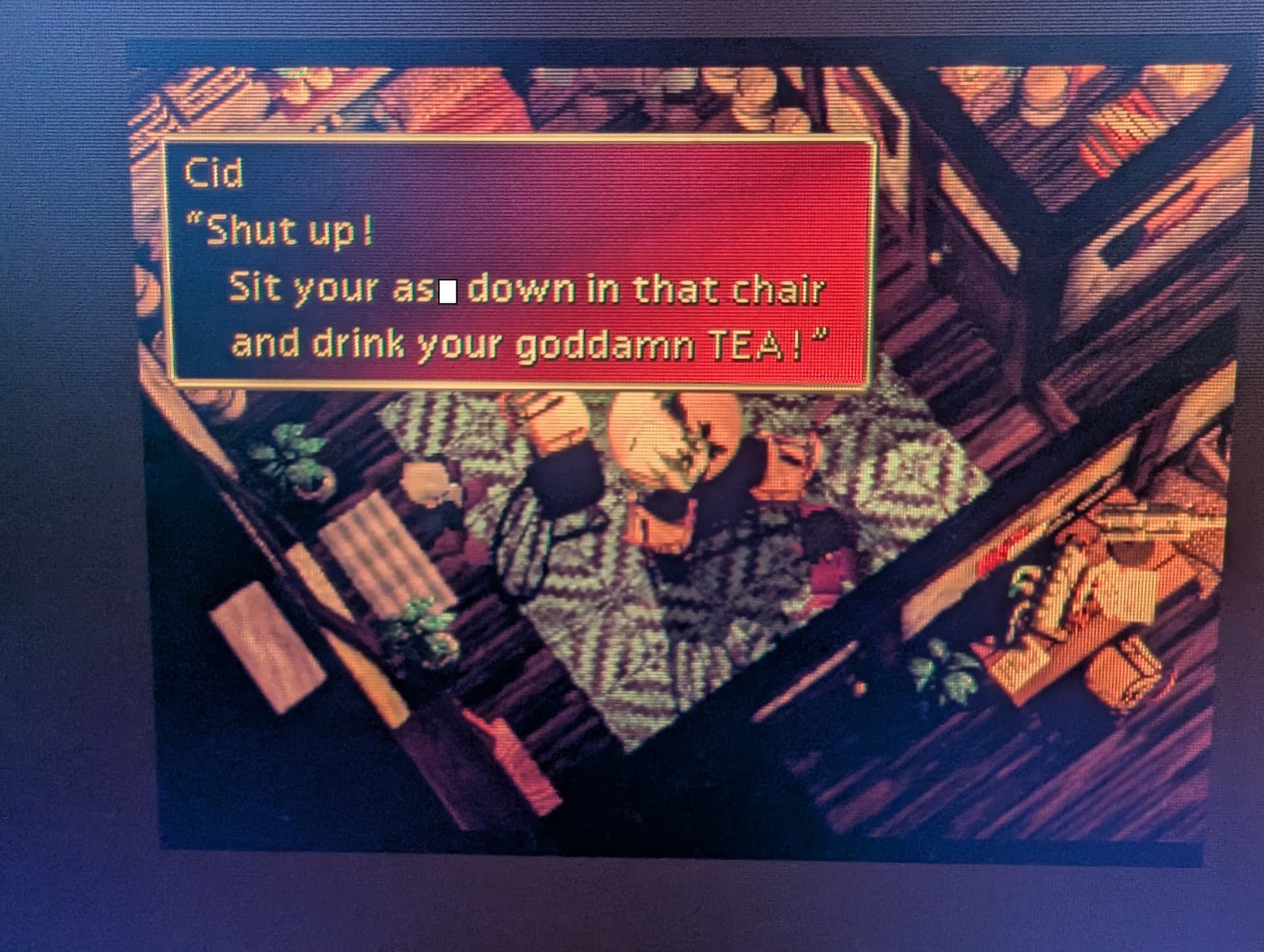
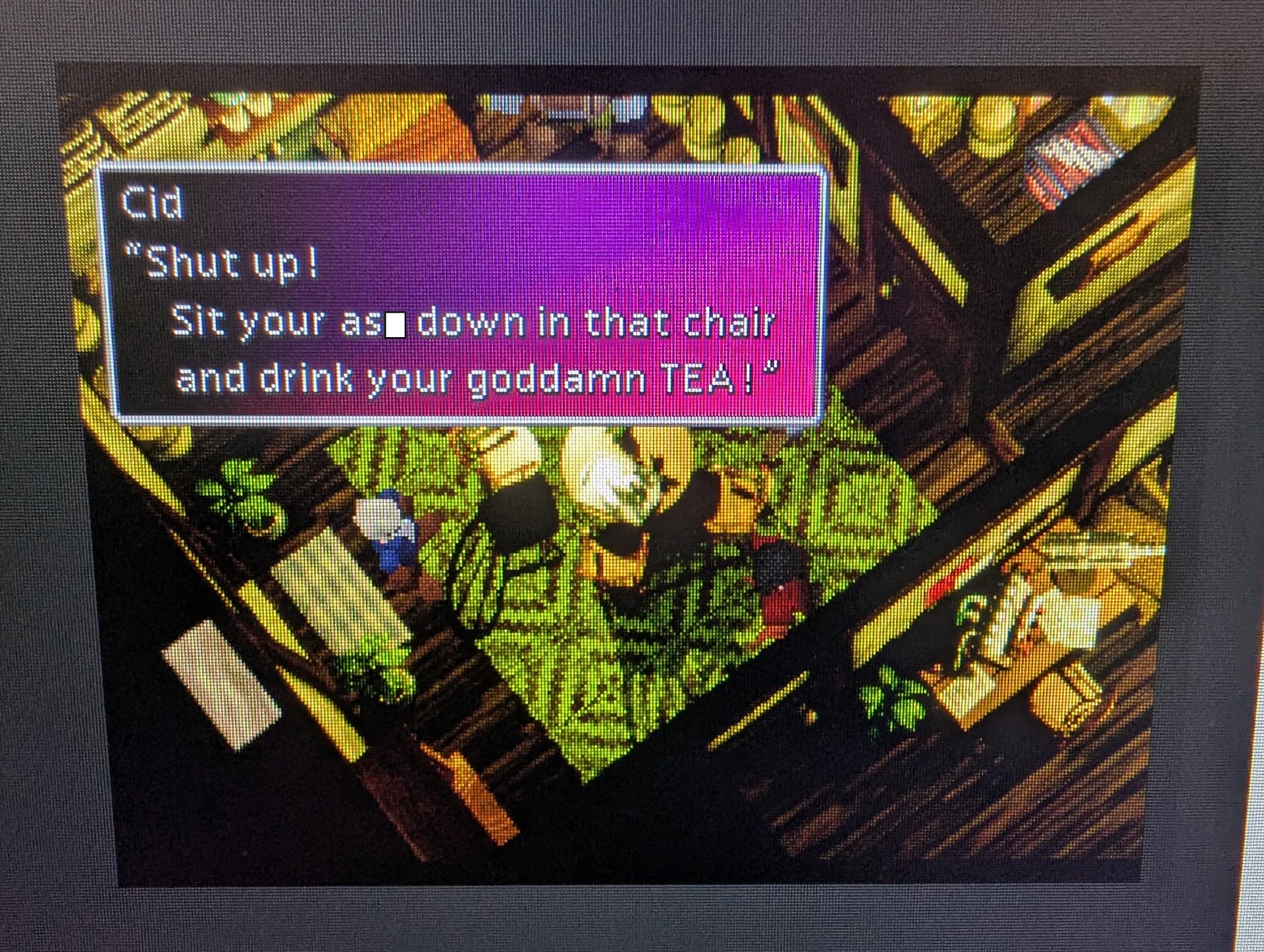
Hey all, @plaidman took inspiration from a post Xongle did a while back and expanded on it a bit. Install via archive installer, and read the readme for configuration options.
This package includes a script in Tasks to manually change between dark and light mode, with configurable temperature settings.
It also includes an optional automatic temperature adjustment script with configurable time and speed of adjustment.
config file is in SD1/MUOS/task/.daynight/daynight.ini. it’s pretty self-explanatory, but there are details in the readme.
_ **Auto Day/Night mode:** _
For this to work you have to **enable user init scripts**. From main muOS menu go **config → general settings → Advanced Settings → enable user init scripts**
readme: [cube-xx/day-night/README.md at main · plaidman/cube-xx · GitHub](https://github.com/plaidman/cube-xx/blob/main/day-night/README.md)
pixie version: [https://github.com/plaidman/cube-xx/raw/refs/heads/main/day-night/DayNightMode.muxzip](https://github.com/plaidman/cube-xx/raw/refs/heads/main/day-night/DayNightMode.muxzip)
banana version: [https://github.com/plaidman/cube-xx/raw/refs/heads/main/day-night/DayNightMode.zip](https://github.com/plaidman/cube-xx/raw/refs/heads/main/day-night/DayNightMode.zip)
Goose version: [https://github.com/imantorx/stuff/raw/refs/heads/main/DayNightMode.muxupd](https://github.com/imantorx/stuff/raw/refs/heads/main/DayNightMode.muxupd)
future plans:
automatic day/night tracking if you have wifi enabled
also change brightness
maybe a UI to edit config values.
_ **Day / Night Mode Manual Hotkeys":** _
I added a simple hotkey toggle to turn day/night mode off, if like me you need to use it for your kids nap time during the day and don’t want to exit your game.
R1+R2+Select = day
R1+R2+Start = night
[https://github.com/imantorx/stuff/raw/e13801b357c7c85e3b1d469ea01373d0fa686c1e/DayNightHotkeysV2.muxzip](https://github.com/imantorx/stuff/raw/e13801b357c7c85e3b1d469ea01373d0fa686c1e/DayNightHotkeysV2.muxzip)
**update for pixie patch 2:**
Devices with analog sticks: [https://github.com/imantorx/stuff/raw/refs/heads/main/DayNightHotkeys%20no%20analog%20sticks%20V2.2.muxzip](https://github.com/imantorx/stuff/raw/refs/heads/main/DayNightHotkeys%20no%20analog%20sticks%20V2.2.muxzip)
Devices with no analog sticks: [https://github.com/imantorx/stuff/raw/refs/heads/main/DayNightHotkeys%20with%20analog%20sticks%20V2.2.muxzip](https://github.com/imantorx/stuff/raw/refs/heads/main/DayNightHotkeys%20with%20analog%20sticks%20V2.2.muxzip)
**CANADA GOOSE 2508.1:**
Devices with analog sticks:
[https://github.com/imantorx/stuff/raw/refs/heads/main/Day%20Night%20Hotkey-with%20analog-2508.1%20CANADA%20GOOSE.muxupd](https://github.com/imantorx/stuff/raw/refs/heads/main/Day%20Night%20Hotkey-with%20analog-2508.1%20CANADA%20GOOSE.muxupd)
Devices with no analog sticks: [https://github.com/imantorx/stuff/blob/main/Day%20Night%20Hotkey-no%20analog-2508.1%20CANADA%20GOOSE.muxupd](https://github.com/imantorx/stuff/raw/refs/heads/main/Day%20Night%20Hotkey-no%20analog-2508.1%20CANADA%20GOOSE.muxupd)
TSP: [https://github.com/imantorx/stuff/raw/refs/heads/main/Day%20Night%20Hotkey-TSP-2508.1%20CANADA%20GOOSE.muxupd](https://github.com/imantorx/stuff/raw/refs/heads/main/Day%20Night%20Hotkey-TSP-2508.1%20CANADA%20GOOSE.muxupd)
**SILLY GOOSE 2508.2**
Devices with analog sticks: [https://github.com/imantorx/stuff/raw/refs/heads/main/Day%20Night%20Hotkey-with%20analog-2508.2%20SILLY%20GOOSE.muxupd](https://github.com/imantorx/stuff/raw/refs/heads/main/Day%20Night%20Hotkey-with%20analog-2508.2%20SILLY%20GOOSE.muxupd)
Devices with no analog sticks: [https://github.com/imantorx/stuff/raw/refs/heads/main/Day%20Night%20Hotkey-no%20analog-2508.2%20SILLY%20GOOSE.muxupd](https://github.com/imantorx/stuff/raw/refs/heads/main/Day%20Night%20Hotkey-no%20analog-2508.2%20SILLY%20GOOSE.muxupd)
TSP: [https://github.com/imantorx/stuff/raw/refs/heads/main/Day%20Night%20Hotkey-TSP-2508.2%20SILLY%20GOOSE.muxupd](https://github.com/imantorx/stuff/raw/refs/heads/main/Day%20Night%20Hotkey-TSP-2508.2%20SILLY%20GOOSE.muxupd)
**Current Version (GOLDEN GOOSE 2508.3 and All Future versions):**
R1+R2+Start = swaps between day/night
[https://github.com/imantorx/stuff/raw/refs/heads/main/Color%20Temp%20-%20Manual%20Shutdown%20Hotkey%20Golden%20Goose.muxupd](https://github.com/imantorx/stuff/raw/refs/heads/main/Color%20Temp%20-%20Manual%20Shutdown%20Hotkey%20Golden%20Goose.muxupd)
---
### Author:  [@eggdogggo](https://community.muos.dev/u/eggdogggo)
#### Post date: [April 19, 2025, 10:12am UTC](https://community.muos.dev/t/day-night-temperature-toggle/211/2 "2025-04-19T10:12:34Z")
Woah good job Imantor!!!
---
### Author:  [@oiimrosabel](https://community.muos.dev/u/oiimrosabel)
#### Post date: [April 21, 2025, 9:01pm UTC](https://community.muos.dev/t/day-night-temperature-toggle/211/3 "2025-04-21T21:01:16Z")
Hey ! I noticed you’re using a generic icon in your [script](https://github.com/plaidman/cube-xx/blob/main/day-night/task/Toggle%20Day-Night%20Mode.sh)
May I provide you an icon for your app ? All you’d have to do is to replace `# ICON: junk` with a unique name, like `daynight`.
Thanks in advance
---
### Author:  [@GameOver\_Jay](https://community.muos.dev/u/GameOver_Jay)
#### Post date: [May 19, 2025, 10:11pm UTC](https://community.muos.dev/t/day-night-temperature-toggle/211/4 "2025-05-19T22:11:45Z")
I love the idea of this. Just commenting that hopefully we can get brightness change added also. It’d help a lot!
---
### Author:  [@imantor](https://community.muos.dev/u/imantor)
#### Post date: [May 25, 2025, 8:57pm UTC](https://community.muos.dev/t/day-night-temperature-toggle/211/5 "2025-05-25T20:57:48Z")
Hey Jay you can already do brightness with hotkeys. menu key + volume up and down will change it globally!
---
### Author:  [@GameOver\_Jay](https://community.muos.dev/u/GameOver_Jay)
#### Post date: [May 26, 2025, 1:53am UTC](https://community.muos.dev/t/day-night-temperature-toggle/211/6 "2025-05-26T01:53:21Z")
Yeah i know, but would be cool to hit a hot key combo and it goes dim and warm for nightnode. Even cooler if it could also turn off LEDS
---
### Author:  [@Fantee](https://community.muos.dev/u/Fantee)
#### Post date: [May 30, 2025, 9:34pm UTC](https://community.muos.dev/t/day-night-temperature-toggle/211/7 "2025-05-30T21:34:10Z")
Love this app, it is really useful. Thank you!!!
I’m trying to use the hotkey toggle, but it isn’t using the values I set here: SD1/MUOS/task/.daynight/daynight.ini. I have also set automatic to no.
When I use the hotkey toggle it always uses the values that were initially set, the ones that came with the instalation. Maybe I’ve done something wrong…?
When I use the toggle in the Task Toolkit, it uses my values:
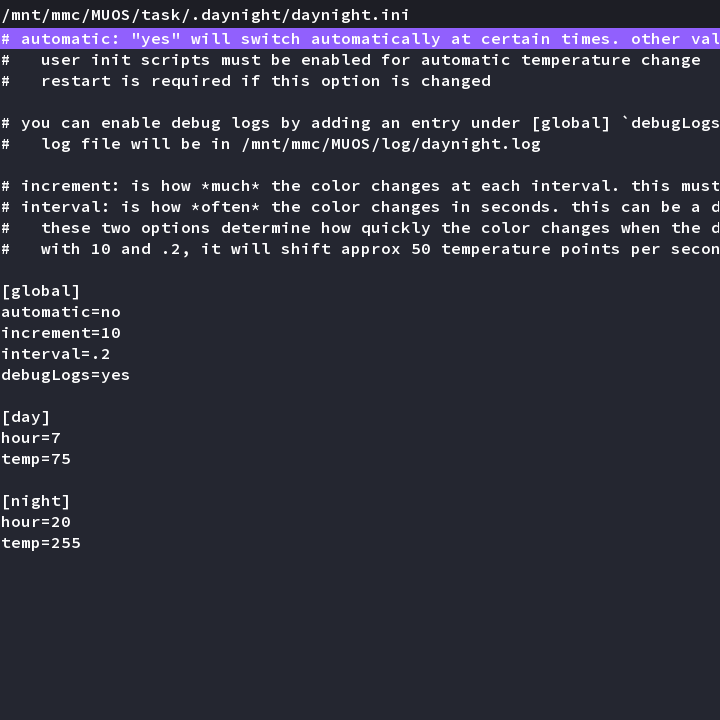
I’m using the pixie version and NightHotkeysV2.1.muxzip.
I’ve also installed this [Issues with wifi and search in Pixie patch 2 (54c85a0f) - #7 by xonglebongle](https://community.muos.dev/t/issues-with-wifi-and-search-in-pixie-patch-2-54c85a0f/281/7) a few days ago to correct the issue with search.
If someone could help me, I would really appreciate that.
Thanks in advance!
---
### Author:  [@imantor](https://community.muos.dev/u/imantor)
#### Post date: [June 3, 2025, 9:32pm UTC](https://community.muos.dev/t/day-night-temperature-toggle/211/8 "2025-06-03T21:32:27Z")
The hotkeys use their own values, its unfortunately seperate from the automatic script. If you want to set those you’ll have to edit the values in the following file either on your device via ssh or in the muxzip before installing it:
/opt/muos/script/mux/hotkey.sh
and the specific one you’re looking for is:
#DAY NIGHT TOGGLE:
DAY) echo 0 \> /sys/class/disp/disp/attr/color\_temperature ;;
NIGHT) echo 250 \> /sys/class/disp/disp/attr/color\_temperature ;;
---
### Author:  [@Fantee](https://community.muos.dev/u/Fantee)
#### Post date: [June 4, 2025, 8:53pm UTC](https://community.muos.dev/t/day-night-temperature-toggle/211/9 "2025-06-04T20:53:51Z")
Alright! Thank you very much! 😃
---
### Author:  [@Kirky](https://community.muos.dev/u/Kirky)
#### Post date: [September 25, 2025, 9:16pm UTC](https://community.muos.dev/t/day-night-temperature-toggle/211/10 "2025-09-25T21:16:06Z")
Goose tag added as requested.
---
### Author:  [@imantor](https://community.muos.dev/u/imantor)
#### Post date: [October 15, 2025, 3:38pm UTC](https://community.muos.dev/t/day-night-temperature-toggle/211/11 "2025-10-15T15:38:22Z")
Updated for **SILLY GOOSE 2508.2**
---
### Author:  [@Maxmordon113](https://community.muos.dev/u/Maxmordon113)
#### Post date: [December 4, 2025, 3:00am UTC](https://community.muos.dev/t/day-night-temperature-toggle/211/12 "2025-12-04T03:00:11Z")
May I ask which line I should change in the script to change the temperature value?
---
### Author:  [@mitchel](https://community.muos.dev/u/mitchel)
#### Post date: [January 6, 2026, 11:18am UTC](https://community.muos.dev/t/day-night-temperature-toggle/211/13 "2026-01-06T11:18:31Z")
I am trying to install this on my rg35sp on Loose Goose. But failing so far. I am confused which files I should download. Could someone help me?
---
### Author:  [@imantor](https://community.muos.dev/u/imantor)
#### Post date: [January 6, 2026, 1:57pm UTC](https://community.muos.dev/t/day-night-temperature-toggle/211/14 "2026-01-06T13:57:00Z")
Hi Mitchel it should be: Canada Goose: [https://github.com/imantorx/stuff/raw/refs/heads/main/DayNightMode.muxupd](https://github.com/imantorx/stuff/raw/refs/heads/main/DayNightMode.muxupd) if you’re having issues I can look into it later today.
---
### Author:  [@imantor](https://community.muos.dev/u/imantor)
#### Post date: [January 6, 2026, 1:58pm UTC](https://community.muos.dev/t/day-night-temperature-toggle/211/15 "2026-01-06T13:58:00Z")
Hey Max, did you figure out the value to change? If not is it for the hotkeys or for the auto script? Unfortunately they use value in different locations.
Talked to Max on discord and got it all sorted out.
---
### Author:  [@mitchel](https://community.muos.dev/u/mitchel)
#### Post date: [January 6, 2026, 8:48pm UTC](https://community.muos.dev/t/day-night-temperature-toggle/211/16 "2026-01-06T20:48:25Z")
> [@imantor](#):
>
> [DayNightMode.muxupd](https://github.com/imantorx/stuff/raw/refs/heads/main/DayNightMode.muxupd)
Thanks, Imantor, this one worked!
It’s just the toggle though. I remember the older version had settings and an option to automatically switch based on the time of day. Is that feature coming back? (Also, the glyph icon isn’t loading.)
\*nevermind see you mentoined it for future plans
That said, I’m very happy using it with the hotkeys for now. Thanks again!
---
### Author:  [@imantor](https://community.muos.dev/u/imantor)
#### Post date: [January 6, 2026, 9:00pm UTC](https://community.muos.dev/t/day-night-temperature-toggle/211/17 "2026-01-06T21:00:11Z")
That one should do it based on the time.
The readme on plaidmans site has info on how to change it if you desire
>
---
### Author:  [@valzi](https://community.muos.dev/u/valzi)
#### Post date: [February 4, 2026, 3:51am UTC](https://community.muos.dev/t/day-night-temperature-toggle/211/18 "2026-02-04T03:51:58Z")
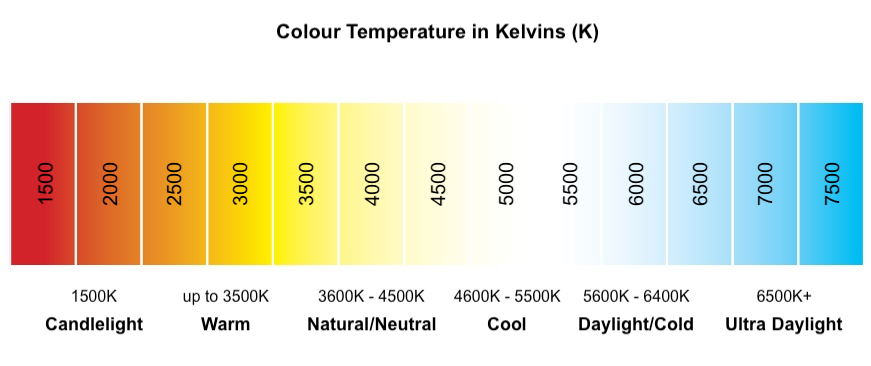
What is the temperature range? I just entered 2700 and it looks the same to me as the default 250.
---
### Author:  [@imantor](https://community.muos.dev/u/imantor)
#### Post date: [February 4, 2026, 1:53pm UTC](https://community.muos.dev/t/day-night-temperature-toggle/211/19 "2026-02-04T13:53:23Z")
I believe its -255 to 255
---
### Author:  [@valzi](https://community.muos.dev/u/valzi)
#### Post date: [February 7, 2026, 6:18pm UTC](https://community.muos.dev/t/day-night-temperature-toggle/211/20 "2026-02-07T18:18:48Z")
Thanks, I’ll try some. (The default is much too red for me, personally.)
Is it possible to change the range to match real color temperatures?
[Next page](https://community.muos.dev/t/day-night-temperature-toggle/211.md?page=2)