# Dolphin Rt:Core for muOS v11.5.00 — 'Triptych'
**URL:** https://community.muos.dev/t/dolphin-rt-core-for-muos-v11-5-00-triptych/1693
**Category:** Testing
**Tags:** anbernic, content
**Created:** [September 29, 2026, 3:46pm UTC](https://community.muos.dev/t/dolphin-rt-core-for-muos-v11-5-00-triptych/1693 "2026-09-29T15:46:40Z")
**Posts on this page:** 3
**Page:** 1
### Author:  [@sirpips](https://community.muos.dev/u/sirpips)
#### Post date: [September 29, 2026, 3:46pm UTC](https://community.muos.dev/t/dolphin-rt-core-for-muos-v11-5-00-triptych/1693/1 "2026-09-29T15:46:40Z")
Hey everyone! 👋
After months of work, testing, and a few sleepless nights, I’m proud to present a **new version** of my Dolphin project for muOS. This isn’t just an update of the old core — it’s a **complete rewrite** that takes the best of what came before and pushes it to a new level.
This is
**DOLPHIN RT:CORE** for muOS **- v11.5.00 ‘Triptych’**
and this is _ **Flavour I: Comfort Zone**._
* * *
## **🎯 What is Comfort Zone?**
**Comfort Zone** is the _streamlined_ edition of Dolphin Rt:Core. The idea is simple: **no useless menus, no settings to fiddle with, no bloat.** You assign the core to your ROM folder, pick a profile, and play.
Everything happens through the **muOS Content Explorer** , exactly like any other emulator in the system.
* * *
## **🎉 Finally — A Working Exit Hotkey!**
Let’s start with the headline news, because this one deserves it.
**Comfort Zone finally ships with a working exit hotkey:** `START + SELECT`.
You press it, Dolphin quits, you’re back in muOS. **No more rebooting the device.**
For anyone who has spent time with GameCube or Wii emulation on these handhelds, you know exactly how painful this was. You finish a session, you want to try a different **Profile** , or you want to test another title — and the only way out was to **reboot the entire device**. Every single time.
Thankfully muOS has extremely fast boot times, otherwise this would have been an absolute nightmare. But even with fast boots, it was a real gap in the experience — and it was felt. **Now it’s gone.**
The exit is clean:
- `START + SELECT` sends a proper `SIGTERM` to Dolphin
- The launcher catches the signal and shuts everything down gracefully
- You’re back in the muOS frontend in under two seconds
No menus. No overlays to dismiss. No combos to memorize. Just press and you’re out.
* * *
## **✨ What’s Included**
### **🚀 Seven Ready-to-Use Profiles**
Every profile is tuned for the H700, with **JITARM64 forced** (`CPUCore = 4`) and **async shader compilation** (`ShaderCompilationMode = 3`). Compared to the previous version, CPU-bound performance improved by **50% to 300%**.
| Profile | Description |
| --- | --- |
| **performance** | Daily driver, balanced |
| **compatibility** | Accuracy first, slower |
| **rintromping** | Maximum speed |
| **speedhacks** | Extra hack flags enabled |
| **blackscreenfix** | For games that won’t boot |
| **sweetspot** | Custom-tuned balance |
| **default** | Baseline reference |
Available for **GameCube** (upright) and **Wii** (upright + sideways).
* * *
### **🎨 Automatic Bloom Removal**
The **“All Games Bloom Removal”** mod is **always active** for every game. It’s the single biggest FPS gain on H700 (+2–5 FPS on most 3D titles). Zero configuration needed.
* * *
### **🎯 Per-Game DOF Removal**
For the heaviest titles, we’ve added **Depth of Field removal** — already active and targeted only to those games:
Crash Nitro Kart · Crash Tag Team Racing · Crash: Wrath of Cortex · DBZ Budokai 1/2 · Super Mario Sunshine · Scaler · Metroid Prime · Super Smash Bros. Melee · Mario Smash Football
* * *
### **🎮 Curated GameSettings**
12 per-game overrides for problematic titles (NFS Most Wanted, Crash, DBZ, Mario Sunshine, etc.), each documented with region, reason, and expected FPS.
* * *
## **📦 Installation**
| Step | Action |
| --- | --- |
| **1** | Download [`Dolphin_RtCore_v11.5.00-I_ComfortZone.muxupd`](https://github.com/SilverCrow2323/Dolphin-Core-for-MuOS/releases/tag/v11.5.00) from the release |
| **2** | Copy to `/mnt/mmc/ARCHIVE/` (SD1) or `/mnt/sdcard/ARCHIVE/` (SD2) |
| **3** | Go to **Applications → Archive Manager** |
| **4** | Select the `.muxupd` file and start installation |
| **5** | Wait — everything is installed automatically ✅ |
* * *
## **🎮 Usage**
1. From muOS, open the **Content Explorer**
2. Navigate to your GameCube or Wii ROM folder
3. Press **X** → **Assign Core**
4. Select **Nintendo GameCube** or **Nintendo Wii**
5. Pick a profile from the list (7 available)
6. Launch any game — the core is now assigned to that folder
* * *
## **🛡 Compatibility List**
The community-curated compatibility list with **200+ tested titles** is available here:
🔗 **[silvercrow2323.github.io/Dolphin-Core-for-MuOS](https://silvercrow2323.github.io/Dolphin-Core-for-MuOS/)**
Each entry includes: star rating, FPS range, recommended profile, and known issues.
* * *
## **⚠ Honest Note on Performance**
**The H700 is not hardware for Dolphin.** This is a **technical demonstration** , not a plug-and-play emulator. Realistic expectations:
- 🟢 Lightweight 2D games: **30–50 FPS**
- 🟡 Medium 3D games: **15–25 FPS**
- 🔴 Heavy 3D games (NFS, Crash, Zelda): **5–15 FPS**
If you want smooth GameCube performance, you need a device with Snapdragon 8 Gen 2 or better. But if you want to **squeeze every last drop out of the H700** , this is the closest you’ll get.
* * *
## **🤝 We Want Your Feedback**
This project lives and dies by community testing. If you try Comfort Zone, **please share your results** — whether they’re good, bad, or ugly.
Specifically, we’d love to receive:
- 🎯 **Test results** — which titles work, which don’t, and at what FPS
- ⚙ **Winning configurations** — profile + GameSettings combos that made a game playable
- 🎨 **Useful mods** — any Graphics Mods or texture packs that improved a specific title
- 🔗 **Sources and links** — Dolphin forum threads, community spreadsheets, anything useful
- 🐛 **Bug reports** — if something breaks, tell us exactly what happened
Post them in this thread, or open an issue on GitHub:
🐛 **[github.com/SilverCrow2323/Dolphin-Core-for-MuOS/issues](https://github.com/SilverCrow2323/Dolphin-Core-for-MuOS/issues)**
Every report helps. Every config gets folded back into the next release. **This is a community project, and the community makes it better.**
* * *
## **🙏 Credits**
A huge thank you to everyone who made this possible.
### **Previous Dolphin Core work**
This project would not exist without the pioneering work on the **first Dolphin core for muOS**. A massive thank you to the developers, testers, and contributors who laid the groundwork:
- 🏆 **@Speedrun** — for the original Dolphin core for muOS, and for showing what was possible on this hardware
- 🎛 **muOS team** — for building an OS that actually makes this kind of project viable
- 🐬 **Dolphin developers** — for an incredible emulator, and for continuing to support ARM64
- 📊 **Community testers** — everyone who ran games, reported FPS, and shared findings
- 🎨 **Dolphin forums** — for the HD texture pack work on Crash Nitro Kart and other titles
Previous thread for reference:
🔗 [Original Dolphin core thread on muOS forum](https://community.muos.dev/)
If I’ve missed anyone, please let me know — I’ll update the credits immediately.
### **Special thanks**
- **SPDW Factory Lab** — for the late nights, the testing rig, and the sheer stubbornness required to keep tuning profiles that “almost” worked
- **Everyone on this forum** — for the feedback, the bug reports, and the encouragement
* * *
## **🔗 Links**
- 📥 **Release** : [github.com/SilverCrow2323/Dolphin-Core-for-MuOS/releases/tag/v11.5.00](https://github.com/SilverCrow2323/Dolphin-Core-for-MuOS/releases/tag/v11.5.00)
- 📊 **Compatibility List** : [silvercrow2323.github.io/Dolphin-Core-for-MuOS](https://silvercrow2323.github.io/Dolphin-Core-for-MuOS/)
- 🐛 **Bug Reports** : [GitHub Issues](https://github.com/SilverCrow2323/Dolphin-Core-for-MuOS/issues)
- 💬 **Discussion** : this thread
* * *
**Dolphin Rt:Core v11.5.00 — Flavour 1: Comfort Zone.**
  
_Still Sbrobbing. Always Rintromping._ 🎮
— **sirpips aka SilverCrow2323** / SPDW Factory Lab
---
### Author:  [@sirpips](https://community.muos.dev/u/sirpips)
#### Post date: [September 30, 2026, 7:50am UTC](https://community.muos.dev/t/dolphin-rt-core-for-muos-v11-5-00-triptych/1693/2 "2026-09-30T07:50:38Z")
[Release] Dolphin Rt:Core v11.5.00 — Flavour II: Bash Arsenal
> **[Release Dolphin Rt:Core v11.5.00 - Flavour II: 'Bash Arsenal' ·...](https://github.com/SilverCrow2323/Dolphin-Core-for-MuOS/releases/tag/v11.5.00-II)**
>
> Dolphin Rt:Core v11.5.00
> Flavour II — Bash Arsenal
>
>
>
>
>
>
>
>
> ⚡ TL;DR
> Bash Arsenal v11.5.00 — the power-user extension of Comfort Zone. Adds tier adjusters, a 7-category Task Toolkit menu, a...
* * *
Hey everyone!
Some of you have already tried **Comfort Zone** — the “assign and play” flavour of Dolphin Rt:Core. It works, it’s clean, and it got people gaming on the H700 with GameCube and Wii titles.
But a few of you asked the same question: _“What if I want more control?”_
This is the answer.
**Bash Arsenal** is the power-user extension of Comfort Zone. It installs **on top of** it, adds a full Task Toolkit menu, tier adjusters, a mod scanner, save data managers, and an in-device technical manual. Everything Comfort Zone has, plus the knobs to tune it.
* * *
## What is Bash Arsenal?
Bash Arsenal is a **superset** , not a replacement.
- ✅ Everything in Comfort Zone works identically
- ➕ **Adds tiered profiles** — Lite, Standard, Max
- ➕ **Adds automation tasks** — 30+ scripts in a 7-category menu
- ➕ **Adds a mod scanner** — auto-mirrors your `Load/` folder
- ➕ **Adds save data managers** — wipe GC/Wii saves safely
- ➕ **Adds an in-Task-Toolkit manual** — 13 pages, no PC required
No custom UI. No Python. No background daemons. Everything runs through the **standard muOS Task Toolkit framework**.
* * *
## The Tier System — Rt:Core Profiles
Comfort Zone had single-strength profiles. Bash Arsenal replaces that with **three discrete tiers** for each of the three flagship profiles.
### The Four Core Profiles
| Profile | Philosophy | Use Case |
| --- | --- | --- |
| 🚀 **rtboost** | Performance Boost — max FPS | Titles that stutter on rtprime |
| ⚖ **rtprime** | Balanced — daily driver | 90% of your library |
| 🎯 **rtpure** | Compatibility — accuracy first | Games with glitches |
| 🐛 **rtverbose** | Debug — verbose logging | Report generation |
### Three Tiers per Profile
| Tier | rtboost | rtprime | rtpure |
| --- | --- | --- | --- |
| 🟢 **Lite** | OC 0.85, minimal hacks | OC 1.0, near-accurate | OC 1.0, async shader |
| 🟡 **Standard** | OC 0.65, full hacks | OC 1.0, moderate hacks | OC 1.0, sync shader |
| 🔴 **Max** | OC 0.50, everything off | OC 0.75, aggressive | OC 1.0, strictest accuracy |
**Why tiers instead of sliders?** Sliders create 42+ untested combinations. Tiers are three discrete, fully-validated states. Each is a complete `Dolphin.ini` + `GFX.ini` pair, tested end-to-end.
* * *
## The Task Toolkit Menu
Everything lives inside **Applications → Task Toolkit → Dolphin RtCore**. Seven categories:
### 01. Profile Adjusters
Swap the active tier of any Rt:Core profile on the fly.
- `RtBoost [Performance]` → Lite · Standard · Max
- `RtPrime [Balanced]` → Lite · Standard · Max
- `RtPure [Accuracy]` → Lite · Standard · Max
Selecting a tier instantly replaces `Dolphin.ini.rtboost` (or `rtprime` / `rtpure`). Next launch uses it.
### 02. Toggles
Live switches for on-screen overlays.
- **FPS Overlay** — ShowFPS
- **VPS Overlay** — ShowVPS
- **Speed Overlay** — ShowSpeed
- **OSD Messages** — OnScreenDisplayMessages
- **Cursor Visibility** — Wii pointer cursor
### 03. Config Management
State inspection and lifecycle tools.
- **Show Active Config** — current profile, tier, active mods, key INI values
- **Reset All Profiles** — restore every profile to factory defaults
- **Expose All Tiers** — show every tier in Content Explorer → Assign Core
- **Standard Only** — collapse Content Explorer to base profiles only
### 04. Advanced Options
Auto-generated tree mirroring your `Load/` folder.
- **Refresh Mods List** — scans `Load/GraphicMods/`, `Load/Textures/`, etc. and rebuilds the toggle menu
- **Per-mod toggles** — enable/disable any mod via `.disabled` marker
- **Bulk actions** — `_Disable All` and `_Enable All` per subfolder
### 05. Logs
- **Clean Logs** — wipes log files
- **View Launcher Report** — last session summary
### 06. Technical Manual
An in-device reference manual — 13 pages, no PC required.
| Page | Topic |
| --- | --- |
| 00 | Index |
| 01–02 | Toggles — Overlays & On-Screen Info |
| 03–06 | Profiles — rtboost · rtpure · rtprime · rtverbose |
| 07 | How To Choose a Profile |
| 08 | Core Tools |
| 09 | Advanced Options |
| 10 | Save Data |
| 11 | Logger & Diagnostics |
| 12 | Assign & Tiers |
Each page auto-closes after a configurable reading time. Options submenu: Fast (5s) / Normal (10s) / Slow (15s), plus a general-purpose timer (3/5/7s) for other tasks.
### 07. Save Data
Safe wipe utilities for GameCube and Wii saves.
- **Delete GC Saves** — memory cards + per-game saves (keeps SRAM)
- **Delete Wii Saves** — game save data only (keeps system files)
- **Delete All Saves** — both
Plus the classic **Eradicate da Dolpheen** — the full uninstaller.
* * *
## Content Explorer — Two Modes
Bash Arsenal ships with **two assign strategies** , switchable from Task 03.
### 🎯 MODE 1 — Standard Only (default)
Content Explorer → Assign Core shows only the base profiles:
Dolphin - rtboost - upright
Dolphin - rtprime - upright
Dolphin - rtpure - upright
Dolphin - rtverbose - upright
Clean menu. Tier is managed from Task 01. **Recommended for 95% of users.**
### 🌐 MODE 2 — All Tiers Exposed
Enable via **Task 03 → Expose All Tiers** :
Dolphin - rtboost - upright
Dolphin - rtboost lite - upright
Dolphin - rtboost std - upright
Dolphin - rtboost max - upright
… same pattern for rtprime and rtpure
Assign a specific tier to a specific game directly. For users who want per-game tier control.
> Revert any time with **Task 03 → Standard Only**.
* * *
## What’s Inherited from Comfort Zone
Everything from Flavour I is present and unchanged:
- 🔹 Automatic Bloom Removal — global, enabled by default
- 🔹 Curated per-game DOF Removal — 10 titles pre-targeted
- 🔹 HD Texture Pack for Crash Nitro Kart — 5.7 MB, active by default
- 🔹 Empiric GameSettings — 12 hand-tuned engine overrides
- 🔹 START + SELECT exit hotkey — no menus, no prompts
- 🔹 Zero Python, zero gptokeyb — pure C/SDL input handler
- 🔹 Minimal disk I/O — two log files total
The [Compatibility Database](https://silvercrow2323.github.io/Dolphin-Core-for-MuOS/) with 200+ benchmarked games applies equally.
* * *
## Installation
| Step | Action |
| --- | --- |
| 1 | Ensure **Comfort Zone v11.5.00** is already installed |
| 2 | Download [`Dolphin_RtCore_v11.5.00_BashArsenal.muxupd`](https://github.com/SilverCrow2323/Dolphin-Core-for-MuOS/releases/tag/v11.5.00-II) from the release |
| 3 | Copy to `/mnt/mmc/ARCHIVE/` (SD1) or `/mnt/sdcard/ARCHIVE/` (SD2) |
| 4 | Go to **Applications → Archive Manager** |
| 5 | Select the `.muxupd` file and start installation |
| 6 | Open **Applications → Task Toolkit → Dolphin RtCore** — the menu is ready |
> ⚠ **DO NOT install Bash Arsenal on a device WITHOUT Comfort Zone.** The Rt:Core, launcher script and standard profile files come from Comfort Zone; Bash Arsenal is the extension that adds the task layer on top together with the new adjustable profiles.
* * *
## Usage
### Recommended first actions
1. **Task Toolkit → 01. Profile Adjusters → RtPrime [Balanced] → rtprime Standard**
Sets the daily-driver profile to its balanced tier.
2. **Task Toolkit → 06. Technical Manual → 00. README**
Opens the in-device reference. Page 07 (How To Choose) walks through the decision tree.
3. **Task Toolkit → 04. Advanced Options → Refresh Mods List**
Builds the per-mod toggle menu from your `Load/` folder.
* * *
**Dolphin Rt:Core v11.5.00 — Flavour II: Bash Arsenal.**
_Still Sbrobbing. Always Rintromping._ 🎮
— **sirpips aka SilverCrow2323** / SPDW Factory Lab
---
### Author:  [@sirpips](https://community.muos.dev/u/sirpips)
#### Post date: [October 13, 2026, 10:31am UTC](https://community.muos.dev/t/dolphin-rt-core-for-muos-v11-5-00-triptych/1693/3 "2026-10-13T10:31:38Z")
## \> Site Upgrade & Complete Restyle:
[Dolphin Rt:Core Compatibility Database](https://silvercrow2323.github.io/Dolphin-Core-for-MuOS/)\*\*
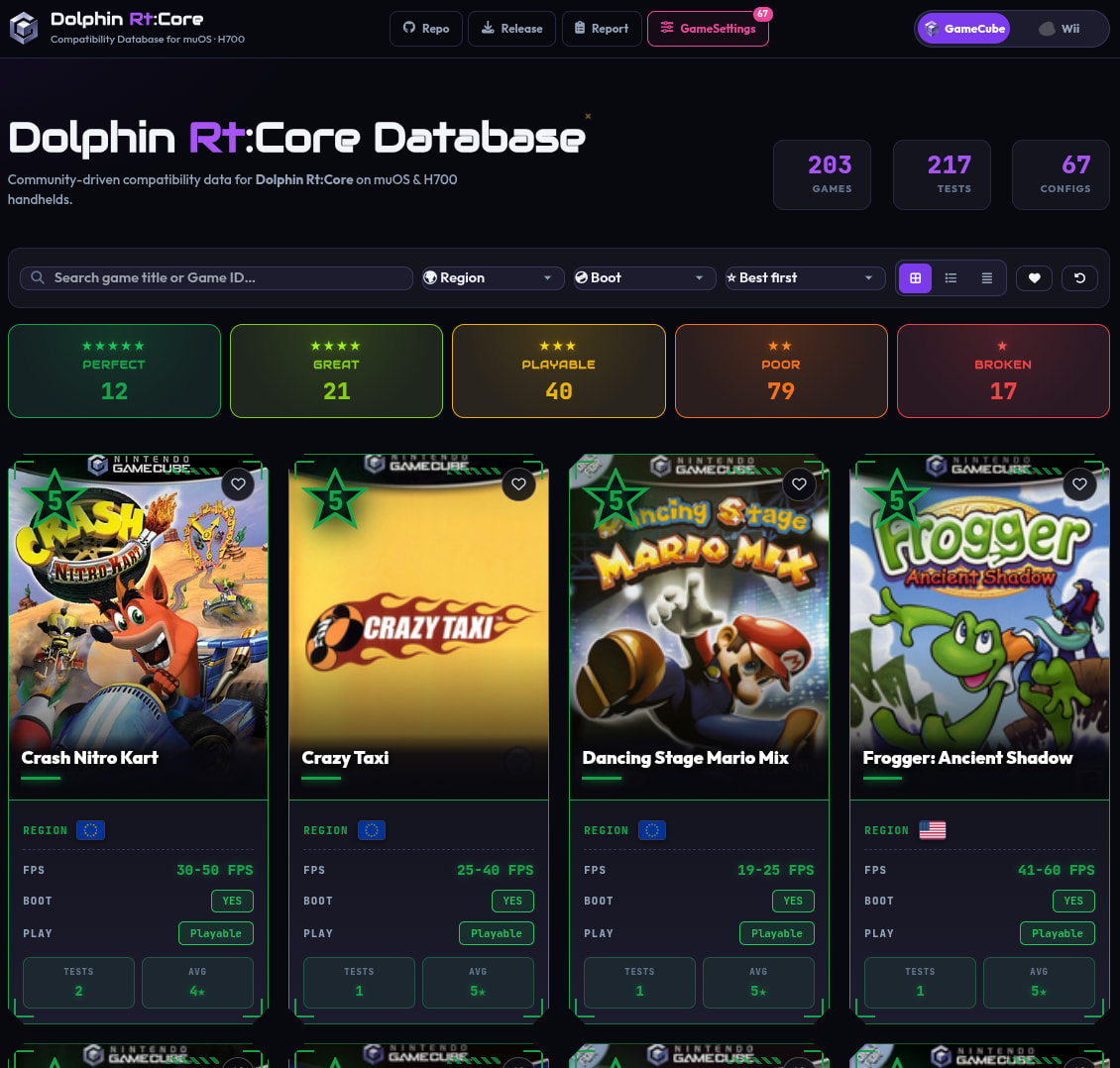
We have a major update for the **Dolphin-Core-for-MuOS** site! We’ve completely revamped the graphics and streamlined the way data is managed and displayed to make your experience smoother and more visually appealing.
Beyond the new look, we have introduced two powerful new features designed to help you get the most out of your MuOS H700:
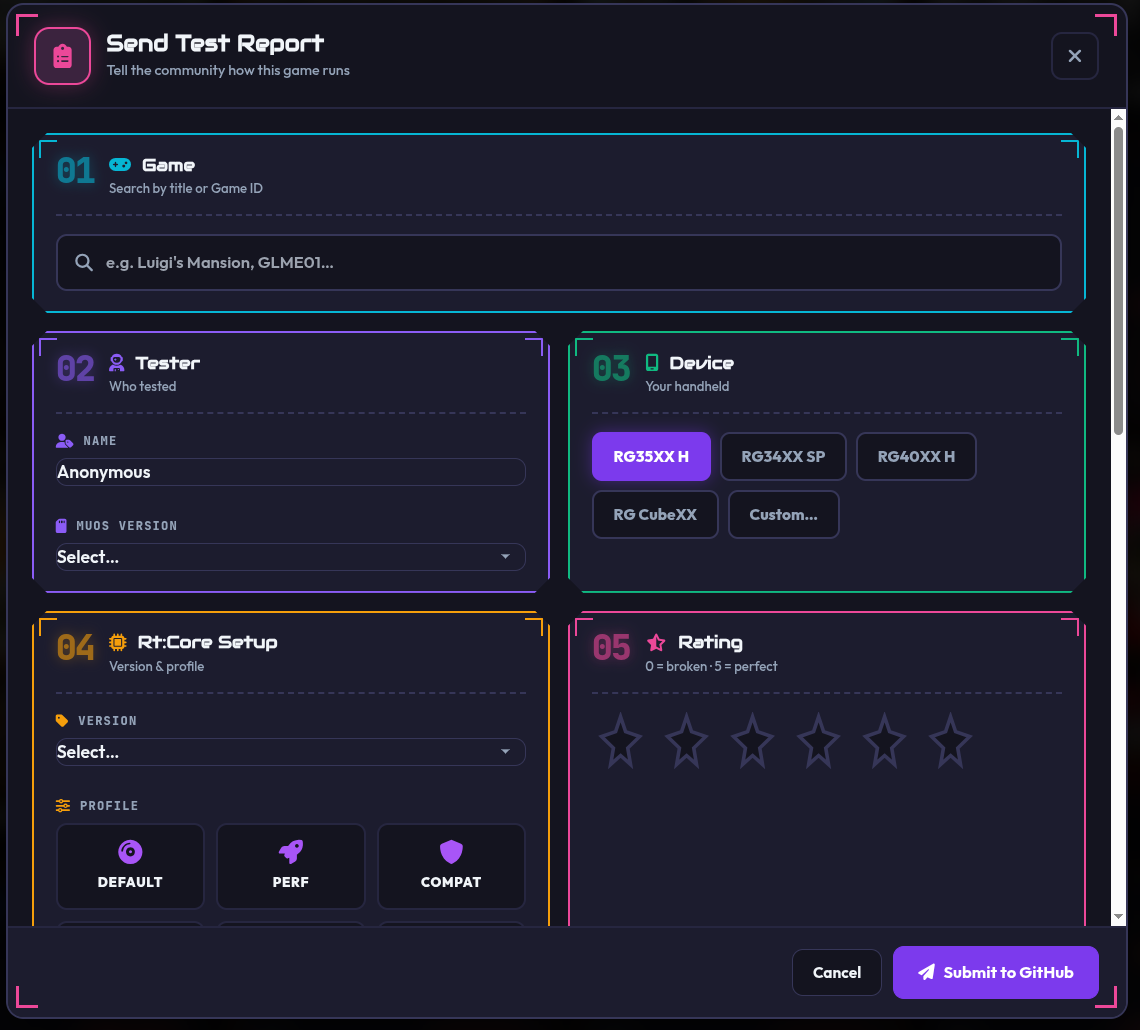
\> **Send Test Report** Now you can submit your testing results directly from the site. No more fumbling with external tools!
- **Dynamic Template:** Fill in your report using dedicated, intuitive widgets tailored to each specific data type.
- **Smart Search:** Use the internal database search to easily find and select the correct Game ID, ensuring your reports are accurate and properly formatted.
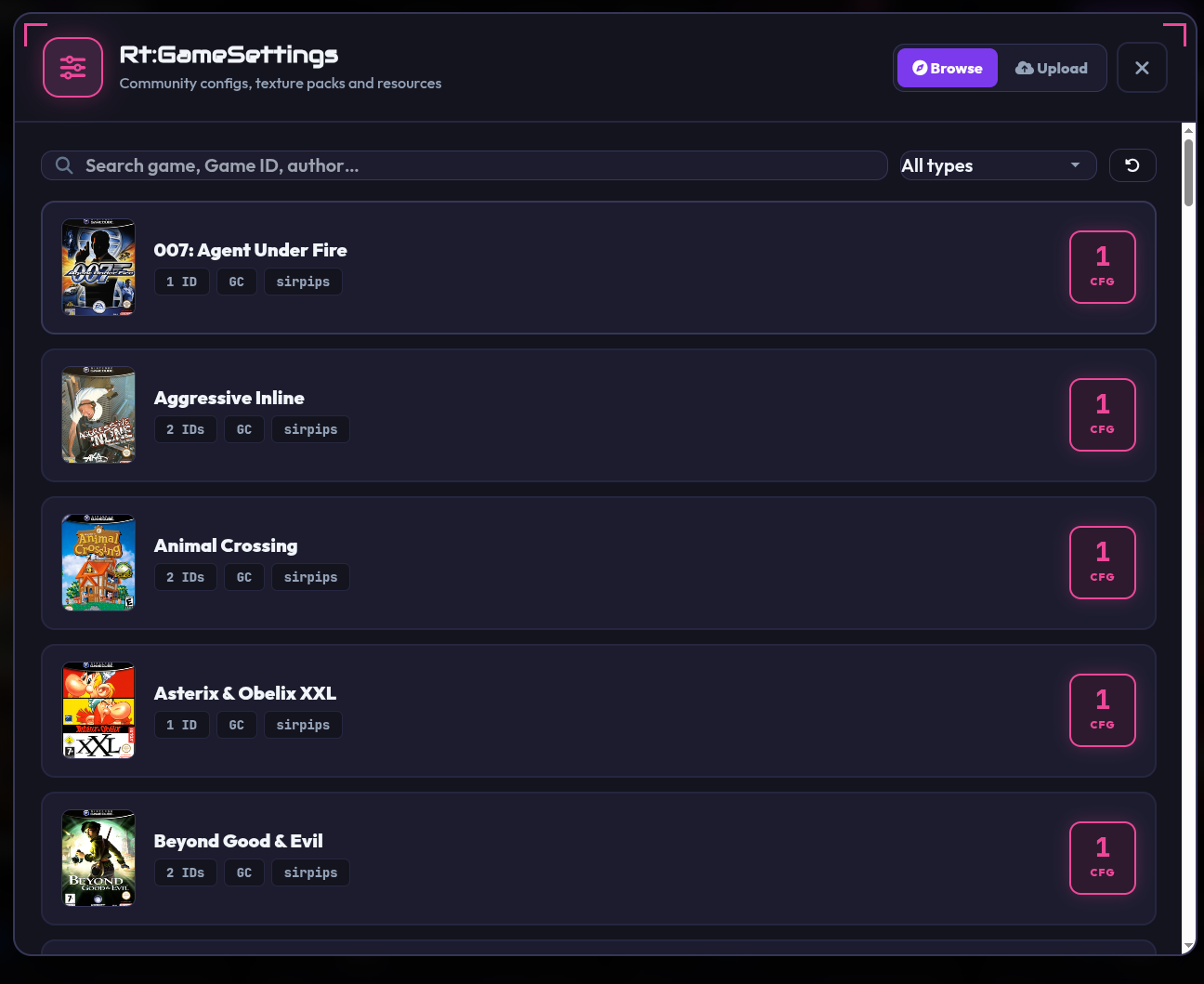
⚙ **GameSettings Database** We’ve added a community-driven database for GameSettings!
- **Share with the Community:** You can now share your optimized GameSettings with everyone.
- **Flexible Integration:** Attach your GameSettings directly to your Test Reports, or upload them as standalone files.
- **Ready to Use:** The database already includes **67 GameSettings**. These include contributions from users who shared settings in their tests, as well as new profiles created by bridging official Dolphin settings with specific H700 optimizations based on extensive testing data.
Check out the new site and help us grow the database!
🔗 [Dolphin Rt:Core · Compatibility Database](https://silvercrow2323.github.io/Dolphin-Core-for-MuOS/)