# Image Burner: A utility to write ISO/IMG to SD cards & format tool (FAT/exFAT/EXT3/NTFS)
**URL:** https://community.muos.dev/t/image-burner-a-utility-to-write-iso-img-to-sd-cards-format-tool-fat-exfat-ext3-ntfs/1671
**Category:** Release
**Tags:** goose, sdcard, application
**Created:** [September 12, 2026, 8:36pm UTC](https://community.muos.dev/t/image-burner-a-utility-to-write-iso-img-to-sd-cards-format-tool-fat-exfat-ext3-ntfs/1671 "2026-09-12T20:36:25Z")
**Posts on this page:** 4
**Page:** 1
### Author:  [@tonywei92](https://community.muos.dev/u/tonywei92)
#### Post date: [September 12, 2026, 8:36pm UTC](https://community.muos.dev/t/image-burner-a-utility-to-write-iso-img-to-sd-cards-format-tool-fat-exfat-ext3-ntfs/1671/1 "2026-09-12T20:36:26Z")
Need to write an image to an SD card, or format a card, without reaching for a PC?
Image Burner does it right on your muOS handheld, controlled entirely with the D-pad and buttons.
### Download
> **[Release Image Burner v1.0.1 · tonywei92/muos-imageburner](https://github.com/tonywei92/muos-imageburner/releases/tag/v1.0.1)**
>
> What is fixed
>
> Burning a compressed image (.img.gz) no longer freezes. Before, the app could sit there looking stuck for a couple of minutes; now the burn starts right away.
> For very large compress...
(The app includes everything it uses — nothing to set up.)
### Screenshots
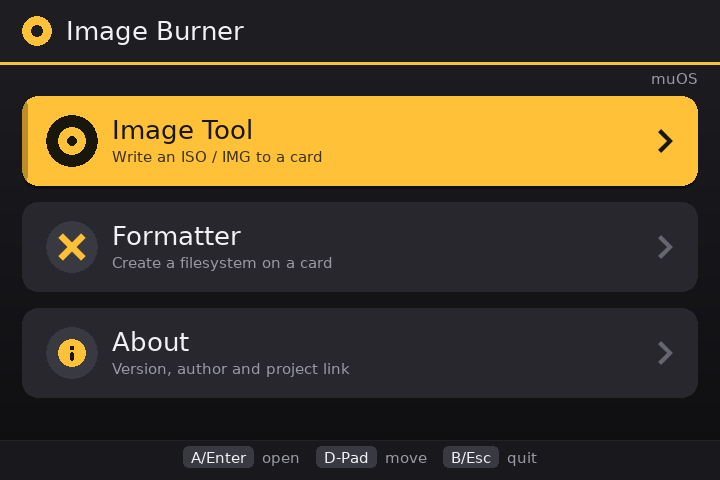
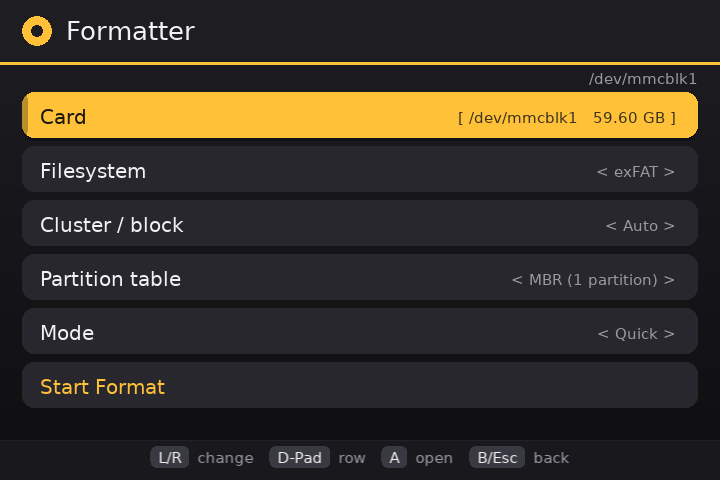
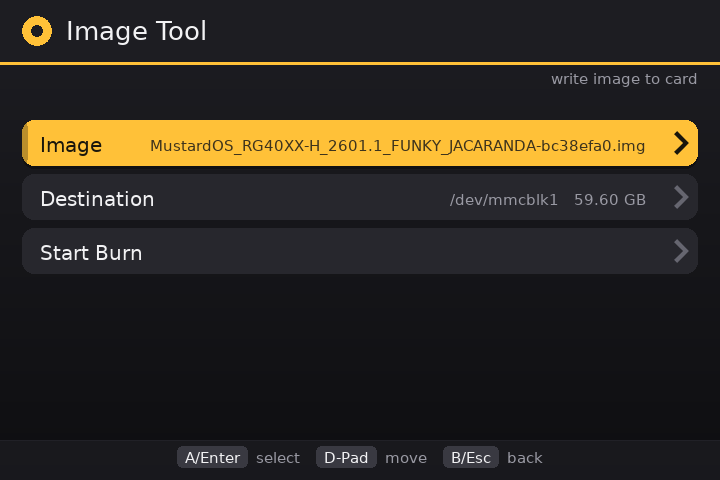
### What it can do
**Write images to a card**
- Pick an `.iso` or `.img` file, choose the card, and write it
- Compressed images work too (`.img.gz`, `.img.xz`) — no need to unpack them first
- Progress bar with speed and time left
- Cancel any time; it tells you if the card was finished or not
- Won’t write to the card muOS is running from, or an image too big for the card
**Format a card**
- Formats: FAT12, FAT16, FAT32, exFAT, EXT2, EXT3 or NTFS
- Optional: cluster size and partition style (MBR, GPT, or none)
- Quick format, or full format that wipes the whole card first
- Cancellable while it works
**Stays safe**
- The card muOS is running from is locked and can’t be selected
- Nothing is erased without a confirmation screen
### How to install
1. Download `ImageBurner-1.0.1.muxapp`
2. Copy it to your card — either `ARCHIVE` folder (SD1 or SD2)
3. On the device open **Applications → Archive Manager** , pick the file and install
4. Launch **Image Burner** from Applications
### How to use
- **Burn an image:** Image Tool → Image → Destination → Start Burn → confirm
- **Format a card:** Formatter → Card → choose your settings → Start Format → confirm
### Compatibility
- Tested on Anbernic H700 handhelds (RG34XXSP) with muOS 2601.0 (Jacaranda)
- Should work on other muOS handhelds too — please share your results
> ⚠ Formatting **erases the card you choose**. Use a spare card and back up anything important first.
## FAQ
**Can I use it to make a Windows installation USB/SD card?**
No — not a working one. Image Burner writes images **byte-for-byte** (a raw copy,
exactly the same as `dd`, balenaEtcher, or Rufus’s “DD mode”). A Windows setup ISO is
an optical-disc image (UDF/ISO 9660), so a raw copy of it isn’t a normal, readable
card: Windows can’t open it, and Windows Setup often can’t read its own files from it
either. Building a _working_ Windows installer means extracting the ISO’s contents
onto a FAT32 card and splitting the oversized `install.wim` — which is what Rufus and
Microsoft’s Media Creation Tool do on a PC. So use Image Burner for Linux/OS images
(muOS, Knulli, Batocera, …) and `.img` files, and make Windows install media with a
PC tool.
**Why does the progress bar sometimes show “…” instead of a percentage?**
Some compressed `.gz` images are too big to measure. gzip stores the uncompressed size
in a 4-byte field, so for images over 4 GB it can’t be trusted, and Image Burner won’t
unpack the whole file just to count it. When the total size isn’t known, the bar rolls
instead of filling and there’s no percentage or time left — the write itself is
unaffected. Uncompressed `.img`/`.iso` files and `.xz` images always show a normal
progress bar.
### Links
- GitHub: [GitHub - tonywei92/muos-imageburner · GitHub](https://github.com/tonywei92/muos-imageburner)
- Downloads: [Releases · tonywei92/muos-imageburner · GitHub](https://github.com/tonywei92/muos-imageburner/releases)
- Report a bug: [Issues · tonywei92/muos-imageburner · GitHub](https://github.com/tonywei92/muos-imageburner/issues)
Free and open source (MIT). Made with ❤ for the muOS community.
---
### Author:  [@sahil](https://community.muos.dev/u/sahil)
#### Post date: [September 13, 2026, 9:48am UTC](https://community.muos.dev/t/image-burner-a-utility-to-write-iso-img-to-sd-cards-format-tool-fat-exfat-ext3-ntfs/1671/2 "2026-09-13T09:48:38Z")
Amazing app. It can be very helpful in certain scenarios. Thankyou 💙
---
### Author:  [@tonywei92](https://community.muos.dev/u/tonywei92)
#### Post date: [September 13, 2026, 12:05pm UTC](https://community.muos.dev/t/image-burner-a-utility-to-write-iso-img-to-sd-cards-format-tool-fat-exfat-ext3-ntfs/1671/3 "2026-09-13T12:05:37Z")
Thanks! 🙏 That’s exactly why I built it. I’m off to China next week to grab a few handhelds and can’t bring a laptop, so I needed a way to flash cards on the go. Glad it’s useful!
---
### Author:  [@sahil](https://community.muos.dev/u/sahil)
#### Post date: [September 13, 2026, 12:13pm UTC](https://community.muos.dev/t/image-burner-a-utility-to-write-iso-img-to-sd-cards-format-tool-fat-exfat-ext3-ntfs/1671/4 "2026-09-13T12:13:09Z")
That’s great. Enjoy your trip 😊