# muOS Anbernic Manager - manage your handheld from a browser on your computer
**URL:** https://community.muos.dev/t/muos-anbernic-manager-manage-your-handheld-from-a-browser-on-your-computer/1835
**Category:** Testing
**Tags:** anbernic, custom, performance
**Created:** [November 4, 2026, 2:18am UTC](https://community.muos.dev/t/muos-anbernic-manager-manage-your-handheld-from-a-browser-on-your-computer/1835 "2026-11-04T02:18:45Z")
**Posts on this page:** 4
**Page:** 1
### Author:  [@Aaron](https://community.muos.dev/u/Aaron)
#### Post date: [November 4, 2026, 2:18am UTC](https://community.muos.dev/t/muos-anbernic-manager-manage-your-handheld-from-a-browser-on-your-computer/1835/1 "2026-11-04T02:18:45Z")
Hi everyone 👋
I have an **Anbernic RG40XX H** running muOS, and I kept wishing there was an easier way to look after it from my computer: copying games, getting box art in the right size, trying themes, changing settings, backing up saves. So I vibe coded a small tool for myself to make that easier. Over time it grew into a proper little project, and I thought maybe someone else here would find it useful too, so I am sharing it.
It is **not an app that runs on the handheld**. It runs on your computer (macOS, Linux or Windows) and opens in your browser. It talks to the handheld over a card reader, USB or Wi-Fi.
## What it does
**Library**
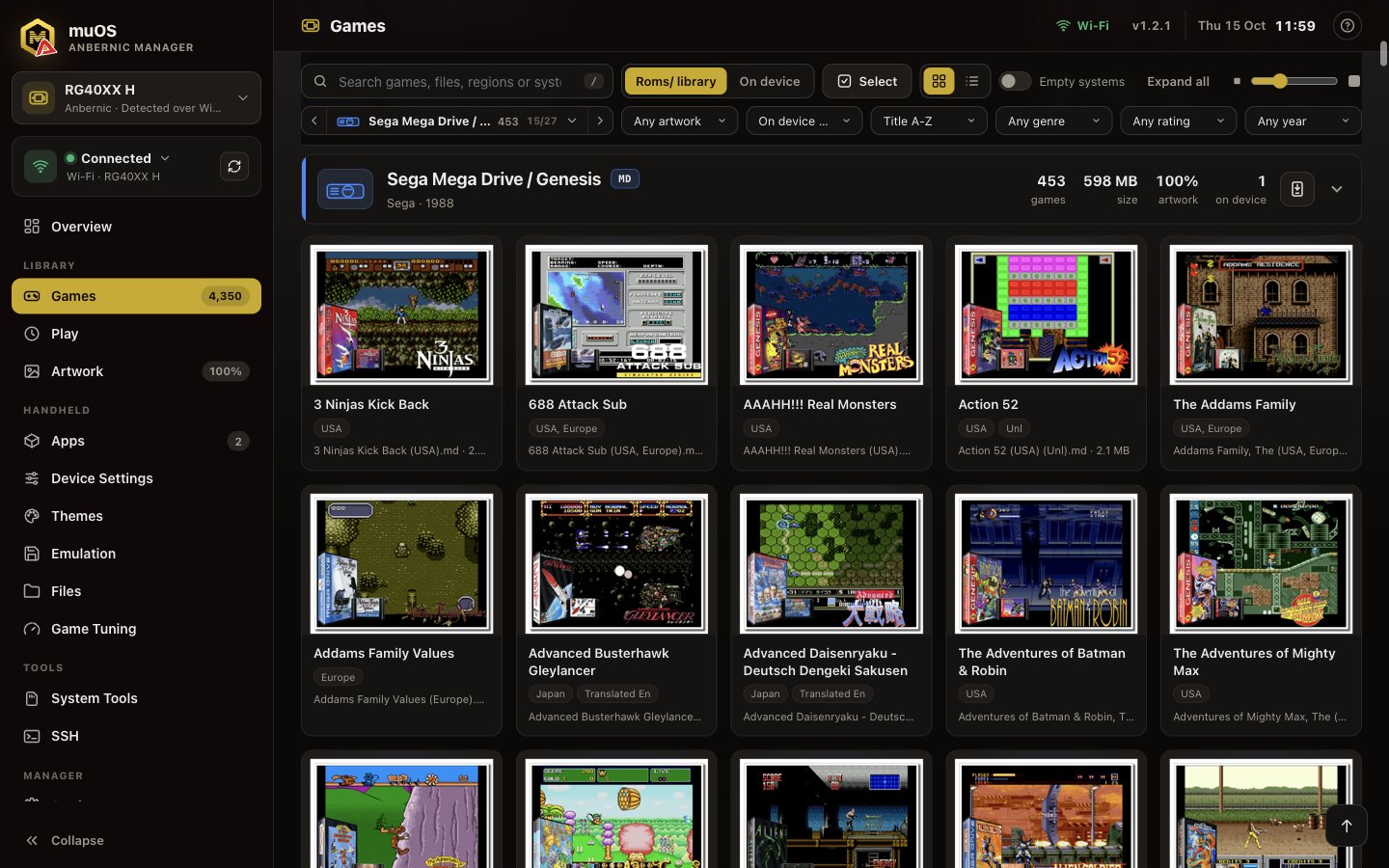
- **Games** : browse your `Roms/` library by system with search and filters, add games by drag and drop, see what is on the handheld and what is missing, and copy games over.
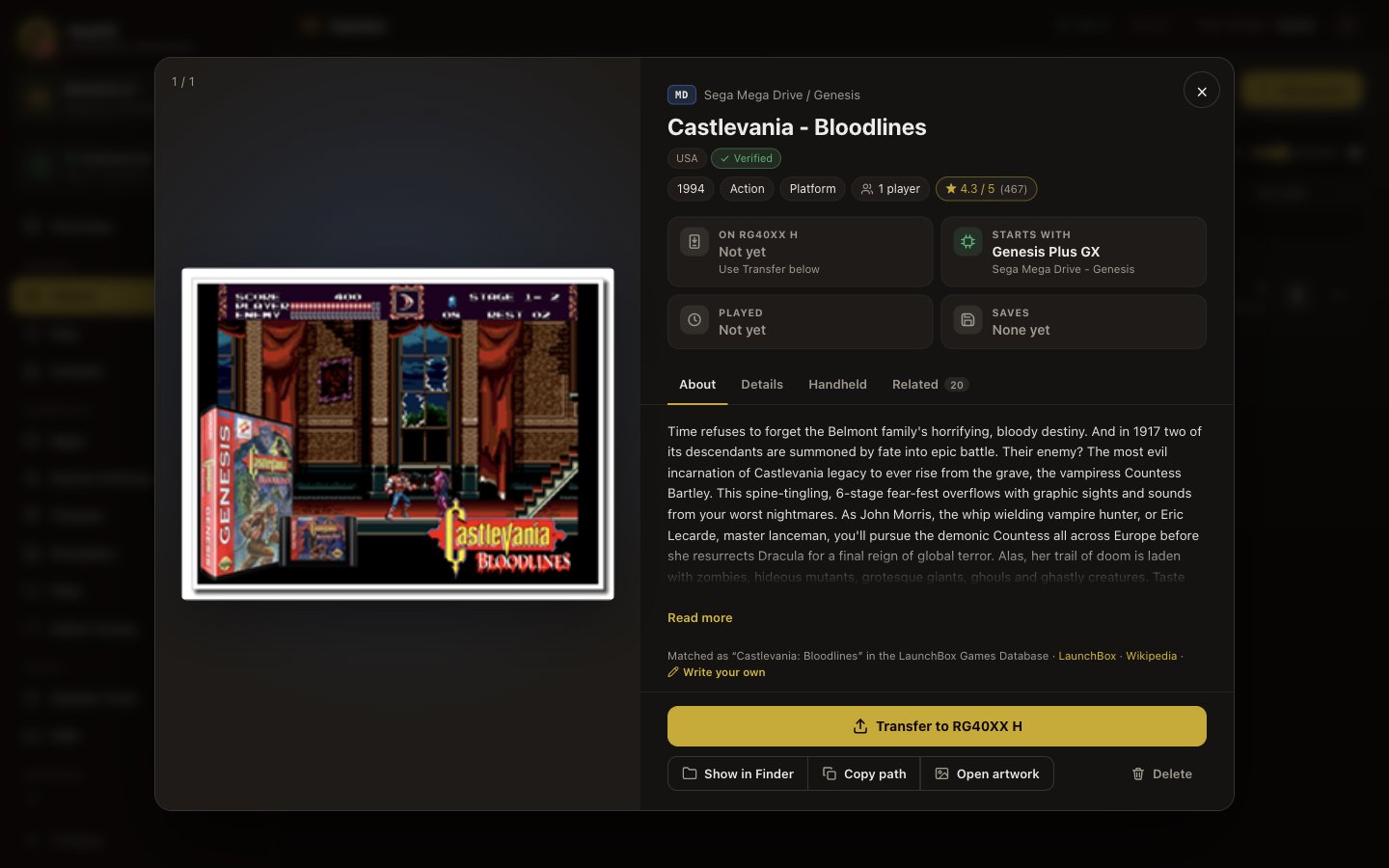
- **Game view** : box art, description and video for each game, a library check (verified / bad dump), missing BIOS. With the handheld connected it also shows the core the game starts with, play time and saves.
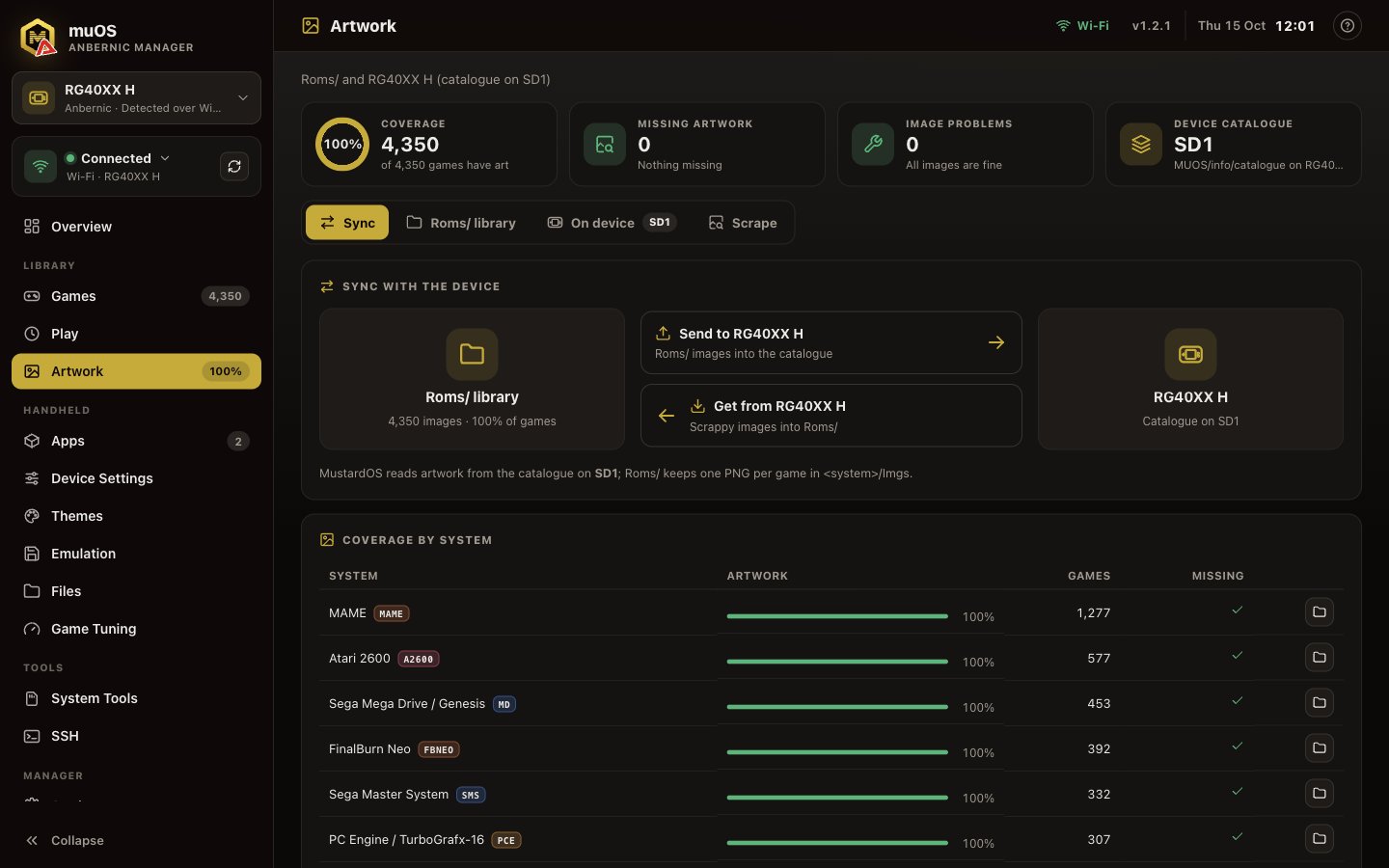
- **Artwork** : fetches box art, screenshots and descriptions (libretro thumbnails, LaunchBox), sized for your screen, and syncs them to the handheld.
- **Play** : play time, recently played games and collections.
- **ScummVM and ports** : free ScummVM adventures with one-click download, and the PortMaster catalogue with install over Wi-Fi.
**Handheld**
- **Apps** : an app market of popular muOS apps (it picks the package that fits your device), plus `.muxapp` / `.muxupd` installs.
- **Device Settings** : change muOS settings (display, audio, network, interface…) from the computer.
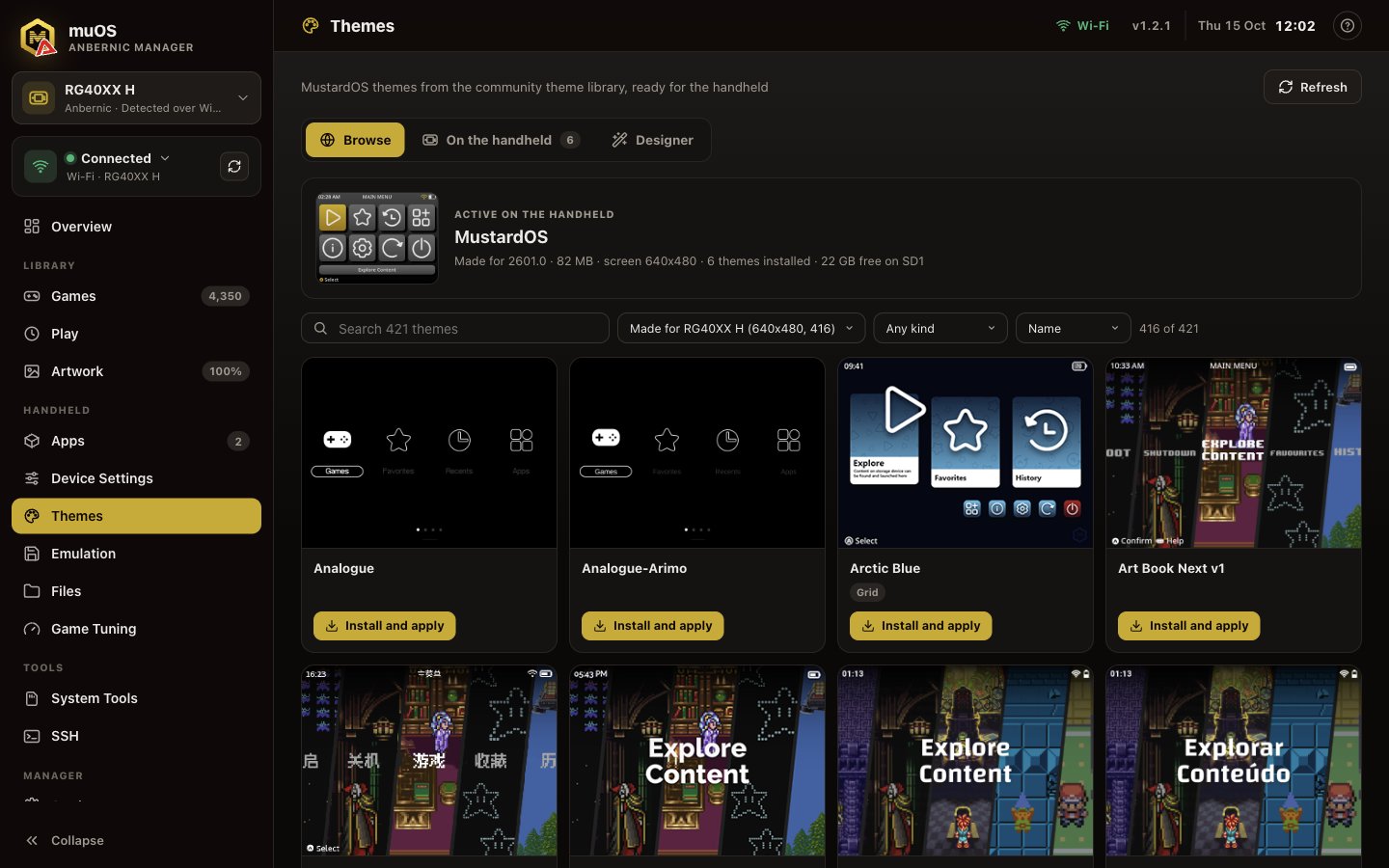
- **Themes** : the community theme library filtered for your screen, with previews, install and apply.
- **Emulation** : back up and restore saves, check BIOS files, choose cores per system or per game, edit RetroArch options.
- **Game Tuning** : per-game emulator settings for heavy games (PPSSPP, Mupen64Plus-Next, PCSX-ReARMed, SwanStation, DuckStation, Flycast) and a per-game CPU governor, with simple presets.
- **Files** : your computer and the handheld side by side.
**Tools**
- **System Tools** : install muOS on an SD card, set up a TF2 games card with every system folder, or wipe a card.
- **SSH** terminal in the browser, a built-in **wiki** , and one-click updates of the manager itself.
## A few honest notes
- I have only tested it on my **RG40XX H**. It knows about the other Anbernic H700 models and the TrimUI Brick / Smart Pro (screen sizes, card slots, Wi-Fi), but I could not try them myself, so reports from other devices are very welcome.
- Everything runs locally on your computer. Nothing is uploaded anywhere.
- Anything that changes the handheld or erases a card asks first. Deleting on the computer goes to the Trash, but deleting on the handheld is permanent (the manager tells you before it does it). Please back up your saves before experimenting.
- Wi-Fi features need **SFTP + Filebrowser** , and **Secure Shell** for settings, apps and themes (Configuration \> Web Services).
## Getting it
Download and installation instructions are on GitHub:
**[GitHub - aaronns87/muos-anbernic-manager: Local web manager for an Anbernic RG40XX H running MustardOS: games, artwork, ports, themes, apps and device settings · GitHub](https://github.com/aaronns87/muos-anbernic-manager)**
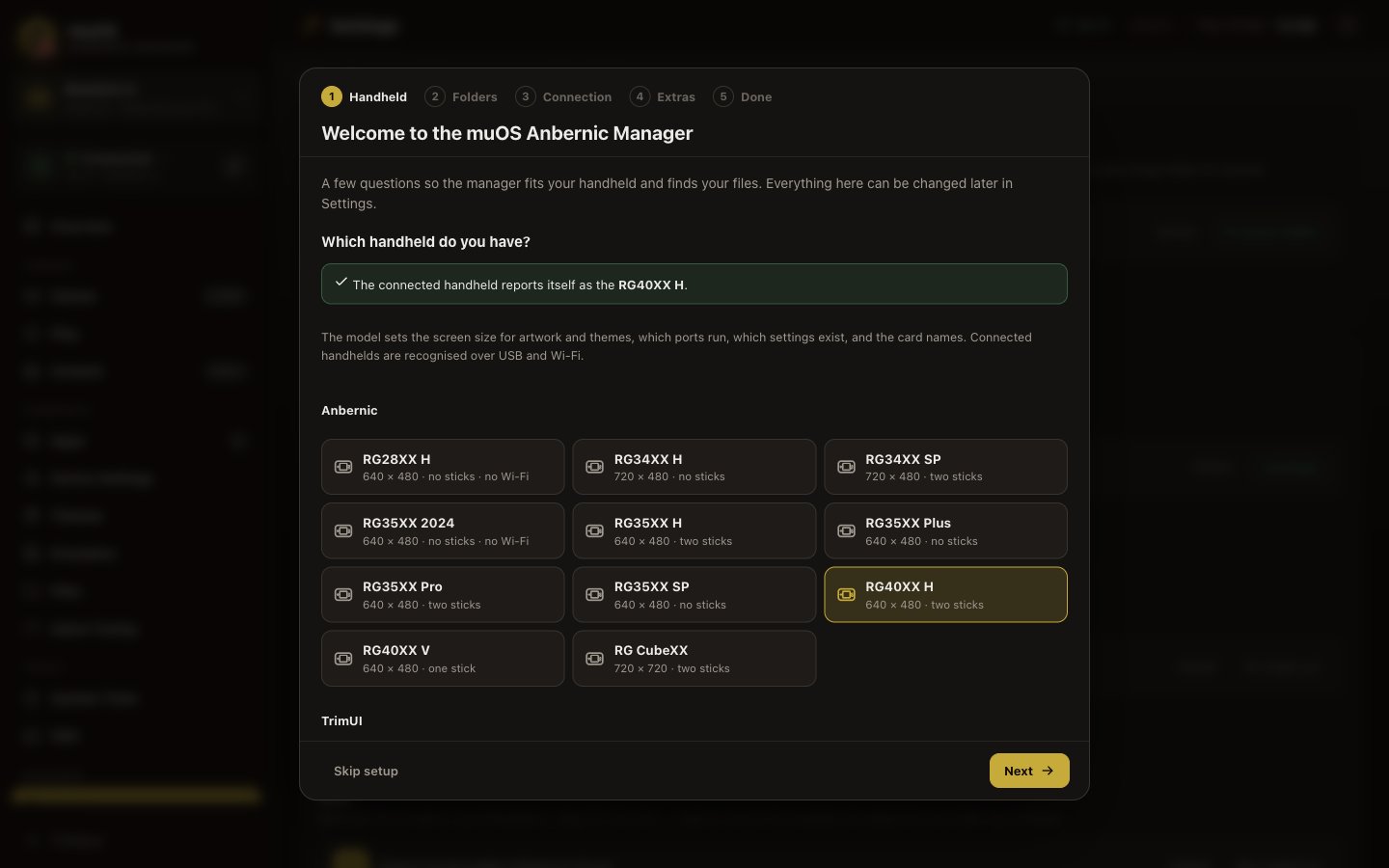
You need Node.js 23.6 or newer (the installer can set it up for you). Then run `installer.sh` (macOS / Linux) or `installer.cmd` (Windows), and a setup wizard asks for your handheld, folders and connection.
## Feedback
My plan is to keep improving it based on my own use and on your feedback. If something breaks, does not fit your device, or you have an idea, reply here or open an issue on GitHub. I would really appreciate it.
Thanks to the muOS team and everyone in this community for the firmware, the themes and all the apps. This project is not affiliated with muOS or Anbernic.
---
### Author:  [@RIMinoru6](https://community.muos.dev/u/RIMinoru6)
#### Post date: [November 8, 2026, 10:32pm UTC](https://community.muos.dev/t/muos-anbernic-manager-manage-your-handheld-from-a-browser-on-your-computer/1835/2 "2026-11-08T22:32:47Z")
Ehy
I was able to try your hub only today and …I’m at a complete loss of words, you did an astounding job building an hub with perfect esthetic (muos style + the way you placed all the many elements and tools on the page…amazing) andevery single tool to interact with the muos device
I launched it connecting my rg35xxh via USB …and bro, was a fuckin dream 😂
It’s clear how much effort you putted into this, amazing
Bro, in Italian we say è na figata fenonenale
Phenomenal!!! And also thank you for including my void desk in the app store hehe
About the store have you developed some index to gather info about muos apps in the forum and GitHub? Or you added them manually?
Also …may I ask you a couple thing about adding new cores ? Wherever you want, even on GitHub in the discussion section (primarily on dolphin-rt-core, where I have a couple of doubts and wanted to ask you)
I’ll use this for sure from today !
Keep up the great work and thank you! Literally the best (by far) PC portal for muos
---
### Author:  [@Aaron](https://community.muos.dev/u/Aaron)
#### Post date: [November 15, 2026, 2:09pm UTC](https://community.muos.dev/t/muos-anbernic-manager-manage-your-handheld-from-a-browser-on-your-computer/1835/3 "2026-11-15T14:09:14Z")
Hi! Sorry for answering 7 days later, my account was on hold and in review for long time, I forgot to check if it has been approved. Finally it is 😃
I am very happy that you liked the app, I hope that it is easy to install and run 😃
Here is the answer on the store question:
There is no forum index. The list is two sources. One is a short list I keep in the app (Void Desk is on that list). The other is the community App Downloader catalogue (`andersmmg/app_downloader`). For each of those repos the hub pulls the latest MustardOS package, release notes, stars and screenshots straight from GitHub. If an app is only a forum thread, it will not appear until it is in one of those two lists.
So pretty much it is a combo of manual maintenance and external catalogue.
On the core question the answer is:
Please feel free to ask here or on GH, I will read them both (sometimes I might be away for some periods of time depending of my work / private life balance of course).
I have pushed new version 1.2.6 now that includes:
Dolphin Rt:Core: Listed in the app market so you can Get / Send / install the `.muxupd` from GitHub. Andromeda packages are recognised for matching. The hub does not ship the `dolphin` binary — after install it still goes in `/opt/muos/share/emulator/dolphin/`.
If you have any suggestions about missing features / good to haves / bugs, or whatever regarding the app, just let me know!
---
### Author:  [@Aaron](https://community.muos.dev/u/Aaron)
#### Post date: [November 23, 2026, 2:53pm UTC](https://community.muos.dev/t/muos-anbernic-manager-manage-your-handheld-from-a-browser-on-your-computer/1835/4 "2026-11-23T14:53:36Z")
## Update — now at **v1.3.2**
Quick catch-up since the last reply (1.2.6 / Dolphin in the app market). A lot landed for **MustardOS Andromeda** , and a few big quality-of-life features on top. Current version: **1.3.2**.
GitHub: [GitHub - aaronns87/muos-anbernic-manager: Local web manager for Anbernic handhelds running MustardOS: games, artwork, ports, themes, apps and device settings · GitHub](https://github.com/aaronns87/muos-anbernic-manager)
Changelog: [https://github.com/aaronns87/muos-anbernic-manager/blob/main/CHANGELOG.md](https://github.com/aaronns87/muos-anbernic-manager/blob/main/CHANGELOG.md)
* * *
### Andromeda & connection (1.3.0 → 1.3.1)
- Full **Andromeda Device Settings** catalogue (Bluetooth, screensavers, passcode, web service ports, fonts, storage toggles, extra cores, HDMI, overlays, etc.) — shown when those config files exist; Jacaranda keeps its shorter list
- Release badge with MustardOS version / codename; **Use handheld ports** syncs SSH/SFTP from the device
- **Andromeda USB (MTP)** path documented in the connection panel (Device Link off → Wi-Fi + SSH → set MTP → unplug/replug)
- Wi-Fi SFTP understands Andromeda **Primary / Secondary Storage** (not only older SD1 / SD2 names)
- USB recognises Andromeda **Device Link** ; changed SSH host key can be trusted from Connection / Terminal / Device Settings after a reinstall
- **Web services** status on Connection + Overview (SSH, SFTP, terminal, Syncthing, landing, mDNS, Tailscale when present)
- Emulation Cores / Systems / RetroArch / Game Tuning on Andromeda use the new manifest paths and ROM mounts
- **`.muxbak`** device backups in ARCHIVE (list, download, create, restore) next to the existing save tar.gz backups on the computer
- Theme Designer: **Andromeda** version target + 720×576 / 1920×1080
- App market: **MustardTube** ; package matching prefers the handheld’s numeric MustardOS version
### Play in the browser (1.3.2)
Play button on game cards and in the game viewer for EmulatorJS-supported systems (GB/GBC/GBA, FC/FDS, SFC, VB, N64, NDS, SMS/GG/MD/32X/CD, Saturn, PCE/CD, WonderSwan, Neo Geo Pocket, Atari 2600/5200/7800, Lynx, C64, VIC-20, PS, PSP).
- Cores from CDN on first use; streamed ROM/BIOS (including large CHD/ISO)
- `.cue` / `.m3u` sidecar tracks; workspace `bios/` for PS / Sega CD / Saturn / PCE CD
- Session keyboard remapping, focus mode, graphical controller layout
- Dreamcast and arcade stay handheld-only
### Games library (1.3.2)
- **Favourites** (star on cards + viewer; stored in this browser)
- **Smart lists** : Never copied, No art, Bad dump, Needs tuning, On device only — with Select shown / transfer / artwork
- **Free & homebrew** catalogue under Games → Add (curated legal ROMs)
- **Update handheld…** plan: scrape missing art, sync artwork, queue copies for games not on the device
- **Since last connect** on Overview: what changed in play totals, saves and library vs device
### Saves, discs & recipes (1.3.2)
- **Save browser** (Emulation → Saves + game viewer Handheld tab): pull / push / delete / prune save states over SSH
- **Multi-disc playlists** : Make playlist… for Disc N sets without a `.m3u` (batch + CHD convert aware)
- **Library recipes** (Settings → Behaviour): chain scrape → copy → rescan with presets and Run now
- **Syncthing** : Open Syncthing when reachable; Wait for idle before large copies / recipes
- **Device profiles** : named Wi-Fi connection sets you can switch without retyping
- **Support pack** from Logs (zip of day logs + VERSION + connection snapshot)
### OS market & System Tools (1.3.0)
- Library **OS** section + **OS market** modal (catalogue releases, host links, Add image helper)
- **Add image to OS folder** into `os/mustardos_/` with hash
- Install MustardOS: remount-safe flash, live write/verify progress, skip-verify option, Are you sure confirmations (no typing disk ids)
- Smaller screens: dismissible nav drawer; connection panel redesigned around Transfer path cards
### Appearance, Logs & Wiki (1.3.0 → 1.3.1)
- Settings **Appearance** : colour schemes (Mustard, Ocean, Forest, Berry, Slate, Ember + custom), Softer style, compact layout, zoom, clock/date
- Workspace **logs/** + **Logs** viewer (search, filter, export); Wiki moved under Overview
- **Hints and tips** carousel after setup / What’s new (toggleable from Behaviour)
### Also since the thread started (already in 1.2.x, if you missed them)
Transfers queue + history · TF2 over Wi-Fi · optional Assistant (BYOK) · PS1 BIOS/CHD/archive Fix wizard · Device Controls + Benchmark · full RetroArch Menu+X core options · Theme Designer · cheats in Game Tuning · multi-connection chip in the top bar
* * *
Update from the manager (it checks GitHub `main`), or pull / re-download from the repo.
Feedback, bugs and “nice to have” ideas are welcome here or on GitHub — happy to hear what you try on other devices too.