# \[Pixie\] Aurora
**URL:** https://community.muos.dev/t/pixie-aurora/68
**Category:** Theme Releases
**Tags:** aurora, theme, pixie
**Created:** [April 6, 2025, 8:57pm UTC](https://community.muos.dev/t/pixie-aurora/68 "2025-04-06T20:57:17Z")
**Posts on this page:** 20
**Page:** 3
### Author:  [@bulkh](https://community.muos.dev/u/bulkh)
#### Post date: [April 26, 2025, 7:21am UTC](https://community.muos.dev/t/pixie-aurora/68/42 "2025-04-26T07:21:21Z")
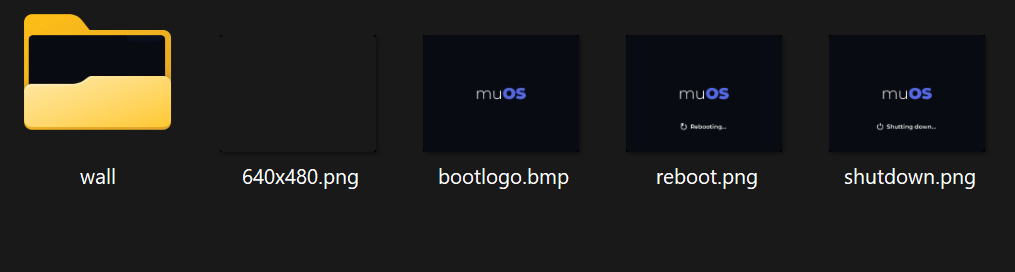
I’ve noticed, that there is no overlay. Checked files and noticed, that it’s name is not right to work
---
### Author:  [@oiimrosabel](https://community.muos.dev/u/oiimrosabel)
#### Post date: [April 26, 2025, 7:34am UTC](https://community.muos.dev/t/pixie-aurora/68/43 "2025-04-26T07:34:29Z")
Yep, I noticed that, it’ll come in the next hotfix. Alongside support for the CubeXX.
---
### Author:  [@Magnaderra](https://community.muos.dev/u/Magnaderra)
#### Post date: [April 26, 2025, 8:54am UTC](https://community.muos.dev/t/pixie-aurora/68/44 "2025-04-26T08:54:52Z")
Could you put it on github too? I usually follow updates on github.
---
### Author:  [@oiimrosabel](https://community.muos.dev/u/oiimrosabel)
#### Post date: [April 26, 2025, 9:08am UTC](https://community.muos.dev/t/pixie-aurora/68/45 "2025-04-26T09:08:02Z")
It’s always on GitHub first, under “Releases”, as adding the theme to the theme repository takes more time.
> **[GitHub - oiimrosabel/Aurora: An elegant and easy on the eyes MuOS theme.](https://github.com/oiimrosabel/Aurora)**
>
> An elegant and easy on the eyes MuOS theme.
---
### Author:  [@DarthMotzkus](https://community.muos.dev/u/DarthMotzkus)
#### Post date: [April 27, 2025, 5:03am UTC](https://community.muos.dev/t/pixie-aurora/68/46 "2025-04-27T05:03:41Z")
Is 720x480 rg34xx next? 😁🙏🏻
---
### Author:  [@rayman1972](https://community.muos.dev/u/rayman1972)
#### Post date: [April 30, 2025, 10:53pm UTC](https://community.muos.dev/t/pixie-aurora/68/47 "2025-04-30T22:53:36Z")
Hi. Just wanted to help out a little so I add 720x480 to the theme by using a python helper called skimage.transform. This is a function that can stretch images in a smart way, without too much distortion. I have tested it on my RG34XX-h and I like it. If you like it, you are free to use the result of course. If not, than I am happy using it on my own RG34XX.
[Aurora.muxthm](https://git.myprivatehosts.org/rayman30/Aurora/raw/branch/main/Aurora.muxthm)
---
### Author:  [@mxdamp](https://community.muos.dev/u/mxdamp)
#### Post date: [May 2, 2025, 8:46am UTC](https://community.muos.dev/t/pixie-aurora/68/48 "2025-05-02T08:46:39Z")
Thanks for planning a custom icon, great work on your themes as always. 🥳
---
### Author:  [@percysfm](https://community.muos.dev/u/percysfm)
#### Post date: [May 2, 2025, 9:21pm UTC](https://community.muos.dev/t/pixie-aurora/68/49 "2025-05-02T21:21:24Z")
Version 3 in Spanish
[https://www.mediafire.com/file/q0g5ogdzhwcqtie/(ES)V3Aurora.muxthm/file](https://www.mediafire.com/file/q0g5ogdzhwcqtie/(ES)V3Aurora.muxthm/file)
---
### Author:  [@xenamta](https://community.muos.dev/u/xenamta)
#### Post date: [May 3, 2025, 9:50am UTC](https://community.muos.dev/t/pixie-aurora/68/50 "2025-05-03T09:50:53Z")
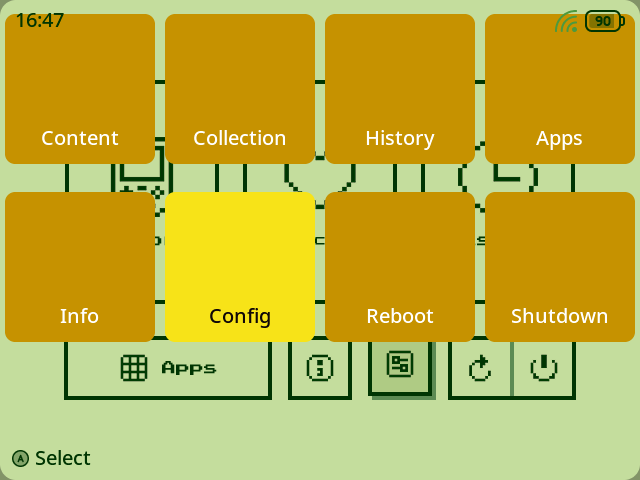
I’m having issue with the alternative themes. The only one working is the default one (Moon). I’m currently using a RG40XX H.
---
### Author:  [@bitter\_bizarro](https://community.muos.dev/u/bitter_bizarro)
#### Post date: [May 3, 2025, 2:03pm UTC](https://community.muos.dev/t/pixie-aurora/68/51 "2025-05-03T14:03:12Z")
You may just need to go to task toolkit and run toggle grid mode for main menu
---
### Author:  [@xenamta](https://community.muos.dev/u/xenamta)
#### Post date: [May 4, 2025, 1:09pm UTC](https://community.muos.dev/t/pixie-aurora/68/52 "2025-05-04T13:09:33Z")
It worked. Thanks for the help.
---
### Author:  [@bitter\_bizarro](https://community.muos.dev/u/bitter_bizarro)
#### Post date: [May 4, 2025, 1:29pm UTC](https://community.muos.dev/t/pixie-aurora/68/53 "2025-05-04T13:29:32Z")
this problem
> [@\[Pixie\] Aurora](https://community.muos.dev/t/pixie-aurora/68/50):
>
> I’m having issue with the alternative themes. The only one working is the default one (Moon). I’m currently using a RG40XX H.
is caused by the fact that you have COLUMN\_COUNT and ROW\_COUNT set in `/640x480/scheme/default.ini` That would turn grid mode on for all screens including the main menu which your theme does not support grid mode on the main menu. It would also enable it for Applications but you’re not including application image so I don’t think you want that either. You’d either want to move those settings out to muxplore.ini or set ROW\_COUNT to 0 in a muxlaunch.ini and muxapp.ini
---
### Author:  [@grandelago](https://community.muos.dev/u/grandelago)
#### Post date: [May 8, 2025, 2:59am UTC](https://community.muos.dev/t/pixie-aurora/68/54 "2025-05-08T02:59:10Z")
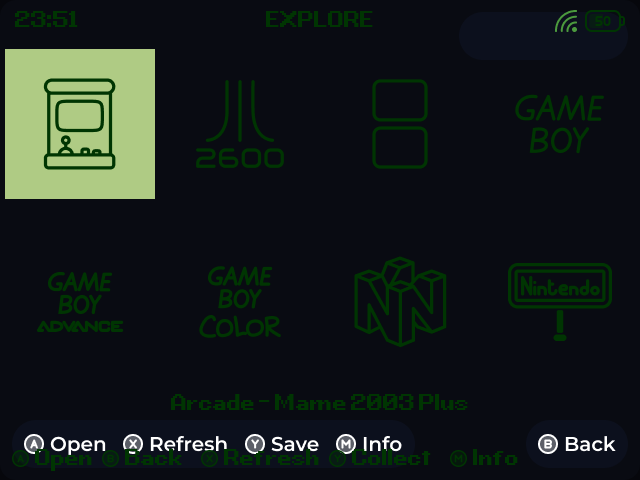
Hi! I had the same problem as xenamta, but after toggle the grid mode for main menu, all other menus are still with this “layer” with different colors. I tried to toggle the grid for the other menus but didn’t work.
---
### Author:  [@AbdullahTrees](https://community.muos.dev/u/AbdullahTrees)
#### Post date: [May 8, 2025, 8:37pm UTC](https://community.muos.dev/t/pixie-aurora/68/55 "2025-05-08T20:37:02Z")
Hi, I need to ask, how did you enable the name of the system/core below the icons in ‘Explore’? In my one the names are missing and that makes it confusing because I intend to gift this to someone who is new to gaming and may not be aware of what the systems are called.
---
### Author:  [@grandelago](https://community.muos.dev/u/grandelago)
#### Post date: [May 8, 2025, 10:15pm UTC](https://community.muos.dev/t/pixie-aurora/68/56 "2025-05-08T22:15:36Z")
I did nothing special. Just downloaded the Aurora.muxthm from the [Github’s release page](https://github.com/oiimrosabel/Aurora/releases/), placed in the themes folder and picked the alternative theme “Retro”. I didn’t setup anything but the grid mode in the main menu.
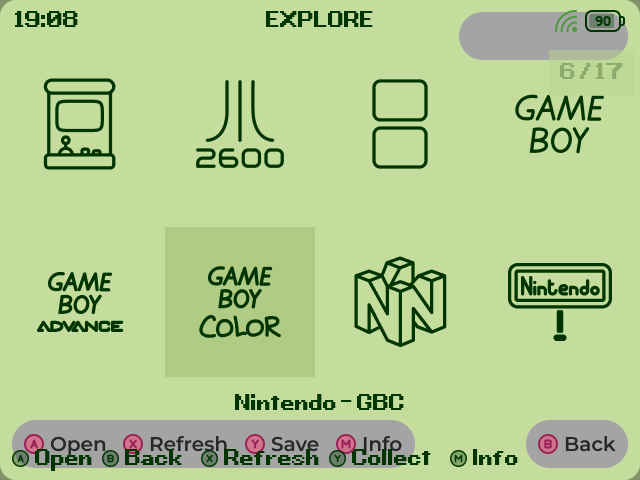
Just realized when doing the steps to remember this that the Retro alternative theme keeps the colors from the previous alternative in the menus.
Example of Retro explore menu after i switched from Blossom theme:
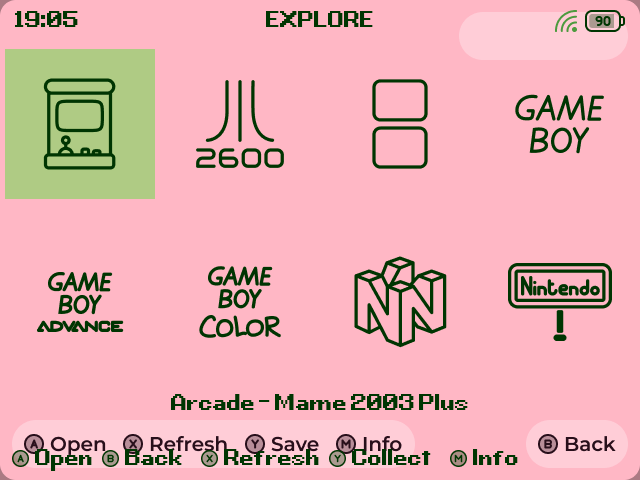
While the Blossom theme itself is fine:

I like the Retro theme main menu icons display so I would like to make it work, and the colors fit better with my RG35XX SP than the OneTwo theme. For now I setted the DMG theme and switched to the Retro and the collors have a good match, there is only the “commands layer” int he screens.
---
### Author:  [@AbdullahTrees](https://community.muos.dev/u/AbdullahTrees)
#### Post date: [May 9, 2025, 7:29pm UTC](https://community.muos.dev/t/pixie-aurora/68/57 "2025-05-09T19:29:39Z")
There’s a bug (or not sure if its a limitation of the system, will be very sad if it is)
The space for the clock is too small so if you have AM/PM enabled, the AM/PM spills out of the shaded region for the clock and icons. A temporary fix for this is to use the moon theme as the clock bg and screen bg have the same color.
Another issue is the name of the game in a system, if too long, should be scrolling, otherwise you can’t really see the name as it becomes obscured by the image/boxart of the game.
---
### Author:  [@mxdamp](https://community.muos.dev/u/mxdamp)
#### Post date: [May 11, 2025, 12:41am UTC](https://community.muos.dev/t/pixie-aurora/68/58 "2025-05-11T00:41:33Z")
The size of the pill shape isn’t configured by muOS, it’s baked into the image being used as the background. It’s perfect when using the 24-hour clock but will look a bit off when using the 12-hour clock.
---
### Author:  [@aquanight](https://community.muos.dev/u/aquanight)
#### Post date: [May 12, 2025, 11:49pm UTC](https://community.muos.dev/t/pixie-aurora/68/59 "2025-05-12T23:49:59Z")
Check the artwork section to fix the gamelist
> **[Artwork](https://muos.dev/help/artwork)**
>
> Custom Firmware (CFW) primarily for handheld devices. Configurable, themeable, friendly, easy-to-use.
---
### Author:  [@rohmygod](https://community.muos.dev/u/rohmygod)
#### Post date: [May 14, 2025, 3:26pm UTC](https://community.muos.dev/t/pixie-aurora/68/60 "2025-05-14T15:26:30Z")
Hello Rosabel, thank you so much for this wonderfully good looking theme. I have been using it for weeks now and everything about it just looks and feels great.
Just one thing I noticed yesterday after updating the theme to the latest version and now can see the icon for Rethemer app is missing. It was present in the earlier version.
---
### Author:  [@rohmygod](https://community.muos.dev/u/rohmygod)
#### Post date: [May 14, 2025, 3:50pm UTC](https://community.muos.dev/t/pixie-aurora/68/61 "2025-05-14T15:50:23Z")
Its the version 2025\_05\_08\_0820
[Previous page](https://community.muos.dev/t/pixie-aurora/68.md?page=2)
[Next page](https://community.muos.dev/t/pixie-aurora/68.md?page=4)