# Rethemer - A recoloring tool for alternate themes
**URL:** https://community.muos.dev/t/rethemer-a-recoloring-tool-for-alternate-themes/140
**Category:** Testing
**Created:** [April 14, 2025, 3:10pm UTC](https://community.muos.dev/t/rethemer-a-recoloring-tool-for-alternate-themes/140 "2025-04-14T15:10:04Z")
**Posts on this page:** 17
**Page:** 1
### Author:  [@photonic2790](https://community.muos.dev/u/photonic2790)
#### Post date: [April 14, 2025, 3:10pm UTC](https://community.muos.dev/t/rethemer-a-recoloring-tool-for-alternate-themes/140/1 "2025-04-14T15:10:05Z")
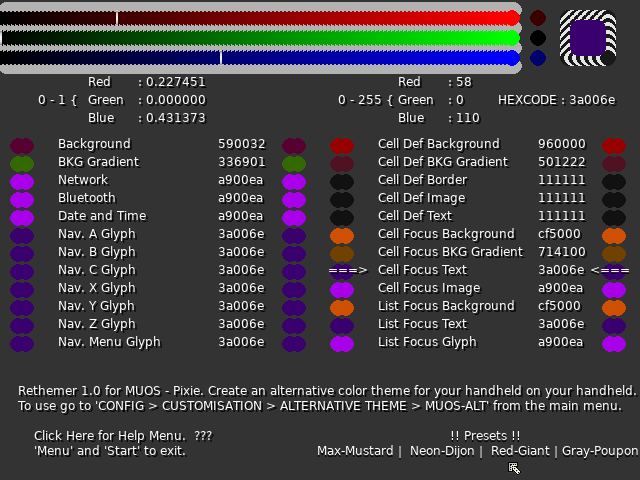
Hi, I whipped up a little app for recoloring themes on MUOS Pixie.
It’s called Rethemer, written in lua, using love2d framework.
[Download rethemer.muxzip | LimeWire](https://limewire.com/d/XE2Ep#NAHyzXwnun) \<\< download link, rethemer.muxzip, use archive manager to install it.
---
### Author:  [@xonglebongle](https://community.muos.dev/u/xonglebongle)
#### Post date: [April 14, 2025, 10:50pm UTC](https://community.muos.dev/t/rethemer-a-recoloring-tool-for-alternate-themes/140/2 "2025-04-14T22:50:33Z")
Wow that’s impressive. What’s more impressive is that limewire is a file sharing thing now!? 😂
---
### Author:  [@photonic2790](https://community.muos.dev/u/photonic2790)
#### Post date: [April 15, 2025, 10:34pm UTC](https://community.muos.dev/t/rethemer-a-recoloring-tool-for-alternate-themes/140/3 "2025-04-15T22:34:28Z")
Yeah, I had to chuckle when limeiwre came up as top results on google file sharing.
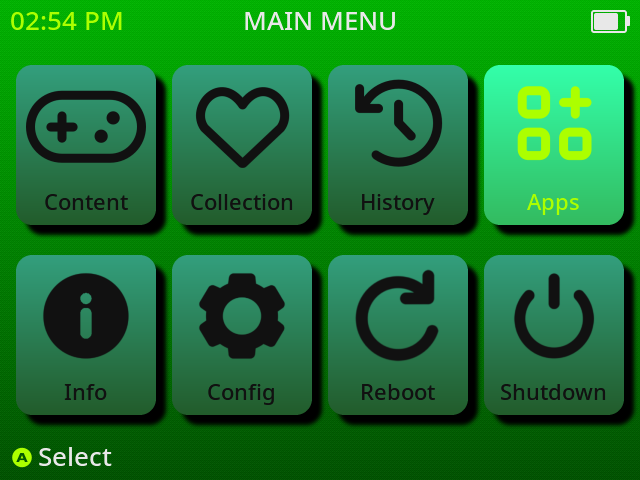
Anyways, I’m glad to hear you like the app. Here’s a picture of yesterdays theme for me, I went green.
---
### Author:  [@mxdamp](https://community.muos.dev/u/mxdamp)
#### Post date: [April 16, 2025, 11:15pm UTC](https://community.muos.dev/t/rethemer-a-recoloring-tool-for-alternate-themes/140/4 "2025-04-16T23:15:20Z")
Cool! How do I access the help menu? On my RG XXCube I can click on the different presets by pressing the right stick, but clicking on the help area doesn’t bring up a menu or additional text. On my RG35XXSP the application does not launch (only some visual bugging in the muOS menu before closing). Both handhelds are running 2502.0 PIXIE (7c4e6a8f).
---
### Author:  [@photonic2790](https://community.muos.dev/u/photonic2790)
#### Post date: [April 20, 2025, 2:20am UTC](https://community.muos.dev/t/rethemer-a-recoloring-tool-for-alternate-themes/140/5 "2025-04-20T02:20:58Z")
> **[GitHub - Photonic2790/Rethemer: Rethemer 1.1 MUOS - Pixie alternative theme...](https://github.com/Photonic2790/Rethemer)**
>
> Rethemer 1.1 MUOS - Pixie alternative theme creator
Thank you for testing other devices. I made quite a few changes to V1.1 and even put it up on github. Hopefully some of your issues resolve, but the SP problems are tricky without being able to debug that personally.
---
### Author:  [@mxdamp](https://community.muos.dev/u/mxdamp)
#### Post date: [April 22, 2025, 5:03am UTC](https://community.muos.dev/t/rethemer-a-recoloring-tool-for-alternate-themes/140/6 "2025-04-22T05:03:11Z")
Can you link to the v1.1? There aren’t any .muxzip files in the repo and the original download link no longer works.
---
### Author:  [@photonic2790](https://community.muos.dev/u/photonic2790)
#### Post date: [April 26, 2025, 6:27pm UTC](https://community.muos.dev/t/rethemer-a-recoloring-tool-for-alternate-themes/140/7 "2025-04-26T18:27:35Z")
> **[Releases · Photonic2790/Rethemer](https://github.com/Photonic2790/Rethemer/releases)**
>
> Rethemer 1.1 MUOS - Pixie alternative theme creator - Photonic2790/Rethemer
I put up a release on github, I just tested it with PIXIE update 2 and it seems to behave nicely if installed either before or after the update.
---
### Author:  [@Pike](https://community.muos.dev/u/Pike)
#### Post date: [April 26, 2025, 9:08pm UTC](https://community.muos.dev/t/rethemer-a-recoloring-tool-for-alternate-themes/140/9 "2025-04-26T21:08:32Z")
How did you install it? I used archive and its not loading the app.
Edit: mine’s also an RG35xxsp
---
### Author:  [@photonic2790](https://community.muos.dev/u/photonic2790)
#### Post date: [April 27, 2025, 12:56am UTC](https://community.muos.dev/t/rethemer-a-recoloring-tool-for-alternate-themes/140/10 "2025-04-27T00:56:20Z")
After choosing Rethemer-1.1.muxzip in Archive Manager the program should show up in your list of applications. I don’t need to reboot or anything here.
---
### Author:  [@Pike](https://community.muos.dev/u/Pike)
#### Post date: [April 27, 2025, 9:35am UTC](https://community.muos.dev/t/rethemer-a-recoloring-tool-for-alternate-themes/140/11 "2025-04-27T09:35:35Z")
Okay, it shows up in the applications now, but when I try to open it, it takes me back to the main page. It won’t open at all. It doesn’t work on the previous or current patch of pixie. What device are you using with Muos? That may have something to do with the issue.
---
### Author:  [@Pike](https://community.muos.dev/u/Pike)
#### Post date: [May 1, 2025, 7:40pm UTC](https://community.muos.dev/t/rethemer-a-recoloring-tool-for-alternate-themes/140/12 "2025-05-01T19:40:55Z")
Okay, now the app works, but the controls won’t let me do anything but move the green bar backwards. The only buttons that work are;
- Menu (sets the bar colors to the color it’s currently on)
- Y ( turns down the green bar)
- START + SELECT ( closes app)
- L/R (sets the red bar to zero)
- X ( lowers the red bar)
- B (lowers the blue bar)
- ( there’s also a cursor trapped in the upper left corner that doesn’t move)
If you have the time, would it be possible to remap the controls?
Suggestions
L2- activate cursor navigation with D-pad
R2- reverse X,Y, and B directions
SELECT- save changes ( there isn’t a download alt page, and no alt-muos theme exists)
And the power button doesn’t make the d-pad an analog stick, it just turns off the screen
---
### Author:  [@photonic2790](https://community.muos.dev/u/photonic2790)
#### Post date: [May 5, 2025, 10:28pm UTC](https://community.muos.dev/t/rethemer-a-recoloring-tool-for-alternate-themes/140/13 "2025-05-05T22:28:43Z")
Thank you for your help, yeah I’ll try to get those changes made soon. I really appreciate the suggestions, I’m on a device with sticks and never would’ve come up with the L2-toggle for mouse on D-pad, my current solution was just to remap it there full time.
Added: Looks like toggling mouse on d-pad is a no go, thats all tied into gptokey and it’s behavior quirks.
I put the new remap files up on github. Both .gptk files and mux\_launch.sh were updated.
[Rethemer/master at master · Photonic2790/Rethemer · GitHub](https://github.com/Photonic2790/Rethemer/tree/master/master) (the bottom 3 files)
---
### Author:  [@rohmygod](https://community.muos.dev/u/rohmygod)
#### Post date: [May 16, 2025, 4:51am UTC](https://community.muos.dev/t/rethemer-a-recoloring-tool-for-alternate-themes/140/14 "2025-05-16T04:51:06Z")
I have one question, earlier when I used using this with a theme that had alternate theme, after selecting a color palatte in Rethemer, it used to automatically show up in the alternate theme option. But now, after changing a couple of themes, I don’t seem to see the alternate option for theme. Could you please advise if I need to save the selected color palatte in the app before exiting to show in the alternative theme option?
Also could you please confirm if it will only show the alternate theme option only if the theme supports it?
---
### Author:  [@photonic2790](https://community.muos.dev/u/photonic2790)
#### Post date: [May 18, 2025, 1:15pm UTC](https://community.muos.dev/t/rethemer-a-recoloring-tool-for-alternate-themes/140/15 "2025-05-18T13:15:45Z")
You’re correct about both of those. Rethemer only works with themes that are set to use the muos alternative theme system. When using Rethemer with custom themes you will need to first select the custom theme, then follow the normal process in Rethemer (I’ve only tested custom alt themes with Aurora, that theme allowed new glyphs and time colors, plus some backgrounds and text iirc)
---
### Author:  [@rohmygod](https://community.muos.dev/u/rohmygod)
#### Post date: [May 18, 2025, 3:45pm UTC](https://community.muos.dev/t/rethemer-a-recoloring-tool-for-alternate-themes/140/16 "2025-05-18T15:45:59Z")
Thank you for confirming! Love the app and the idea behind it!
It’s always a great thing when you can customize stuff as you like, especially when the options are limitless 😀
---
### Author:  [@fatcatming](https://community.muos.dev/u/fatcatming)
#### Post date: [July 24, 2025, 3:52am UTC](https://community.muos.dev/t/rethemer-a-recoloring-tool-for-alternate-themes/140/17 "2025-07-24T03:52:39Z")
how to use this without stick? (rg35xxsp)
---
### Author:  [@teamofwinter](https://community.muos.dev/u/teamofwinter)
#### Post date: [December 31, 2025, 9:47pm UTC](https://community.muos.dev/t/rethemer-a-recoloring-tool-for-alternate-themes/140/18 "2025-12-31T21:47:01Z")
can you update it to work with goose build please