Hi,
I tried to migrate my save states to pickles, but it somehow only did the trick for the .srm files. The Core is assigned in MuOS, but the config files says otherwise…
Here is my rom folder:
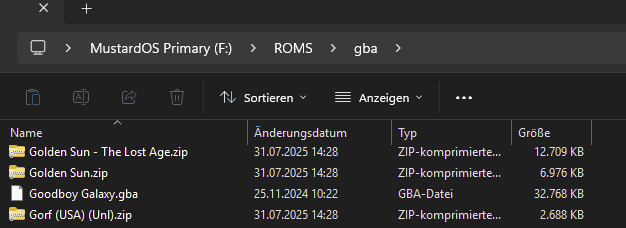
here is an excerpt from the log:
SKIPPED no matching assigned content: mGBA/Golden Sun - The Lost Age.state1
SKIPPED no matching assigned content: mGBA/Golden Sun - The Lost Age.state2
SKIPPED no matching assigned content: mGBA/Golden Sun - The Lost Age.state3
SKIPPED no matching assigned content: mGBA/Golden Sun - The Lost Age.state4
SKIPPED no matching assigned content: mGBA/Golden Sun - The Lost Age.state5
SKIPPED no matching assigned content: mGBA/Golden Sun - The Lost Age.state6
SKIPPED no matching assigned content: mGBA/Golden Sun - The Lost Age.state7
SKIPPED no matching assigned content: mGBA/Golden Sun - The Lost Age.state8
SKIPPED no matching assigned content: mGBA/Golden Sun - The Lost Age.state9
SKIPPED no matching assigned content: mGBA/Golden Sun - The Lost Age.state10
SKIPPED no matching assigned content: mGBA/Goodboy Galaxy.state.auto