# Save state Migration not working
**URL:** https://community.muos.dev/t/save-state-migration-not-working/1734
**Category:** 2606 Andromeda
**Tags:** other
**Created:** [October 26, 2026, 8:35am UTC](https://community.muos.dev/t/save-state-migration-not-working/1734 "2026-10-26T08:35:13Z")
**Posts on this page:** 3
**Page:** 1
### Author:  [@raiod](https://community.muos.dev/u/raiod)
#### Post date: [October 26, 2026, 8:35am UTC](https://community.muos.dev/t/save-state-migration-not-working/1734/1 "2026-10-26T08:35:14Z")
Hi,
I tried to migrate my save states to pickles, but it somehow only did the trick for the .srm files. The Core is assigned in MuOS, but the config files says otherwise…
Here is my rom folder:
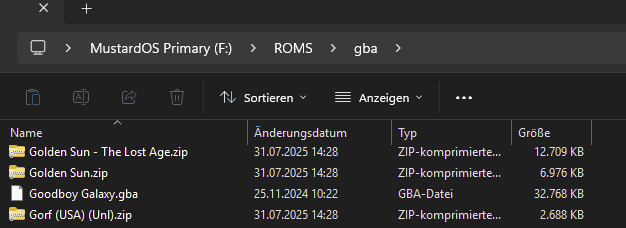
here is an excerpt from the log:
SKIPPED no matching assigned content: mGBA/Golden Sun - The Lost Age.state1
SKIPPED no matching assigned content: mGBA/Golden Sun - The Lost Age.state2
SKIPPED no matching assigned content: mGBA/Golden Sun - The Lost Age.state3
SKIPPED no matching assigned content: mGBA/Golden Sun - The Lost Age.state4
SKIPPED no matching assigned content: mGBA/Golden Sun - The Lost Age.state5
SKIPPED no matching assigned content: mGBA/Golden Sun - The Lost Age.state6
SKIPPED no matching assigned content: mGBA/Golden Sun - The Lost Age.state7
SKIPPED no matching assigned content: mGBA/Golden Sun - The Lost Age.state8
SKIPPED no matching assigned content: mGBA/Golden Sun - The Lost Age.state9
SKIPPED no matching assigned content: mGBA/Golden Sun - The Lost Age.state10
SKIPPED no matching assigned content: mGBA/Goodboy Galaxy.state.auto
---
### Author:  [@bgelmini](https://community.muos.dev/u/bgelmini)
#### Post date: [October 26, 2026, 2:18pm UTC](https://community.muos.dev/t/save-state-migration-not-working/1734/2 "2026-10-26T14:18:51Z")
It is a known issue about the migration script. It is being worked on.
At least for sram, in game saves, if something was not picked by the script, people can just move them manually from
`/muos/save/file/name of core`
to
`/muos/pickles/sram/name of core/path to game`
You can always create a save in pickles to be sure about the path where to put your saves for that game/system!
**One important thing to remember when moving saves:**
If you had previously launched the game, it will have created an auto save state when closing, so after you move your sram save, you need to launch the game by holding the A button until it launches, instead of a single press, that way it bypasses the loading of that auto save state from before the sram save was moved.
Sorry about hijacking your topic to put this info up!
---
### Author:  [@system](https://community.muos.dev/u/system)
#### Post date: [October 28, 2026, 2:26am UTC](https://community.muos.dev/t/save-state-migration-not-working/1734/3 "2026-10-28T02:26:18Z")
This topic was automatically closed 60 minutes after the last reply. New replies are no longer allowed.