No problem  !
!
Thank you for making this app, and for updating it. Tbh, I never thought that redesign would become a real thing.
5 Likes
hehe. All because it’s so beautiful.
I wanted to go home immediately to do it after you shared the figma.
Lmao. I also missed a few points, I will update it.
3 Likes
Love seeing collaboration here – the redesign looks fantastic!
4 Likes

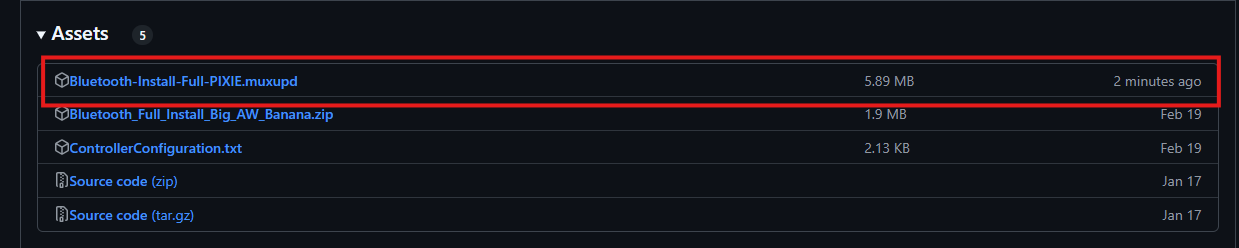
This has probably been asked before but If an app like this one has more work done on it, do users download the muxzip file again and put it into archive to update it?
1 Like
I don’t fully understand the question.
But basically, for the apps I make, users will need to download the file I’ve marked and place it into the archive to install it.
If there’s any additional info, I’ll include a note with each update. 
I believe Egg is asking how updating the application works. For example can you just unzip the latest version and it will work as opposed to deleting the old one and fresh installing.
1 Like
Ahh currently, I’m still packaging it as a first-time installation.
The contents will be extracted and copied into the Bluetooth folder inside the Application directory.
If there’s a lot of overlap between the old and new versions.
I’ll create a .muxupd file and write an update.sh script to delete the old version’s Bluetooth folder, then copy the new version’s Bluetooth content into the Application directory.
4 Likes
Thank you for explaining it better Kirky
3 Likes
Oooooo I see, thank you for getting back to me, I love the app so far and the new UI is wonderful as well
3 Likes
I love how they took a stray bullet out of nowhere 
3 Likes
Any ETA on multiresolution support? My main device is 720x720 and it is kinda hard to read and doesn’t fill the screen. The new UI looks amazing tho!
Ha. I dont have Rgcubexx.
So it’s hard to support 720x720 
installed flawlessly on my SP with the latest pixie patch. The only issue I am having is with PPSSPP not recognizing the d-pad on my SN30 Pro. I tried remapping auto and manually, but no luck. Anyone else run into this?
1 Like
Hmm. Yeah.
I’m tried and same results.
I’ll find a solution.
Another useful pin from the old thread:
For controllers: It seems that in the latest retroarch, the automap feature is automatically enabled, so it’s best to turn it off before doing button mapping.
- To disable automap:
Open Applications → RetroArch → Settings → Input → Auto Config-> Swich Off Then back to Main Menu of RetroArch → Configuration File → Save Current Configuration
- To map button:
Bluetooth App - #3 by nvcuong1312
3 Likes
Thank you @nvcuong1312 for this lovely app and thanks @oiimrosabel for the beautiful interface.
I need some help regarding the setup of controller.
I installed it in my RG40XXV running pixie version of muOS and then connected my xbox controller. Then I tried to setup the controller like you had advised here -
Recommended way to setup external controllers for RetroArch
Recommended way to setup external controllers for RetroArch(so you don’t get stuck without hotkeys):
Open RetroArch through the Applications menu.
Go to Settings>Input>RetroPad Binds>Port 2 Controls (It is important that you leave Port 1 alone for now)
In Device Index select your external controller, if not yet selected, then Set All Controls and configure your controls according to the instructions.
After setting the controls, get back to main RetroArch menu and go to Configuration File and Save Current Configuration. This way RA will remember your controler settings after you shut it down.
Now launch a game in any system you would like to. Open the Quick Menu with Menu+X on your handheld, and go to
Controls>Port 2 Controls and in Mapped Port select 1.
This way your external controller will behave as Controller 1 in game, but if something happens and your controler disconects, you won’t be locked in retroarch and will be able to leave it with the usual hotkeys. (If after doing this you still don’t have controls in game, try changing Port 1 Controls’s Mapped Port to anything else then 1)
Get back to the Controls menu and go to Manage Remap Files and Save Core Remap File, or Save Content Directory Remap File, as you wish. This way this core/directory will remember your choice next time you use it.
(Thank you @bgelmini for putting it all together)
When I connect my controller and go into retroarch, it seems like the dpad is pressed up and the selection just continuously keep going up like this -
This is from within a game but the same happens when I go to Retroarch in applications as well.
Controller seems to work fine when I am not inside retroarch but I do notice that it sometime skips registering a button press without any configuration done within retroarch.
Is there anything wrong I might be doing or need to make any changes to any configuration separately. Please advise.
1 Like
1 Like

2 Likes
Thanks for your work, it’s a really interesting project.
I’m not sure if this is the right place to post issues, but I got an error trying to connect a BT keyboard:
spawn bluetoothctl
Waiting to connect to bluetoothd…
e[0;94m[bluetooth]e[0m# info 33:33:16:0D:87:26
Device 33:33:16:0D:87:26 (public)
Name: Bluetooth_Keyboard
Alias: Bluetooth_Keyboard
Class: 0x00000540 (1344)
Icon: input-keyboard
Paired: no
Bonded: no
Trusted: no
Blocked: no
Connected: no
LegacyPairing: no
UUID: Vendor specific (00000000-deca-fade-deca-deafdecacaff)
e[0;94m[bluetooth]e[0m#
hci0 new_settings: powered bondable ssp br/edr le secure-conn
e[0;94m[bluetooth]e[0m#
Agent registered
e[0;94m[bluetooth]e[0m#
[e[0;93mCHGe[0m] Controller 68:8F:C9:08:AB:A0 Pairable: yes
e[0;94m[bluetooth]e[0m# pair 33:33:16:0D:87:26
Attempting to pair with 33:33:16:0D:87:26
e[0;94m[bluetooth]e[0m#
hci0 33:33:16:0D:87:26 type BR/EDR connect failed (status 0x04, Connect Failed)
e[0;94m[bluetooth]e[0m#
Failed to pair: org.bluez.Error.ConnectionAttemptFailed
e[0;94m[bluetooth]e[0m#
[e[0;91mDELe[0m] Device 33:33:16:0D:87:26 Bluetooth_Keyboard
e[0;94m[bluetooth]e[0m# yes
e[1;39mInvalid command in menu main: yese[0m
e[1;39m
Use “help” for a list of available commands in a menu.
Use “menu ” if you want to enter any submenu.
Use “back” if you want to return to menu main.e[0m
e[0;94m[bluetooth]e[0m# Pairing failed. Exiting.
exit
e[0;94m[bluetooth]e[0m#