would it be possible to hack together a startup script or something that automatically attempts to pair with a saved device? It’d be nice to be able to streamline connecting to my headphones to make it more of a pick up and play experience.
thanks for the awesome app!
2 Likes
hello I am having a problem I’m trying to connect a Xbox controller but it keeps on saying failed send to me /data/connect.txt could I get a way to fix this?
1 Like
Yeah. Im got some report about xbox controller.
But sadly i dont have one. So i cant fix this issue.
Some people report they can connect when scan with 20seconds. Hope this informations will helpful
I had similar issue with my xbox controller, same error message but couldn’t find much details in the logs.
I deleted the app and reinstalled it, and it worked for me. I was able to connect to my controller after that.
1 Like
Haha. it’s hard to find a solution. There are quite a few people who have been able to connect in different ways: updating the controller’s fw, increasing the scan time,… and like yours, uninstalling and reinstalling
1 Like
hey i tried it and it shows the same error. Did you do anything specifically?
Hey I tried both and it still shows the same error why does it say “failed send to me /data/connect.txt” specifically.
Hey there, I don’t think I specifically did anything as far I remember.
One thing I did do was remove all the previous devices before trying to connect my controller.
I think your device does detect the controller but doesn’t connect right?
Not the person you’re responding to, but having exactly that issue. I have an Xbox Series controller, and everytime trying to connect my controller, it detects it, it says it’s connected, but my controller is unresponsive and the light keeps blinking, indicating that the controller itself is not actually considering itself to be connected.
I made sure to update my bluetooth app and I ensured my controller was updated (it was), and I know this controller works because I use it somewhat regularly on my Xbox. I was also successful in connecting it to my computer, and have made sure that the controller is no where near anything it would normally be connected to when trying to connect. Additionally, I made sure to remove all other bluetooth devices from the list within the bluetooth app.
Obvs I know you’re not the developer, and I also know the dev doesn’t have a good way to test Xbox controllers for their development. Plus, it’s free work on their part, so I absolutely can’t and won’t hold them to it or hold it against them. I do think it would be good if there could be a way to test it, though, as Xbox controllers are pretty common to use for stuff like this.
Sorry for the Xbox Controller issue.
I’m also quite annoyed that I can’t solve it completely.
I have 4 controllers in total (ds4, ds5, x2 iine mini) and it’s hard to buy more xbox controllers
I’ve looked around my friends but no one has it. 
hey sorry for late response but yeah it does detect the device but wont connect. I tried two different controllers same result  I even reinstalled it but same result
Love the app, thanks for creating it! 
Some minor suggestions for streamlining the experience with audio devices:
- When connecting to an audio device, automatically switch output to it (this would be the common use case I imagine?).
- Don’t require a confirmation prompt to exit the app (reopening the app is quick & easy, so it doesn’t matter if you accidentally exit?).
Ideally I think connecting headphones would require just three button presses: open app, select headphones, exit app. The current experience isn’t bad by any means, it just feels like a lot of repetition when you’re doing it multiple times a day 
1 Like
Yeah.
- When connecting to an audio device, automatically switch output to it (this would be the common use case I imagine?).
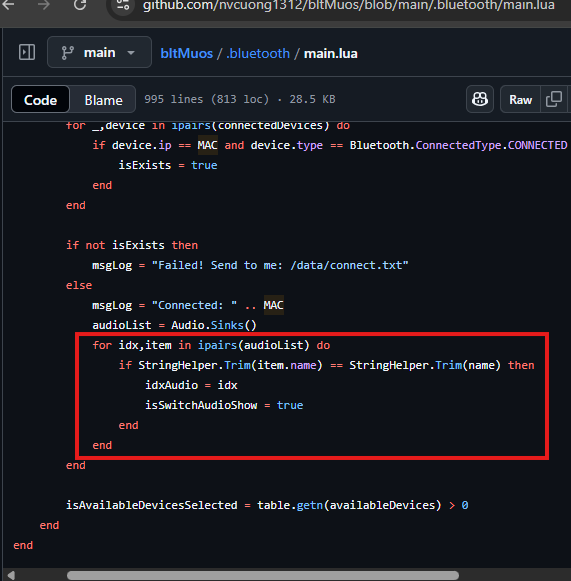
=> It actually already has. It just pops up a confirmation screen asking if you agree to the conversion. If you want it to change automatically instead of pressing confirm, you can easily fix that if you know a little bit about programming.
- Don’t require a confirmation prompt to exit the app (reopening the app is quick & easy, so it doesn’t matter if you accidentally exit?).
=> Since this is my personal preference, I recommend you to change the code yourself. It’s very simple. Haha 
1 Like
Oh yeah, I do remember seeing this now that you mention it! Not sure why but the popup often doesn’t appear for me.
EDIT: I think it might appear when I connect my Bose headphones but not my AirPods? I’ll do some more testing to try and confirm…
1 Like
yeah.
I have a condition for it to show the confirmation screen.
Maybe the device name has something special that it can’t compare to, causing the screen to not show up. 
1 Like
No reason to apologize, I completely get it. If I were to mail one to you (with the promise of receiving it back!) would you be willing to look it over with that controller? I have four, so sparing one for a bit is no biggie.
1 Like
I appreciate your goodwill.
But the shipping cost might be quite high since it has to be sent internationally (two-way shipping could cost as much as an Xbox controller).
I might set up a donation on Ko-fi instead. 
1 Like
Do you mind my asking where you’re located? I might have a reasonable solution, and would like to be of help if possible. Of course, if you’re not comfortable with the idea, that’s completely understandable. I’m located in Florida, USA.
1 Like
Okay yeah fair enough. Thank you for your time and responses though! And great job implementing this bluetooth application.
1 Like