Hiii @faint_petrichor, @d0npian0
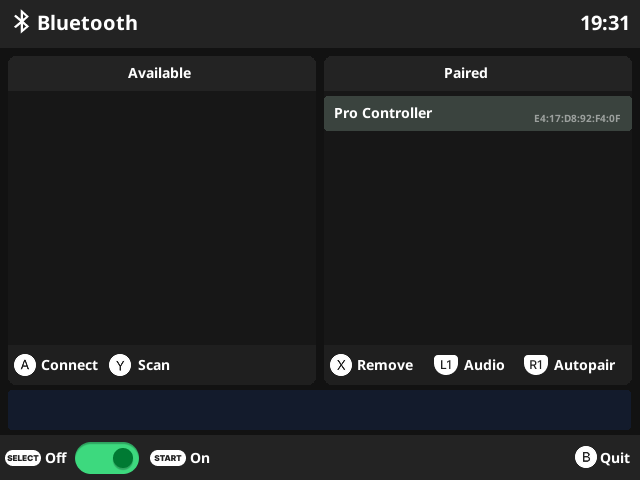
Looking good!
I asked Xongle on discord about simulating the B press, I think the line could be added here but I’m not sure how to specify the B button.
Hi all, I need some help getting this to work please. For context: I am extremely ignorant on this topic, I just recently heard about emulators and how I could play my old childhood games this way and bought an Arnbernic RG40XXH. It came preloaded with MuOS, and to my disappointment I saw it did not support bluetooth, even though the device has the hardware for it. I followed all the steps given for AW Banana and have got the app installed. However, whenever I open it and get to the menu where it says to press START to turn on Bluetooth, after I hit START my device just thinks for about 10 seconds and then gives me the “Bluetooth started failed” message. I tried to turn on Wifi and rebooting as recommended, but everytime I reboot my device it just restarts with Wifi turned off and nothing changes. I tried looking in all the menus I can find if I can toggle wifi on upon startup, but I have not found such a toggle anywhere. Can anyone help me? Please, explain to me like I am 5, I am not a programmer, rather like you would explain it to your grandma 
1 Like
Hi. Maybe your muOS version is older than AW Banana. Try flashing the latest version.
Thanks for your reply. From what I can tell, it is up to date.
I looked around a bit and read some threads on Reddit, and tried flashing a card with Knulli, and got everything to run on there very quickly. For now that means I am all good to go
I think these are just my first steps into emulating though, so I might very well go back to MuOS at some point in the future, and it is good to know that active forums like this one exist. Thanks!
1 Like
Hello I’ve got the lastest version running on Pixie in an 40XXV, when connecting a PS5 controller it works fine within the bluetooth app, all buttons mapped correctly by default but as soon as I exit from the bluetooth app and I’m in the muos UI, nothing works except for the joysticks, I cant press X or O to enter a folder and select a game, or do anything. Is this a known issue?
That’s right.
muOS GUI uses SDL ControllerDB to map buttons for game controllers. However, some controllers are not yet mapped, which leads to incorrect button behavior.
Still, you can use them in games and remap the buttons in the RetroArch Settings.
To be able to remap buttons in RetroArch, please refer to the following link:
Working on solving an issue connecting to a xbox series controller. Bluetooth finds it and connects, shows it even paired. However, on the controller side of things it acts like its still trying to pair. I could be missing something as I am pretty ignorant and new to this whole experience so any advice or guidance would be helpful. Thanks.
1 Like
I don’t have an Xbox controller so it’s hard to fix this problem. I’ve developed an option for connecting to bluetooth:

If it still can’t work, In retroarch there is a bluetooth connection option available. It is hidden by default:
- Main Menu → Settings → UserInterface → Menu Item Visibility → Settings → Show ‘Drivers’ => ON
- Main Menu → Settings, you will see Drivers → Bluetooth → Select bluetoothctl
- Main Menu → Configuration file → Save current config
- Restart retroarch. You will see Bluetooth in Settings. try to scan and connect there.
I connected my 8bitdo SN30 Pro and i don’t see the controller in “device Index” what did i do wrong?
Just did fresh Goose flash and install on 35SP and when i open BT app and try to hit “start” to turn on i get failed to start bluetooth ??
Huh? I dont know why!!
This issue is no longer from Pixie.
Try connect to some wifi network then reboot, open BT again.
loving the bluetooth app. it works great on all my devices. tysm
Anyone with a SN30 Pro have this mapped correctly? I had to fix some stuff in the 8Bitdo SN30 Pro_V045e_P02e0.ini file. My buttons were inverted for A and B and I don’t remember if X or Y wasn’t showing up.
[buttons]
BUTTON_A=1
BUTTON_B=0
BUTTON_X=3
BUTTON_Y=2
The issue I’m having now is my right analog stick doesn’t seem to register correctly in the input tester. My L2 registers as Right analog stick right, and pressing left and right on the right analog stick maps it as up and down on the right stick.
I figured it out, wasn’t the app issue but with MuOS itself. I had to copy a config file I found in there for the 360 controller and used it for the SN30.
2 Likes
Hi, I’ve downloaded the app yesterday for a freshly installed Goose on RG35xxSP and tried to connect an 8bitdo Pro2 (in Xbox mode).
I can pair it, but the controller doesn’t work. After I quit the app and open it again, the controller stays in the “Paired” section, but if I try to connect to it, I get an error.
/data/connect.txt:
Attempting to connect to E4:17:D8:B1:FB:0E
hci0 E4:17:D8:B1:FB:0E type BR/EDR connect failed (status 0x04, Connect Failed)
Failed to connect: org.bluez.Error.Failed br-connection-create-socket
Hi,
Switch to Switchmode and try to connect again.
Hi nvcuong1312
I have a rg35xxPlus and an rg35xxPro. Both have the same issue. Both install fine from archive but when I goto open it in applications, it stalls at “loading application”. eventually MuOS terminates it.
Any Idea what the issue is? Other applications like Scrappy install and run fine.
Thanks!
Hello, As far as I know, in the latest version for Pixie and Goose, I removed some of the command lines to start Bluetooth. So it’s hard for it to hang when you open the app.
Please give me any more information, like the muOS version, what is the name of the BT app you download?