you can also go into Configuration -> Customisation and set Theme Resolution to a different resolution if you want to see what it would look like on another device. It will scale it to fit your devices screen but at least you can get a idea of what it would look like.
1 Like
Thankyou for this. I have added it in scrappy itself add template compatible with fluent theme · saitamasahil/scrappy@2f5f08c · GitHub
1 Like
Fonts look appropriately sized now, thanks! 
1 Like
I’ll work on adding properly sized header and footer glyphs today, as they’re a little bit too small for that font on bigger resolutions
1 Like
I thought I’d mess around with the theme settings myself (just to learn more about the process) and one thing I’m noticing is that it seems there are certain layout values that are hard coded and unchangeable. Notably, the horizontal spacing between each header icon (wifi, battery, etc.) and the vertical spacing between list items when using CONTENT_ITEM_COUNT: 2 pixels.
Now that higher DPI displays are supported, I feel these values may need to be exposed. 2px on the brick’s display is extremely small, making lists look like they aren’t spaced out at all. The same goes for the header icons - they look really close/tight together, though I suppose for those you could bake extra spacing into the images themselves… but that’s not super clean.
Let me know if I’m wrong and there actually is a way to change those values, but from looking at the scheme documentation, I don’t think there is. I also haven’t played with CONTENT_ITEM_HEIGHT so maybe that’s a way to get around the 2px spacing.
I’ve added bigger icons for bigger resolutions and I’ve updated the download links on GitHub
1 Like
First of kudos to your work, this is my favorite theme so far. It’s more versatile than any I’ve used. Problem so far is the clock placement causes overlapping with some system titles. Strangely enough, GBA is included even though in your screen shot there is no overlap (using an RG35XX SP for reference)
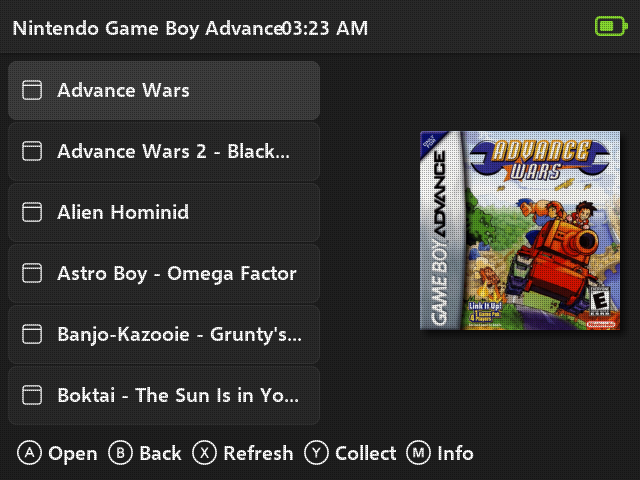
. Do you think you could update the placement perhaps?
You’re using the AM/PM format, that’s why it’s overlapping with the title. The only way I can make it not overlap is by making the font smaller, or moving the clock to the left, but I’m not sure I like the idea.
I’ve updated the downloads on GitHub page. So, essentially, I changed the font size for 480p devices from 20 to 19, which should shave off a couple of pixels without making a drastic change to the looks of the theme
can i added a French language ? need the psd of the font u use…
The font is Selawik Semibold. But you don’t need that, if you want a French translation, just translate this JSON and send it back to me or make a PR to fluent branch of my repo, I’ll then generate the screens for French. French symbols should be already baked in the font.
{
  "charging": "Charging...",
  "menu": {
    "explore": "Content",
    "collections": "Collections",
    "history": "History",
    "applications": "Apps"
  },
  "rebooting": "Restarting",
  "shuttingDown": "Shutting down"
}
1 Like
ok good and thanks !!! and hire the trad
{
  "charging": "Chargement de la batterie...",
  "menu": {
    "explore": "Jeux",
    "collections": "Collections",
    "history": "Historique",
    "applications": "Applications"
  },
  "rebooting": "Redémarrage en cours...",
  "shuttingDown": "Extinction de la console..."
}GitHub release has been updated with French translation.
And oh man, I need to optimize the generation process in my toolkit, as adding one more language really slowed down the export.
1 Like
Thanks again for updating the font and icons! So far this is definitely my favorite muOS theme. With some finagling, I was able to get it looking closer to the 640x480 variant (my personal preference) on the Brick.
A few screenshots here: https://imgur.com/a/SIllYa5
- Moved the clock to the right (in case you want to see what that looks like)
- Added 1px of blank space to both sides of the header icons
- Upscaled the console icons to better fit the brick’s resolution (using AI, not perfect)
- Scraped boxart using the fluent scrappy template with values updated for the Brick
- Adjusted margins/spacing of certain elements to better match the 640x480 version
- Used the list item border feature to simulate additional spacing between list items to get around the 2px v-spacing limitation
Of course this is all just for my personal use, but I’m happy to share anything if you’d like. Kinda makes me want to build my own theme - might have to learn React and make use of your toolkit!
Glad that you made it all work for yourself!
I tried moving the clock to the right, but this won’t work consistently for people using 24-hour vs 12-hour clock, as status icons need to be padded correctly, so I decided to just leave it in the center.
I’ll probably tweak paddings and system icons for bigger versions at some point, but I’ll just leave it be for now, I’m tired of tweaking things and making things work for all of the resolutions at the moment and need to take a break😂
Totally feel that - easy to fatigue on this stuff. Thanks for all your hard work and supporting the Brick!
And yeah, didn’t realize but you’re right about the clock. It won’t work anchored to the right for both variants.
I picked the low-hanging fruit and improved grid icon size (at least a little bit) and font sizes for all the resolutions. So, the latest version from GitHub should be a little bit better than the one before.
Hi! Do you want to share the template for creating the background images? I REALLY like the style of the theme, but I would like to have a purple color option. I really like the purple option in the MuOS default theme, because it goes along so well with my green brick. 
1 Like
There is no template, I just generate those images using my toolkit. I can create a purple variant for you, just tell me which shade of purple we’re talking about (RGB would be nice) and I’ll try to make CSS variables work with it, but no promises it will look good
Ah ok.
This is the purple configuration file from the MuOS Grid theme:
[background]
BACKGROUND = 4A0077
BACKGROUND_GRADIENT_COLOR = 2A0044
[footer]
FOOTER_BACKGROUND = 4A0077
[header]
HEADER_BACKGROUND = 4A0077
[help]
HELP_BACKGROUND = 4A0077
[grid]
CELL_FOCUS_BACKGROUND = B005E6
CELL_FOCUS_BACKGROUND_GRADIENT_COLOR = 6A0F99
[list]
LIST_DEFAULT_BACKGROUND = 4A0077
LIST_FOCUS_INDICATOR = 4A0077
LIST_FOCUS_TEXT = 4A0077
LIST_FOCUS_GLYPH_RECOLOUR = 4A0077
[charging]
CHARGER_BACKGROUND = 4A0077
[verbose]
VERBOSE_BOOT_BACKGROUND = 4A0077
[keyboard]
OSK_BACKGROUND = 2A0044
OSK_ITEM_BACKGROUND = 550066
OSK_ITEM_BACKGROUND_FOCUS = 550066
[notification]
MSG_BACKGROUND = 4A0077
MSG_BORDER = B005E6
[bar]
BAR_BACKGROUND = 4A0077
BAR_PROGRESS_BACKGROUND = 6A0F99
[roll]
ROLL_BACKGROUND = 4A0077
ROLL_SELECT_BACKGROUND = 4A0077
[counter]
COUNTER_TEXT = 4A0077