i just installed muos because many people said it is good. I wanted to test, i flashed it on 64gb card.
i installed it but, where to put the roms?
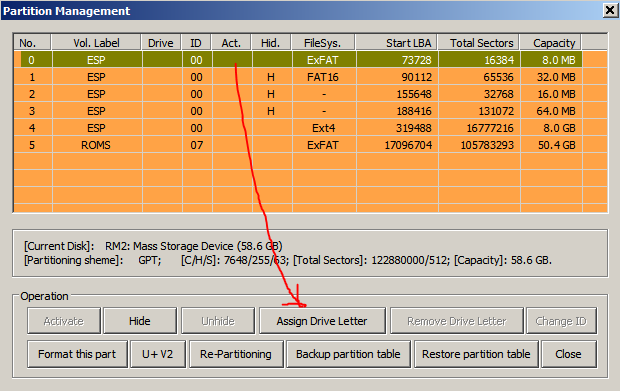
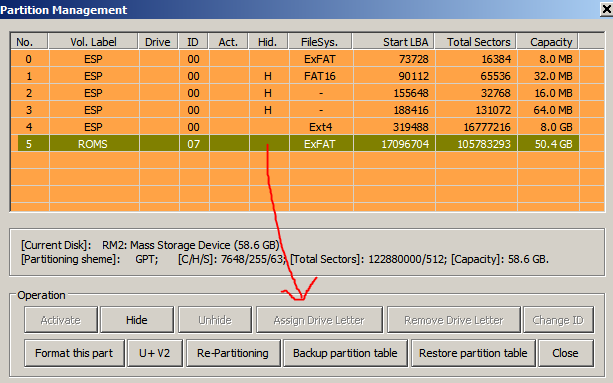
when i insert the card in windows to copy some contents, the card is not displayed. I checked the partitions of the card, one partition can be assigned to a drive letter, but there is nothing inside… i mean, it is a 6Mb partition so i dont think it is the location to put a roms folder…
the other partitions can’t be accessed by windows.
someone carn tell me what’s wrong?
Or maybe the installation card can’t be used to add roms inside?
yes, it is what i explained at the beginning, one partiion only (a 8mb space partition) can be assigned to a drive letter and not this “roms” partitions.
I made a lot of operations like this for several OSes for several devices in the past. but this one doesnt react as it should.
and i tryed for different cards, different flash utilities, different partitions tools. and always the same problem
after the installation completed and shut down, i removed the sd card and inserted it to my pc (win 7).
No drive letter was associated to the card, so i used a partition tool and the parts manager of windows but none of them can assign a drive letter to the roms partition
rufus (old version because new is not compatible with windows 7), win32 disk manager, image usb.
They all give the same result.
but i insist on the windows 7 question, because rasberry pi imager or rufus don’t work on windows 7 so i can only try them with old versions (cant find the rasb pi manager old versions).
but the other tools have not this compatibilies problem so they should work, but its not the case.
Windows 7 is notorious for having trouble dealing with exFAT partitions in many scenarios.
This seems to be one of those.
I would recommend just using MTP to move files via USB or the much better sftp options to move files over wifi. Sftp over wifi is actually faster than MTP, even if on a slow 2.4 ghz connection. Or an even better solution: using a second sd card for roms, if possible.
There’s nothing wrong with muOS nor your flashing software, it’s just a quirk you have to live with while using windows 7.
thanks for the suggestions and explanations.
It is not possible to make this part a fat32 part?^^
its the case with the stock firmware, and it works perfectly even with win7 users^^
Anyway, at the begining i wanted to test muos because i have a 512gb (exfat formated) full of contents and with the stockOS each time that i exit a game it re-index the card content which takes every time 30sec. it is annoying so i wanted to see if this behavior is also present with muos.
I believe it is actually possible, but either way you will need to copy everything out of that partition first(which it seems you can’t), then reformat it as fat32, and then move it back.
Use mtp or sfpt, those are much better solutions.