TL;DR: Kiosk mode only shows a subset of all roms and hides the rest and disabling Kiosk mode makes all roms visible again.
I’m trying to set up my device, so when my four-year-old turns it on, it loads a restricted custom interface. Kiosk mode accomplishes this. I really appreciate how easy it is to turn it off and it will automatically re-enable after a reboot. However, there is one important thing missing. I want him to only see a handful of curated games instead of my entire (not kid friendly) rom collection.
I tried vibe coding something where an initialization of kiosk.sh would trigger something like if [ -f /mnt/MUOS/skip.kiosk.ini ]; then cp /mnt/MUOS/skip.kiosk.ini /opt/MUOS/config/skip.ini
where it would do the reverse and overwrite skip.ini with skip.normal.ini when kiosk mode is turned off. However, my coding skills are inadequate and I keep running into issues. I’m not even sure that changing the skip.ini file would work while booted. Maybe the UI mode can only show games that are tagged as ‘kids games’ while in Kiosk mode?
Perhaps there already is a good solution, if so, I’d love to hear it. Otherwise I hope you think it’s a good suggestion that I hope you will implement one day.
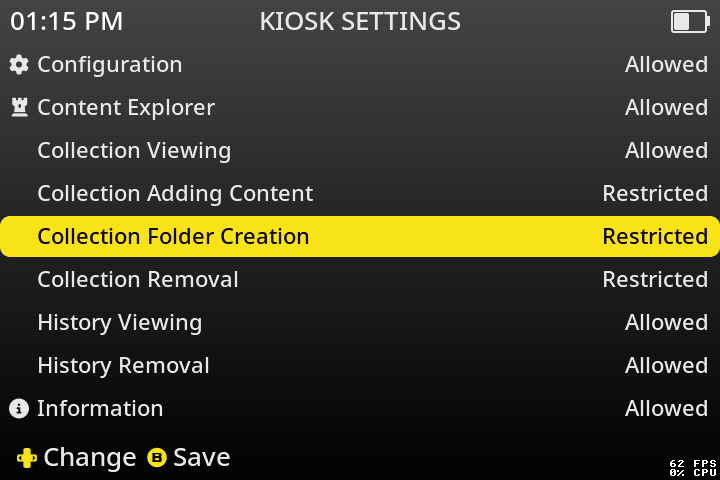
I am actually currently doing a refactor of the kiosk mode for the upcoming Goose release. What this will entail is a way to restrict collection modification, amongst other changes.
The Goose release won’t be too far away. Once released what you would do is add specific content to a collection folder and adjust the kiosk mode settings accordingly.
Thanks for your reply. That sounds like a great feature. Being able to delete a game from a collection while in Kiosk mode was a bit annoying (my kid has pressed ‘X’ instead of ‘A’ a couple of times). Will Goose solve this as well?
If Goose allows Kiosk mode to view just a specific collection, this will probably be the best solution of all. In your screenshot it seems like Kiosk mode lets you view (all) collections or none at all, am I interpreting this correctly? I can make ‘all collections’ work, but fine tuning to allow access to specific collections would be even better (for my specific use case).
Keep up the good work! Impressive how much you have improved my XX devices!
You will be able to create a special folder called kiosk and then in the Kiosk Settings you can set “Collection Access” to restricted which will swap collections to this specific folder.
From here you can add games to a “kiosk” collection list like you normally would with a standard collection. Then once you’re done adding items you can go back into the Kiosk Settings and set the other collection kiosk modifiers (and other settings too) to restricted, set boot mode to collection and you’ve got a somewhat child/friend proof system.
Once the public release is out I’ll be detailing all the new kiosk features, but feel free to reach out when the time comes.
Edit: I should also mention that the kiosk folder will not be visible in the standard collection folder list.
Looking forward to checking out Goose and having both an amazing experience myself and a curated shielded kids experience on the same install. Sounds like the best of both worlds.