Any time I change settings in retroarch, they get reset when I close the app.
I came here today because I just noticed the same thing! It’s super weird because I could swear I made at least one change to my config since I did the update, and yet today nothing is saving! I even toggled the “Retroarch Config Freedom" setting to Off and back On and it’s still the same.
Actually it’s even weirder at least for me - the “Menu Item Visibility"→”Show Menu Sub-Labels" option doesn’t save. “Display Start Screen" also doesn’t save. But another setting, for example the “Appearance"→”Padding Factor", DO save. “Show Core Name” also DOES save….
Okay, I’ve found part of the issue, and this might be some kind of bug? For some reason the ‘menu_show_sublabels = “true”’ entry is getting placed inside /MUX/share/info/config/retroarch.cheevos.cfg which I think makes no sense since that file is supposed to be for retro achievements related settings.
It seems to happen each time I exit retroarch, even if I do NOTHING at all, just open and close. I edit the file, remove that one line from the end, launch RA, and the setting is applied correctly (sub labels off) then I exit RA the cheevos.cfg file is edited to have the ‘show sublabels = true’ line added and when I reopen RA the sub labels are being shown again…
Is there some sequence of actions I can follow to get it to stop doing that?
Oh….this is just what the OS is doing, it’s part of /MUX (internal)/share/application/RetroArch/mux_launch.sh:
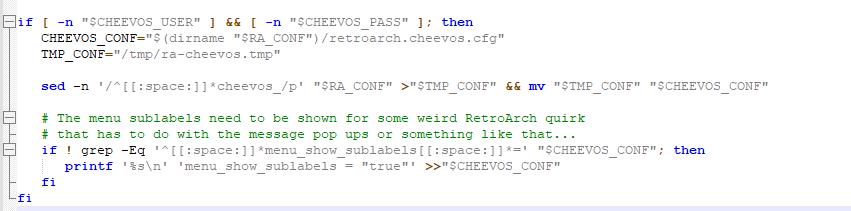
So…is this new to the Loose Goose release? After editing this script there seem to be no issues in using RA with the sub-labels off.
Also I’m sorry to OP, it seems like my issue may have appeared to be similar but perhaps been unrelated.
So I saved the configuration I wanted under a different name. It took a while but I found the folder that includes the default retroarch config and I completely deleted it and then copied over my new configuration and changed its name to be the same as the default config. Replaced the default. And after I closed the app and reopened it. It was back to the original default configuration. The one I deleted.
OMG, I had no idea Retroarch Config Freedom was a setting. That actually completely fixed my issue. Thank you so much!!!
This is explained in a warning dialogue box on the download page - it’s recommended to read through carefully the patch notes and documentation whenever flashing or updating so you’re aware of any major changes.
The recommended way to configure retroarch is by using overrides rather than modifying the retroarch config directly, more info below: