This is for the 2606.0 ANDROMEDA release only!
What is Pickles?
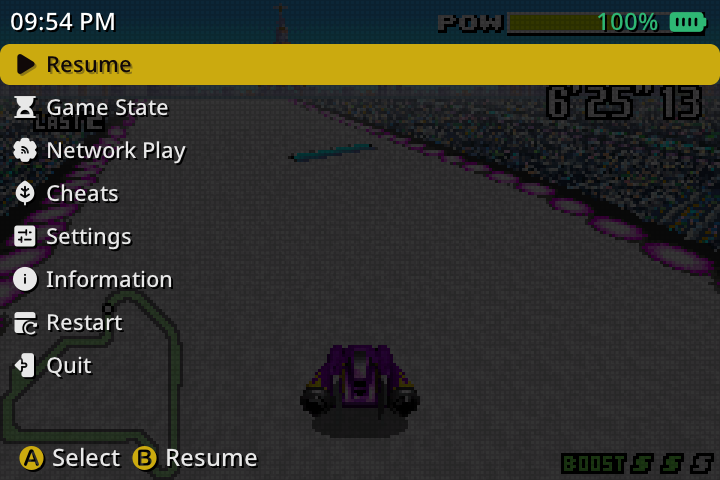
Pickles is a purpose built way to run Libretro cores within MustardOS. It uses your current frontend theme, including its colours, fonts, navigation, and menu styling, rather than sending you into a completely separate interface.
From launching a game to changing its settings, managing saves, or configuring controls, everything feels right at home with Pickles!
Why is it called Pickles?
We already carry a condiment name, and Pickles just works on a burger with Mustard.
Plus they’re delicious!
It also means you can ask whether someone is running “Mustard with Pickles” or “Mustard with RetroArch”, which may be the most important feature of all.
Is Pickles a completely new emulation system?
Not exactly. Pickles and RetroArch both use Libretro cores, which provide the underlying emulation for each console.
Pickles is its own frontend, built specifically for MustardOS. It doesn’t run RetroArch underneath, and it isn’t RetroArch with a few settings hidden. Its video, audio, input, save, menu, and configuration systems are all handled independently.
What makes Pickles stand out?
Pickles is designed around the way people actually use a handheld. You launch a game, make any adjustments you need, and get back to playing without navigating a separate desktop-style frontend or configuration system.
Its pause menu, settings, controls, save states, achievements, cheats, manuals, and multiplayer tools all use the familiar MustardOS interface. Settings are presented in plain language and grouped by what they affect, while contextual help explains less obvious options.
It feels less like opening another application and more like continuing to use MustardOS.
Will games run better with Pickles?
Sometimes, although there isn’t a universal answer for every device, game, and core.
Pickles was built around video, audio, and input pathing with careful frame pacing and relatively little overhead around Libretro cores. This can produce smoother or more responsive results in some situations, but the core still performs most of the actual emulation.
Pickles also provides direct control over frame limiting, frame delay, run ahead (where supported), audio latency, and rate correction. Built-in diagnostics can help identify performance or timing problems without leaving the game.
Our goal with Pickles isn’t to promise magical extra frames. It is to provide a predictable and well integrated experience that is tuned specifically for MustardOS devices!
Why use Pickles instead of RetroArch?
Pickles keeps the parts of emulation most people use and presents them as a coherent part of MustardOS.
You can configure a game, manage its saves, adjust its picture, remap its controls, check achievements, or host a multiplayer session without learning another interface. Settings can be saved at the level that makes sense, and sensible defaults mean you don’t need to configure everything before playing.
Best of all is that there is NO global configuration!
In saying that… RetroArch remains an excellent choice for people who need its enormous feature set, specialised options existing configurations, or broader shader ecosystem. Pickles is for users who value a more focused handheld experience.
Is Pickles replacing RetroArch?
No. RetroArch remains available as an assignable system and core option.
Pickles won’t suit every user or every unusual configuration, and it isn’t intended to remove that choice. You can use Pickles for one system, RetroArch for another, or switch between them whenever required.
Is Pickles intended to match every RetroArch feature?
No. Pickles isn’t trying to become a feature-for-feature copy of RetroArch.
Features are added when they are useful on our devices, can be presented clearly, and fit naturally within MustardOS. This keeps the everyday experience approachable without preventing more advanced users from adjusting performance, timing, input, storage, and display behaviour.
How do Pickles settings work?
Pickles includes sensible packaged defaults, so games are ready to play immediately. Any changes can then be saved for:
- This Content
- This Core
- This Directory
- This Session Only
Settings inherit naturally, allowing you to establish broad preferences and override only what a particular core or game needs. Missing or invalid values safely fall back to known defaults instead of leaving Pickles unable to open its settings.
Core options are also available directly within the Pickles interface.
Pickles picked a pile of profiles!
Pickles includes built in Safe, Balanced, and Quality profiles for quickly choosing an appropriate starting point.
You can also create named profiles containing your preferred settings, compatible core options, and controller mappings. These can be reused without having to repeat the same setup for every game.
If a profile doesn’t suit the game, its changes can be undone without rebuilding your previous configuration by hand. Handy!
How are controls configured?
Controls are configured directly through Pickles. Up to four controller ports can be assigned, with options for core devices, button mapping, analogue sensitivity, deadzones, inversion, rumble, and stick-to-dpad behaviours.
Turbo and input macros are also supported. Macros can combine button presses, holds, waits, repeats, and pauses for games that benefit from more involved sequences.
Reusable Ketchup Layouts can store controller mappings, turbo settings, macros, and controller routing. A secondary controller can even be configured to assist another player where required. More information about “Ketchup” will come over time.
Can Pickles hotkeys be customised?
Yep. MENU button combinations can be assigned for actions such as:
- Fast Forward
- Slow Motion
- Pause
- Quick Save
- Quick Load
- FPS Display
- Header Display
- Manual
- Quit
Fast Forward and Slow Motion can be set to Hold, Press, or Disabled. Their speeds are adjustable, and audio can optionally remain enabled while the playback rate changes gradually, much like a tape recorder speeding up or slowing down.
Hotkey assignments can be reset to their defaults at any time.
How do saves work?
Pickles supports SRAM saves, automatic saves, quick saves, special saves, and named save states with thumbnails.
Timeline saves can be created automatically at a chosen interval, while load history lets you step back if you accidentally load the wrong state. Deleted states are placed into a recoverable trash area instead of immediately disappearing.
Pickles also checks content and core information before loading states, warns about possible incompatibilities, and protects automatic saves from being overwritten unexpectedly.
What display options are available?
Pickles includes scaling modes, aspect ratios, integer and pixel-perfect scaling, rotation, mirroring, viewport positioning, stretching, zooming, cropping, and centring.
Image Corrections provide optional tools for addressing scrolling shimmer and alternating-frame flicker or transparency effects. These are particularly useful for games whose original visual techniques don’t always translate cleanly to modern handheld displays.
Brightness, contrast, saturation, hue, gamma, colour filters, shaders, vignette, and overlays can also be adjusted from the same interface.
Does Pickles support shaders?
Sure does. Colour filters, shaders, and overlays are supported, although none are forced on you by default.
An integrated download catalogue shows which items are not installed, already installed, or have an update available. Downloads are verified before installation, and compatible shaders can expose their own adjustable parameters within Pickles.
Pickles shaders use a different format from RetroArch shaders, so standard RetroArch shader packs cannot be used directly. This allows Pickles shaders to remain tailored to its own rendering system and supported hardware.
Overlays can use built in patterns, catalogue artwork, or assets designed for a particular screen resolution. Their opacity, placement, and cropping can be adjusted as required too.
Does Pickles support multiplayer?
Sure does. Network Play allows supported games to be played across a local network or over the internet. Sessions can be discovered locally or joined by address, with pairing and compatibility checks helping both players establish the correct session.
Game Link is also available for supported link-cable games, including compatible play between separate devices and supported local two-player arrangements.
Multiplayer availability still depends on the capabilities of the selected core and game.
Does Pickles support RetroAchievements?
Yes. Pickles supports achievements, leaderboards, progress tracking, unlock notifications, and achievement browsing while you play.
Temporary connection problems are handled gracefully, with pending activity retried when the service becomes available again.
Pickles currently operates in softcore mode. Hardcore mode is not available because Pickles is not presently a verified RetroAchievements client. Sad!
What other game features are included?
Pickles includes a range of useful features directly within its pause menu:
- Cheats can be added, edited, and toggled while playing. Matching RetroArch cheat files can also be imported where supported.
- IPS, BPS, and UPS patches can be applied without modifying the original game file.
- Disc Control allows discs to be changed for supported multi-disc games.
- Manuals can be opened without leaving the game, with readable text formatting and remembered positions.
- The Information screen provides content, core, renderer, save, BIOS, patch, network, and compatibility details.
- HUD options can show performance, play time, battery information, and the current time.
Holding MENU can also let you sneek peek back at the game from supported menus, making it easier to adjust visual settings without repeatedly closing the interface.
Who is Pickles intended for?
Pickles is for people who want to choose a game, make a few adjustments if needed, and start playing without maintaining a separate frontend and configuration system.
Trust us, once you start using Pickles you’ll find that it is quite nice to use in comparison!
It is easy to approach, but it isn’t limited to basic use. Profiles, scoped settings, advanced timing controls, configurable hotkeys, macros, timeline saves, downloadable visuals, achievements, cheats, patches, and multiplayer are all available when you want them.
If you rely on a specialised RetroArch feature, its established shader collection, or a highly customised existing setup, RetroArch remains available. For everyone else, Pickles offers a focused emulation experience that looks, feels, and behaves like a natural part of MustardOS.