ES-DE has a really cool feature where a directory and a file with the same name appear in the list as one entry, but are interpreted as the file inside the directory when launching.
This allows a folder structure like:
Multi Disc Game.m3u/Multi Disc Game.m3u
Multi Disc Game.m3u/Multi Disc Game (Disc 1).chd
Multi Disc Game.m3u/Multi Disc Game (Disc 2).chd
The file Multi Disc Game.m3u is a playlist with contents:
Multi Disc Game (Disc 1).chd
Multi Disc Game (Disc 2).chd
In the user interface, this appears as one non-folder entry called Multi Disc Game and behaves as if it was a playlist.
This is preferable to having a single directory .hidden with all multi-disc images in it, as you can manage individual game files easier.
It would also be nice to be able to sync my ROM directories between ES-DE and muOS without having to make a workaround for muOS.
just put all 3 files into your game directory and then use skip.ini to hide the .chd files. Then you would only see the .m3u and .cue files. Path to skip ini is /MUOS/info/skip.ini you just need to add a line like *.chd*
That would hide all CHD files, so I wouldn’t be able to see the rest of my games.
My game directory is like:
# single disc game
Final Fantasy Tactics (USA).chd

# multi disc game
Syphon Filter 2 (USA).m3u/Syphon Filter 2 (USA).m3u
Syphon Filter 2 (USA).m3u/Syphon Filter 2 (USA) (Disc 1).chd
Syphon Filter 2 (USA).m3u/Syphon Filter 2 (USA) (Disc 2).chd
I wasn’t sure if .chd files also had .cue files. for your case then .hidden folder is your best bet. We have no plans to add this feature
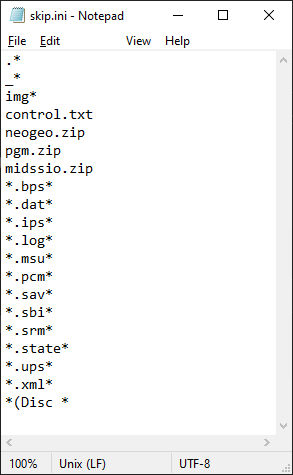
another thing you might try is editing the skip.ini file to exclude files with (Disc in the name instead of excluding .chd
1 Like
Excluding *(Disc * filenames is a cool solution, thank you!
1 Like