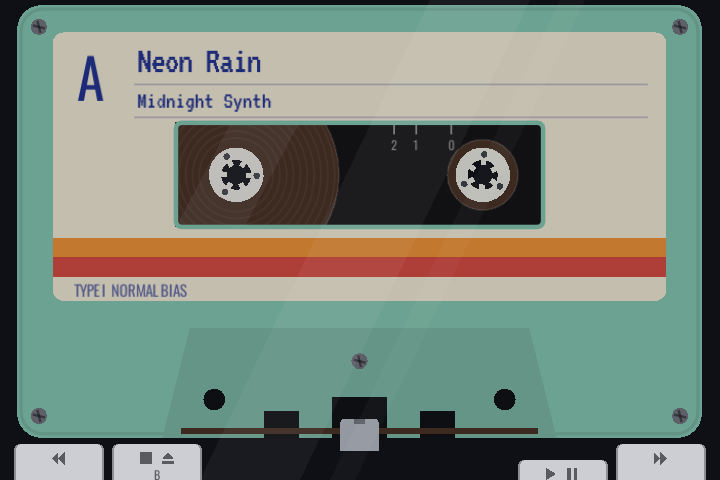
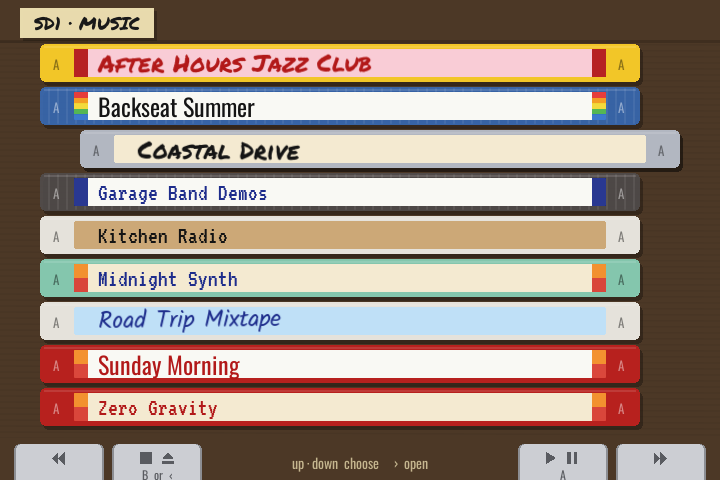
Hi all! I’d like to share Retro Cassette Player, a music player for muOS where your music lives on cassettes. Pick a tape from the box, drop it into the player and watch the reels turn.
How it works
- Every album folder is a tape. The library is a box of cassettes stacked spine-out. Open an album to see its songs as tapes too.
- Every tape looks different. Shell colour, label paper, stripes, handwriting and ink are picked from the album name, and the cassette in the player matches its spine.
- No icons or numbers on screen. You can tell what’s happening the way you would with a real player: keys that stay down, turning reels, how much tape is on each reel, the head against the tape, and minute marks on the cassette window.
- Real tape behaviour: songs sit on one side with short gaps, FF/REW actually wind the tape, a tap on FF/REW finds the next or previous song, and holding them plays the music fast (cue/review).
- Big libraries: the box label shows the letter you’re in and “40 of 87”, and A–Z dividers stand between the tapes.
- Two SD cards show up as SD1 and SD2.
- Pocket mode: the screen goes dark after 30 s without a button press while the music keeps playing. Any button wakes it.
- Kept cool: it only redraws when something moves, and songs load in the background.
- MP3, OGG, FLAC and WAV.
Controls
The four keys on screen sit right above the shoulder buttons:
| Button | Player | Library |
|---|---|---|
| L1 | REW (tap: back a song, hold: review) | Previous letter |
| L2 / B | STOP, press again to eject | Back up a folder |
| R2 / A | PLAY / PAUSE | Put the tape in and play |
| R1 | FF (tap: next song, hold: cue) | Next letter |
D-pad   |
Previous / next song | back, open album |
| D-pad ▲ ▼ | Choose a tape |
Volume is the device’s own volume buttons. Select + Start or Menu quits.
Install
- Download
RetroCassette-0.3.3.muxappfrom the release page. - Copy it to the
ARCHIVEfolder at the top of your SD card and install it with Applications → Archive Manager. - Put your music in a
MUSICfolder at the top of an SD card, one folder per album.
It uses the LÖVE runtime that ships with muOS (from 2048 Plus), so nothing else needs installing.
Tip: switch the device off before taking an SD card out to add music. A card swapped while the device is on isn’t picked up until you restart.
Tested on
- Anbernic RG34XXSP (720×480), muOS 2606 Andromeda
The layout is made for 720×480. Other screen sizes should work with black bars, but I haven’t tried them. Reports from other devices are very welcome, especially whether L2/R2 respond and whether A and B are the right way round.
Feedback & source
Bugs and ideas are welcome here or on GitHub. Free software under GPL-3.0.
Source: GitHub - alesavin/muos-retro-cassette-player · GitHub