rgterm is a minimalist terminal emulator built from scratch for muOS on Anbernic handheld devices.
 Installation
- Download
rgterm.muxzipfrom the GitHub Releases page - Copy it to
/mnt/mmc/ARCHIVE/on your device - Open Applications → Archive Manager and install
- Launch from Applications → rgterm
 Features
- Full VT100/ANSI escape sequence parser
- 256-color and truecolor (24-bit) support
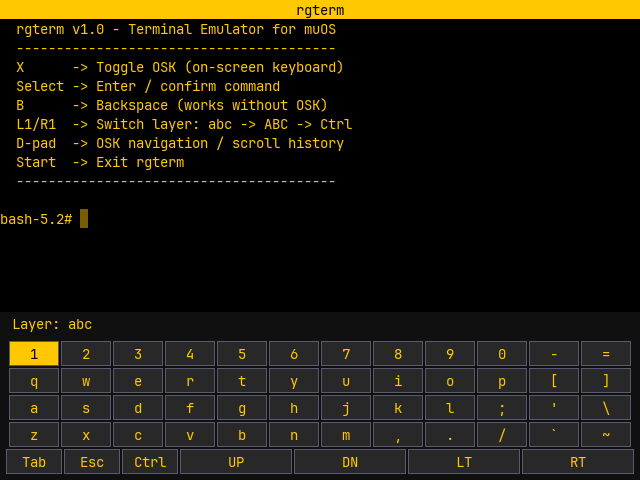
- On-screen keyboard with 3 layers:
abc,ABC,Ctrl - Scrollback buffer (500 lines, configurable)
- Blinking cursor with left/right navigation in shell input
- muOS yellow color theme
- Adaptive FPS (30 active / 5 idle) for battery efficiency
- Configurable via
res/rgterm.ini
 Controls
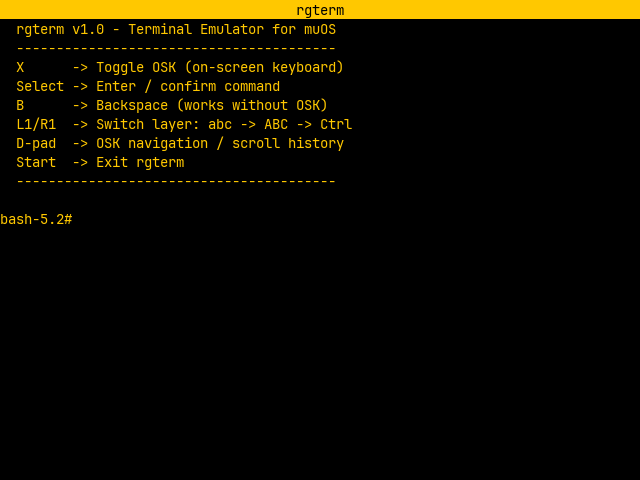
| Button | Action |
|---|---|
X |
Toggle OSK |
Select |
Enter |
B |
Backspace (works without OSK) |
L1 / R1 |
Switch layer: abc → ABC → Ctrl |
D-pad (OSK visible) |
Navigate keys |
D-pad UP/DOWN (OSK hidden) |
Scroll history |
D-pad LEFT/RIGHT (OSK hidden) |
Move cursor in input |
Start |
Exit |
 Links
Links
- GitHub: GitHub - apostolicus/rgterm: Minimalist terminal emulator for muOS on Anbernic handheld devices · GitHub
- Download: Release rgterm v1.0 · apostolicus/rgterm · GitHub
Tested on Anbernic RG35XXSP — muOS 2601.1 Funky Jacaranda
May work on other devices but is untested.
Completely vibe coded using Claude Opus 4.6 and Gemini 3.1 Pro
Feedback and bug reports welcome!


