I recently upgraded to 2508 Goose from Pixie, and I’m aware that the RetroArch settings are locked. My issue is that my saves aren’t being read from SD2. I’m using Content Directory for the saves, and my save files are located in SD2/MUOS/save, but RetroArch isn’t detecting them. I want to transfer my save files from SD2 to the default save location, but I can’t find where it is. What could be the solution?
I encountered the same issue but I realized the files from SD card/Muos/save needs to be moved to root/.config/RetroArch/saves.
I’ve attached a photo for reference
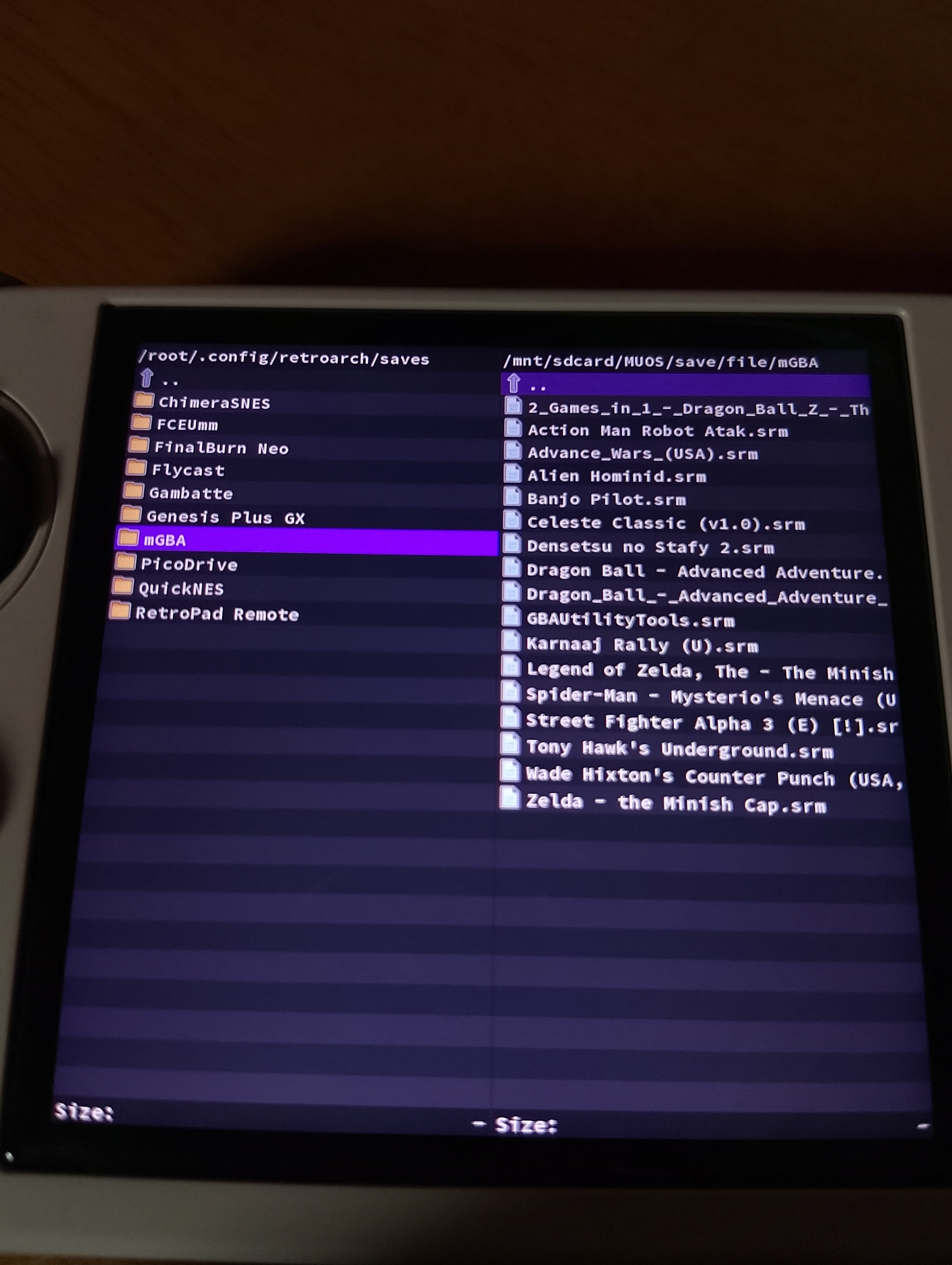
Thanks for the reply! How do I transfer the saves to the root? I tried plugging in my SD1 card in my PC but it is not appearing.
You don’t need to use PC actually, dingux commander is enough. Just open the dingux file manager. Open the files you want to copy or transfer on the left side or whichever you like. For this one you’d like to open saved file from sdcard2 which is sdcard/MUOS/save. And on the right side, open the location you want it to be transferred to. Press the arrow on the top part of the screen and it will show a list of folders, look for the “root“ then click it, you’ll see .config, click it and then on the bottom part there’s “retroarch“ that doesn’t look like a folder, click it and look for “saves“. Mark the folder on the left side of the panel you want to copy and paste it to the right panel.
1 Like
I don’t know how to copy/paste it. I selected all the content directory folders in the left and the only options are Select All, Select None, New Directory, Disk Info and Quit when I pressed Select or Y. is there a shortcut key to copy,paste or delete?
Sorry about that, I forgot to mention that to mark a single file or folder, you need to press the menu key and it will be highlighted to green then press the x button, choose copy/move and it will be automatically moved or pasted to the right panel. You can also just press x if you’re trying to transfer a single item.
1 Like
Thanks! I managed to transfer it and I load a game with my save file it still doesn’t load. I’ve already checked the my retroarch settings and used Content Directory for the save file. Do you think it needs to be default to Core folder instead or Directory?
You can try setting it to retroarchs folder. the root/.config/retroarch/saves so retroarch reads that folder.
I did and it still doesn’t work  I tried to load another game this time without a save. I also did a save state and the weird thing is I can’t locate that save state. Even in root/.config/retroarch/saves
This is complete misleading information. All saves can be stored at the following locations depending if the folder exists or not.
Save States - Please be aware these may not be compatible across versions.
MUOS/save/state
Save Games - Most compatible between versions.
MUOS/save/file
Please ensure you use the storage and backup features that can be found within the Configuration menu.
Just for your information @Lilo2020 unless you have configured your RetroArch configuration incorrectly the structure within /root/.config/retroarch should, and is not, be used as default.
This is not a MustardOS issue rather than an issue with user-fault configuration. I would highly recommend using the Restore RetroArch Configuration of within the Task Toolkit.
1 Like
which path exactly is the MUOS directory? Is it in run/muos/storage/save/file (this is the default from retroarch) from the SD card?
That is an internal bind mount path, ignore that. If you go into Configuration then Storage Options you can scroll down until you seeSave Games + Save States.
If the value states SD1 then it is MUOS/save on the primary mSD card.
If the value states SD2 then it is MUOS/save on the secondary mSD card.
Ok I think it works now and I agree this is a user-fault config.
I believe it has something to do with the Saving setting on my Retroarch just so everyone knows:
Initially I turned on Write Saves to Content Directory, Write Save States to Content Directory. And after I turned it off, it works now.
Thanks again @Lilo2020 and @xonglebongle for the response!
This topic was automatically closed 60 minutes after the last reply. New replies are no longer allowed.