Hi! Noticed one more issue, doing my theme. For some reason now bootlogo on my theme doesn’t appear, it shows standart MustardOS theme bootlogo.
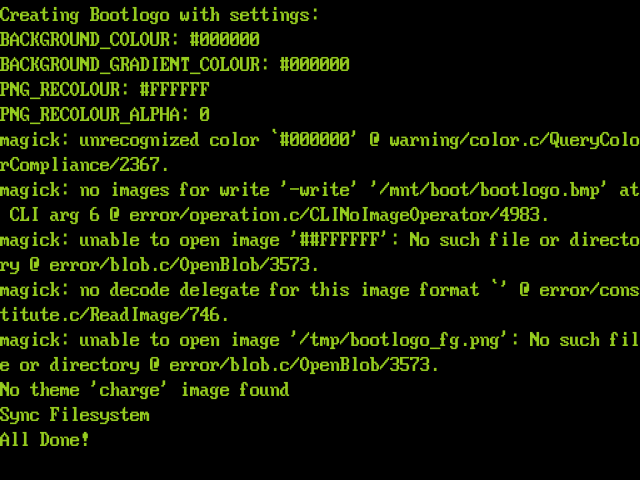
Here’s what is shown when i make refresh bootlogo in task toolkit:
I guess the system is searching for [alternate].ini and [alternate]_bootlogo.json files in alternate folder. But since i use archive files for alternates in my theme, i guess there shouldn’t be any ini or json files in alternate. Or should?
Don’t use a # character against the hex colour code. Please refer to the following alternates for the standard MustardOS theme.
Also just like “CSS” rules we opted to use COLOR not COLOUR but that is due to internal functions that are named color outside of our control. It hurts me, but it is what it is!
I’ve tried adding json file, it helped, thank you!
If i have space in alternate name, should i name it “Dark GamePal_bootlogo.json” or “Dark_GamePal_bootlogo.json”?
Also overlay does not appear on bootlogo, but it works on reboot, shutdown, charging screens. If i want it, i should add it to bootlogo png, right?
But now i noticed one more problem. For some reason in some alternates reboot picture is half transparent. I’ve checked couple times, png files are not half transparent. What could it be?
I test my theme on 2601.1
Can’t upload it because of big size. Theme is available to download here.
No, in SNES GamePal left eye meant to be half transparent. You can compare how it looks on boot screen and on reboot/shutdown/charge, it will be less opaque.
Alphas you listed shouldn’t affect this screens, as correctly remember.
But this properties didn’t do anything reboot/shutdown/charge screens before on goose, pixie etc, only boxart images of content in explore content, collection, history, and also screenshots and theme preview, maybe it’s a bug?