Continuing the discussion from An improved configuration file for MPV (now for one-handed use!):
An improvement over my previous proposed mpv config with a few additional features.
Use R2/L2 seeks to prev/next chapter (good for movies!), hold R1/L1 for one-handed mode.
Use R1+R2 or L1+L2 to navigate in playlists, and press L1+Select or R1+Select to cycle between the available voice tracks.
Save the code below as general.gptk, drop it to /mmc/MUOS/emulator/mpv/ - and presto!
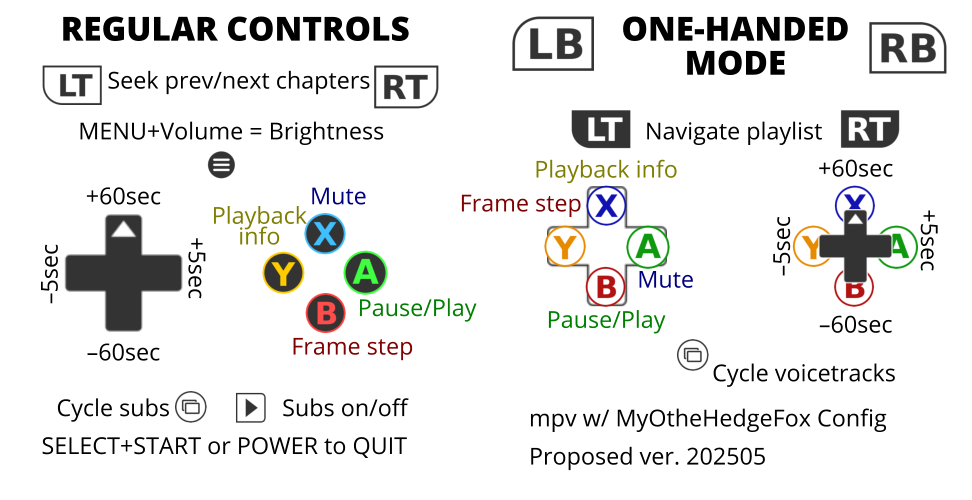
[controls]
overlay = clear
a_hk = esc		# MPV config by MyOtheHedgeFox, ver 202505
	# Now Also Playlists And Chapters edition:
	# hold R1/L1 to use the other half of your controls!
	# R2/L2 seeks to prev/next chapter
	# R1+R2 or L1+L2 to navigate playlists!
	# use Select+Start or Power to exit
	# use volume keys to adj volume
	# use MENU+volume keys to adj brightness
	# drop this to [SD1 aka mmc] /MUOS/emulator/mpv
	# enjoy, vanger

a = p			# pause/play
b = .			# frame step
x = m			# mute sound
y = o			# on screen display (playback info)

up = up			# seek +1min
down = down		# seek -1min
left = left		# seek -5sec
right = right	# seek +5sec

l1 = hold_state flipped		# holding any of these
r1 = hold_state flipped		# enables FLIPPED mode

l2 = pagedown		# seek chapter back
r2 = pageup		# seek chapter fwd

start = v		# subtitle visibility
select = j		# subtitle next

[controls:flipped]
# lets you use the d-pad as a MIRRORED set of ABXY buttons
up = m			# FLIPPED X - mute sound
down = .		# FLIPPED B - frame step
left = p		# FLIPPED A - pause/play
right = o		# FLIPPED Y - on screen display (playback info)

# lets you use the ABXY buttons as a d-pad
a = right		# FLIPPED RIGHT - seek +5sec
b = down		# FLIPPED DOWN - seek -1min
x = up			# FLIPPED UP - seek +1min
y = left		# FLIPPED LEFT - seek -5sec

l2 = <		# L1+L2 - playlist back
r2 = >		# R1+R2 - playlist fwd

select = 3			# voice track next
select = add_shift	#