Same for me. Doesnt open.
Artie v4.0.0 — The Big One 
The biggest Artie update yet. New features, a completely reworked settings system, and a ton of under-the-hood improvements that make everything faster and more reliable.
━━━━━━━━━━━━━━━━━━━━━━━━━━━━━━
 What’s New
 Themes — Dark and light mode, switchable from settings. Your handheld, your vibe.
 Offline Mode — No Wi-Fi? No problem. Browse your entire ROM library and all previously scraped media without touching the network.
 Video Scraping — Artie now downloads gameplay videos (.mp4) straight from ScreenScraper.
 Refine Search — When auto-matching can’t find your ROM, an on-screen keyboard pops up so you can search by name and pick the correct game yourself. No more mystery unmatched ROMs.
 Per-System Batch Selection — Before a batch scrape, pick exactly which systems you want. Skip what you don’t need, scrape what you do.
 Hold-to-Scroll — Hold the D-pad and fly through your lists. Smooth, fast navigation across all screens.
 Full In-App Settings — Log level, region priority (all 7 regions), image mask paths, and more — all configurable without ever touching a config file.
━━━━━━━━━━━━━━━━━━━━━━━━━━━━━━
 Under the Hood
 Zero config files needed — The old config.json is gone. Everything lives in settings.json, fully managed in-app. Existing installs migrate automatically on first launch.
 Rock-solid API handling — Safe dictionary access across the entire scraper layer. No more crashes on weird or incomplete API responses.
 Fixed multi-thread race condition — Batch scraping with multiple threads could previously mix up game IDs, causing videos to download for the wrong ROM. Fixed.
 Better resource management — Images are properly closed after processing, cache keys are deterministic across sessions, and retry logic handles gzip decompression failures gracefully.
 Cleaner codebase — Dead code removed, imports consolidated, constants extracted. Leaner and easier to maintain going forward.
 Updated README — Full documentation rewrite covering every feature, every control, every setting.
━━━━━━━━━━━━━━━━━━━━━━━━━━━━━━
 Full compatibility with all previous Artie installations. Just install the new .muxapp and you’re good to go.
Grab it here: Tags · milouk/artie · GitHub
2 Likes
App isn’t launching on my RG34XX. Tried a fresh install, and still no luck. Just getting “Loading application” and then nothing.
Based on the log.txt file, it looks like the ROMs base path that is set is incorrect:
/mnt/sdcard/ROMS
instead of:
/mnt/mmc/ROMS
At least that’s what it looks like on my end.
i just release v4.0.1 with a hotfix, can you please retry?
Great. It’s an amazing update!
thanks a lot, glad you enjoy it
Yeah, btw i didn’t know muOS supported video preview lol. I will try to add it in scrappy too!
We don’t support video previews. Please see the following.
1 Like
Just tested the hotfix with my RG34XX, and it’s still not launching.
Now it seems to be hanging on the “Loading Application” message altogether. The system freezes and I have to use the ‘Safe-Reboot’ keybind.
Went into settings.json and set my username and password, and manually set threads to 1.
Here’s my log.txt, with mode set to debug, after waiting a few minutes:
requests/__init__.py:86: RequestsDependencyWarning: Unable to find acceptable character detection dependency (chardet or charset_normalizer).
2026-04-08 15:53:11,697 - ArtieScraperLogger - INFO - logger:log_info:191 - Cache manager initialized with cache directory: .cache
2026-04-08 15:53:11,698 - ArtieScraperLogger - INFO - logger:log_info:191 - Artie Scraper v4.0.1 initialized
2026-04-08 15:53:11,698 - ArtieScraperLogger - INFO - logger:log_info:191 - Starting application from: /mnt/mmc/MUOS/application/Artie/.artie
2026-04-08 15:53:11,698 - ArtieScraperLogger - INFO - logger:log_info:191 - Display: 720x480
2026-04-08 15:53:11,699 - ArtieScraperLogger - INFO - logger:log_info:191 - Loaded settings from /mnt/mmc/MUOS/application/Artie/.artie/settings.json
2026-04-08 15:53:11,701 - ArtieScraperLogger - INFO - logger:log_info:191 - ROMs path: /mnt/mmc/ROMS
2026-04-08 15:53:11,701 - ArtieScraperLogger - INFO - logger:log_info:191 - Configuration loaded: user=granville, threads=1, systems=103
2026-04-08 15:53:11,705 - ArtieScraperLogger - INFO - logger:log_info:191 - Image processor initialized
2026-04-08 15:53:11,759 - ArtieScraperLogger - INFO - logger:log_info:191 - Validating API credentials and configuring threads...
2026-04-08 15:53:11,762 - ArtieScraperLogger - INFO - logger:log_info:191 - PERFORMANCE: Initialized optimized HTTP session with connection pooling
2026-04-08 15:53:21,652 - ArtieScraperLogger - INFO - logger:log_info:191 - Found explicit success indicators, skipping error detection
2026-04-08 15:53:21,653 - ArtieScraperLogger - INFO - logger:log_info:191 - API credentials validated - User: Unknown, Level: 10, Max threads: 2
2026-04-08 15:53:21,653 - ArtieScraperLogger - INFO - logger:log_info:191 - Thread configuration: 1 threads
2026-04-08 15:53:21,933 - ArtieScraperLogger - INFO - logger:log_info:191 - Joystick detected: muOS-Keys
2026-04-08 15:53:21,934 - ArtieScraperLogger - INFO - logger:log_info:191 - Attempting to initialize pygame display...
2026-04-08 15:53:22,119 - ArtieScraperLogger - INFO - logger:log_info:191 - Pygame display initialized: 720x480 (internal 640x480)
Summary
This text will be hidden
can you check this version please? (I don’t own a rg34xx so its hard for be to debug. https://drive.google.com/file/d/1hSqXSALYqcbauuLFvOiQfd-oyRD4Qm9n/view?usp=sharing
it should be fixed now with version v4.0.2
Hey, I just installed this app on my rg35xx plus and when i tried to launch it, it stucked on loading application. It’s been 2 minutes now on this screen.
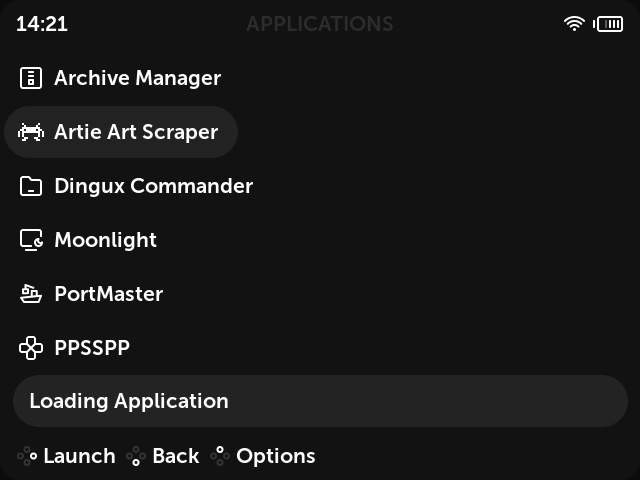
Logs-
requests/init.py:86: RequestsDependencyWarning: Unable to find acceptable character detection dependency (chardet or charset_normalizer).
2026-04-11 14:25:49,973 - ArtieScraperLogger - INFO - logger:log_info:191 - Cache manager initialized with cache directory: .cache
2026-04-11 14:25:49,973 - ArtieScraperLogger - INFO - logger:log_info:191 - Artie Scraper v4.0.2 initialized
2026-04-11 14:25:49,974 - ArtieScraperLogger - INFO - logger:log_info:191 - Starting application from: /mnt/mmc/MUOS/application/Artie/.artie
2026-04-11 14:25:49,974 - ArtieScraperLogger - INFO - logger:log_info:191 - Display: 640x480
2026-04-11 14:25:49,974 - ArtieScraperLogger - INFO - logger:log_info:191 - No settings file found, using defaults
2026-04-11 14:25:49,975 - ArtieScraperLogger - INFO - logger:log_info:191 - ROMs path: /mnt/mmc/ROMS
2026-04-11 14:25:49,976 - ArtieScraperLogger - INFO - logger:log_info:191 - Configuration loaded: user=(none), threads=10, systems=103
2026-04-11 14:25:49,977 - ArtieScraperLogger - INFO - logger:log_info:191 - Image processor initialized
2026-04-11 14:25:50,263 - ArtieScraperLogger - INFO - logger:log_info:191 - Joystick detected: muOS-Keys
2026-04-11 14:25:50,264 - ArtieScraperLogger - INFO - logger:log_info:191 - Attempting to initialize pygame display…
2026-04-11 14:25:50,370 - ArtieScraperLogger - INFO - logger:log_info:191 - Pygame display initialized: 640x480 (internal 640x480)
It also stucked on my RG40XX-H
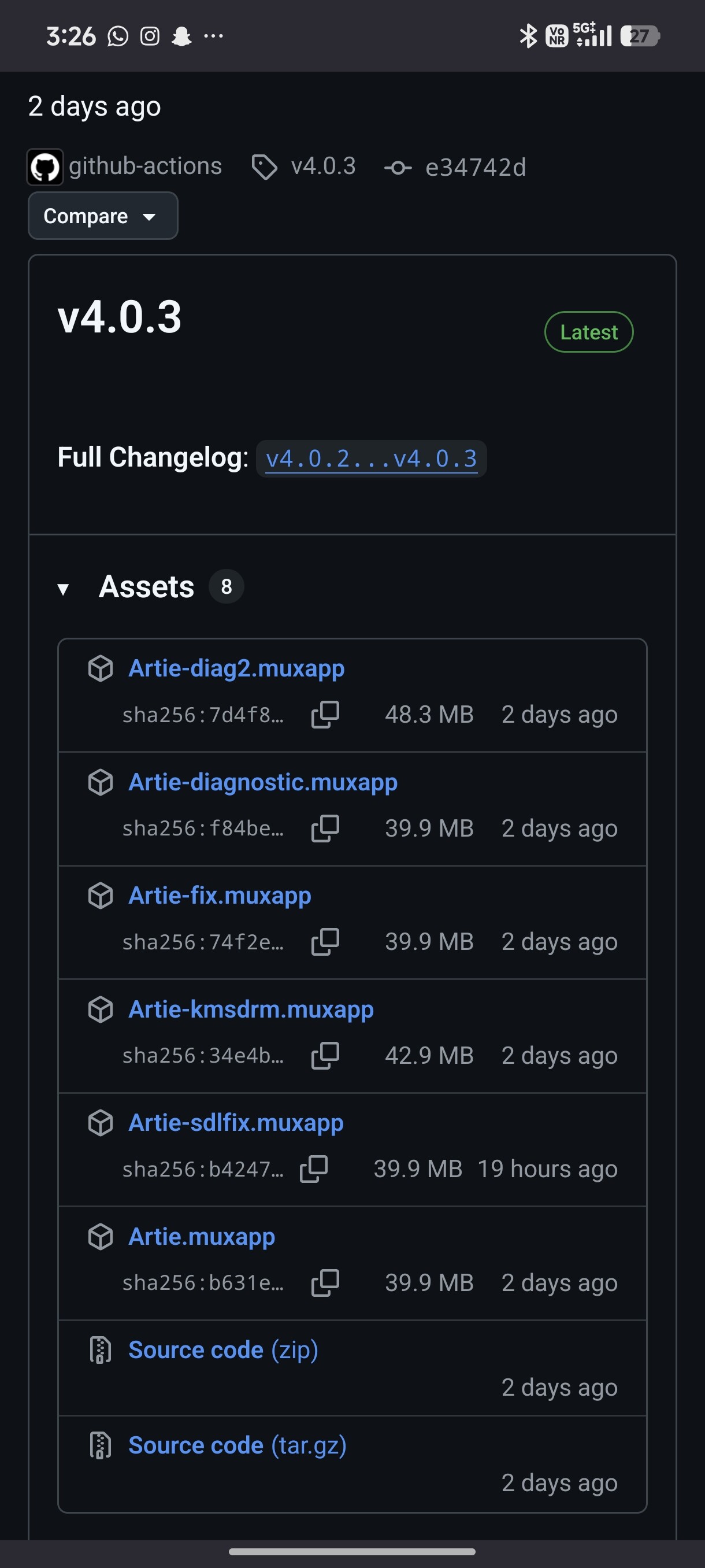
Not working on my RG35XX-SP. It seems to be failing while trying to read ScreenScraper credentials. settings.json also isn’t being created on install so I can’t set my credentials.
Here is the log when I try to open Artie:
requests/__init__.py:86: RequestsDependencyWarning: Unable to find acceptable character detection dependency (chardet or charset_normalizer).
2026-04-13 13:19:28,089 - ArtieScraperLogger - INFO - logger:log_info:191 - Cache manager initialized with cache directory: .cache
2026-04-13 13:19:28,089 - ArtieScraperLogger - INFO - logger:log_info:191 - Artie Scraper v4.0.3 initialized
2026-04-13 13:19:28,089 - ArtieScraperLogger - INFO - logger:log_info:191 - Starting application from: /mnt/mmc/MUOS/application/Artie/.artie
2026-04-13 13:19:28,090 - ArtieScraperLogger - INFO - logger:log_info:191 - Display: 640x480
2026-04-13 13:19:28,090 - ArtieScraperLogger - INFO - logger:log_info:191 - No settings file found, using defaults
2026-04-13 13:19:28,091 - ArtieScraperLogger - INFO - logger:log_info:191 - ROMs path: /mnt/mmc/ROMS
2026-04-13 13:19:28,091 - ArtieScraperLogger - INFO - logger:log_info:191 - Configuration loaded: user=(none), threads=10, systems=103
2026-04-13 13:19:28,092 - ArtieScraperLogger - INFO - logger:log_info:191 - Image processor initialized
2026-04-13 13:19:28,385 - ArtieScraperLogger - INFO - logger:log_info:191 - Joystick detected: muOS-Keys
2026-04-13 13:19:28,386 - ArtieScraperLogger - INFO - logger:log_info:191 - Attempting to initialize pygame display...
2026-04-13 13:19:28,428 - ArtieScraperLogger - INFO - logger:log_info:191 - Pygame display initialized: 640x480 (internal 640x480)
While the app is hanging, if I force close Artie (using menu + start) it prints this error:
[ARTIE] Please configure your ScreenScraper credentials.
Getting the same issue, hanging on “Loading Application”
RG35XX-SP running Jacaranda 2601.0
Wasn’t able to kill the process using either hotkey, so I couldn’t get an error message this time, but here is my log
requests/__init__.py:86: RequestsDependencyWarning: Unable to find acceptable character detection dependency (chardet or charset_normalizer).
2026-04-15 16:15:53,363 - ArtieScraperLogger - INFO - logger:log_info:191 - Cache manager initialized with cache directory: .cache
2026-04-15 16:15:53,364 - ArtieScraperLogger - INFO - logger:log_info:191 - Artie Scraper v4.0.4 initialized
2026-04-15 16:15:53,364 - ArtieScraperLogger - INFO - logger:log_info:191 - Starting application from: /mnt/mmc/MUOS/application/Artie/.artie
2026-04-15 16:15:53,364 - ArtieScraperLogger - INFO - logger:log_info:191 - Display: 640x480
2026-04-15 16:15:53,365 - ArtieScraperLogger - INFO - logger:log_info:191 - No settings file found, using defaults
2026-04-15 16:15:53,366 - ArtieScraperLogger - INFO - logger:log_info:191 - ROMs path: /mnt/mmc/ROMS
2026-04-15 16:15:53,366 - ArtieScraperLogger - INFO - logger:log_info:191 - Configuration loaded: user=(none), threads=10, systems=103
2026-04-15 16:15:53,367 - ArtieScraperLogger - INFO - logger:log_info:191 - Image processor initialized
2026-04-15 16:15:53,652 - ArtieScraperLogger - INFO - logger:log_info:191 - Joystick detected: muOS-Keys
2026-04-15 16:15:53,653 - ArtieScraperLogger - INFO - logger:log_info:191 - Attempting to initialize pygame display...
2026-04-15 16:15:53,695 - ArtieScraperLogger - INFO - logger:log_info:191 - Pygame display initialized: 640x480 (internal 640x480)
Hey, I tried latest version. It’s still same. Stucked on loading application.
i got the same issue on my rg-35xx plus as well