Would love to use this on the TrimUI Brick! Any progress there?
1 Like
I see that this theme supports the TrimUI Smart Pro, but not the TrimUI Brick. I use this theme on my 34sp, and would love to use it on the Brick as well.
Hi! I’ve made screens for TUI Brick in Dark color schemes, so there is some progress. To finish it i need to make another color schemes and languages.
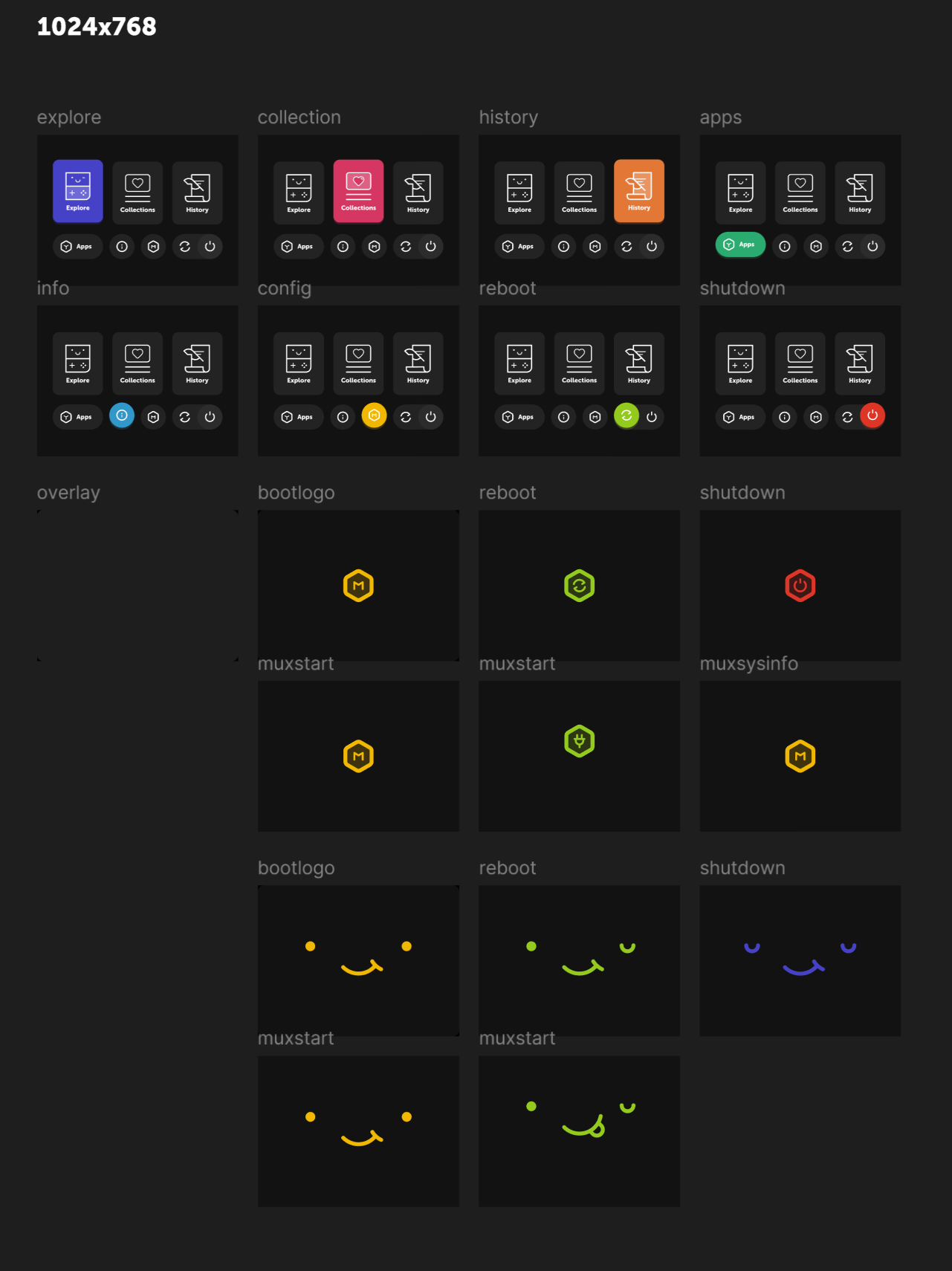
I’ve made 1280x720 resolution in current theme to look good on big TV screen, that’s why it may look too small on TUI Smart Pro. I want to make separate theme files for TUI devices, since they don’t support HDMI output. And it won’t be that big file because of many pictures.
I also need to adapt scheme files to resolutions of TUI devices.
I’ve got a little problem finding free time, got much work to do. But i want to finish the theme and i keep working on it at least couple hours a week.
1 Like
Awesome! Glad to see it’s in progress👍🏻
1 Like
Very excited! Will instantly go on my Brick when it comes out.
1 Like
updated theme on silly (unfortunately forget to check missing icons)
then updated to golden an there are the same icons missing.
should I install this theme update again on golden goose? or there should be made the same fix for golden first?
I’ve added missing icons for golden goose. You can download updated theme on release page
2 Likes
great! thanks, for quick response
Hi guys. This is my favorite theme and I’ve been using it ever since on the Cubexx. I’ve made a few customizations to it, but I doubt I’ll release the whole theme since my plan is just to use it personally. But here’s the edited Main Menu of OneTwo if you guys want to use it. I had to rename the file to .muxzip so I could upload it here directly. Only available in 720x720 though.
Credits to the original theme creator!
OneTwo Main menu - edited.muxzip (168.8 KB)
@bulkh
Hi! CAn you add an icon for mReader core? It is a .txt and .ebub reader

1 Like
Any updates on the progress for TrimUI Brick compatibility?
Hi everyone! I’ve updated the theme. It can be downloaded here.
I am working on TrimUI Brick version and it will released a little later.
If anyone need TUI Smart Pro version, let me now. Otherwise i won’t spend my time on it 
4 Likes
I’ve added an icon for mReader core
1 Like
Hi! I’ve added TrimUI Brick version of the theme, it can be downloaded here
Please let me know if you see some issue
1 Like
I haven’t looked at the theme itself but how come the TrimUI devices are separate?
I thought it’s size will be too big. If i put everything in one theme it will be 62 MB. Maybe people are limited with space.
Also I wanted to make separate version for TUI devices since they have higher resolution screen. I’ve made the same low resolution glyphs and console grid icons for all Anbernic devices. And was planning to use same higher res glyphs and icons for TUI devices to match scaling. Didn’t want to duplicate them for each resolution.
And the third reason is that Anbernic devices HDMI out resolution is the same as TUI Smart Pro resolution. I want to make different scale of the theme on device’s small screen and on TV’s big screen. So that on small screens everything would look big, but on big screen it would look smaller, more similiar to what it looks on home consoles or PC.
If 62 MB is fine, i can make it too. And if nobody is using my theme on TUI SP i guess it’s fine to leave 1280x720 as it is right now.
1 Like
Great points! You also gave me an idea! 
1 Like
I believe some sound file has been add or change name, like boot → startup
I guess you are using TUI version. I’ve checked and saw that i really forgot to update sounds. I’ve updated theme on github, you can download it again and there wiil be new sounds.
1 Like
I love this theme. Can i use navigation sound from this theme into my project Scrappy? 
Here is the sound from OneTwo theme into scrappy experimental build.
1 Like