The Input Tester shows Power Button to exit. I believe it’s Down + B now 
You can download new version of the theme on github page. If you will still have this power button, please tell me what device you are using.
You are right. I didnt realize it was installed as OneTwo (1) on my system since i had a duplicate file already lol.
1 Like
work great on canada goose, did not find any issue yet:)
1 Like
Could you please add Portuguese (BR) translation?
Explore - Explorar
Collections - Coleções
History - Histórico
Apps - Apps
Another suggestion is to use battery percentage indicators, like Aurora Theme
Thanks!
I can add Portuguese, maybe next week.
I don’t want to add battery percentage, because it will show only 10, 20, 30… It won’t really mean anything since it’s not accurate number of battery capacity. That’s why I don’t like the idea of adding numbers.
does it have to be downloaded from github? i just refreshed the on device downloader and downloaded it again, and it still shows the power button on my 34sp
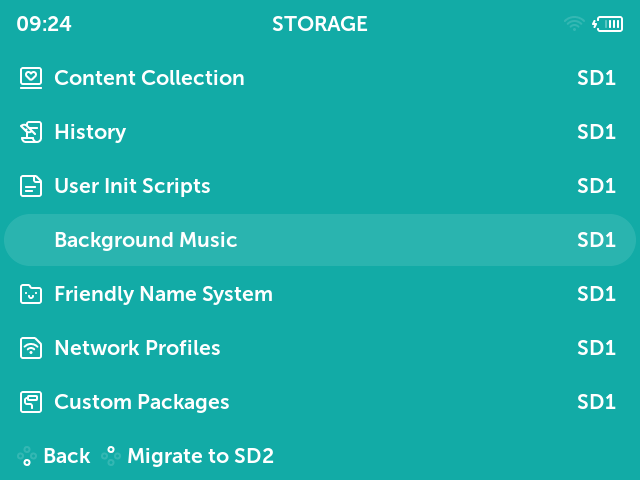
Is this icon missing in the stock MustardOS theme? I can’t find it in stock theme files.
Yes, if you have canad or silly goose version of muos, it’s better to download theme from github.
there is no icon because now it is just text that says
Press DOWN + B to finish testing
Can you please tell me the name of an icon for Background Music in muxstorage?
it should be music
1 Like
Thank you! I also can’t find right names for icons Application, Background Music, Merge Backups in muxbackup.
application, music, merge
eventually the glyphs will be added to the default theme and you can use that as a reference
1 Like
I’ve updated the theme. It can be download here.
2 Likes
Thanks for Portuguese BR! It’s almost perfect, but Apps translation is wrong, It’s “Apps” too, not “App”.
Sorry. When I made new pictures for translation i copied pictures with italian translation and didn’t notice that there is “App’“, will change it this evenging
1 Like
I’ve updated the theme, it should be with “Apps”
Perfect, thanks for the fix.